


Hi. I love Circle Dock. I've been using it to create hotkeys for use on my convertible tablet PC.

I'm having trouble getting the dock to be in a state of always showing. I have unchecked both "Automatically Hide" and "Hide Dock after Opening, Files/folders."
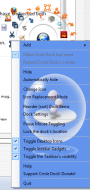
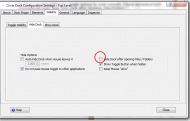
Still, when I click an icon, the dock hides after executing the action, as if the "Hide Dock after Opening, Files/folders" box were checked. I want my dock to always show so I can execute the hotkeys in one click without hitting the center button first. Perhaps I misunderstand the settings? Thanks for the help and for the best launch app ever created!
Here are my specs:
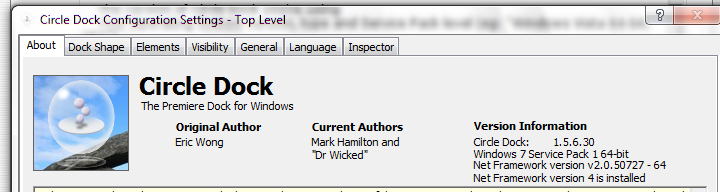
I'm having trouble getting the dock to be in a state of always showing. I have unchecked both "Automatically Hide" and "Hide Dock after Opening, Files/folders."
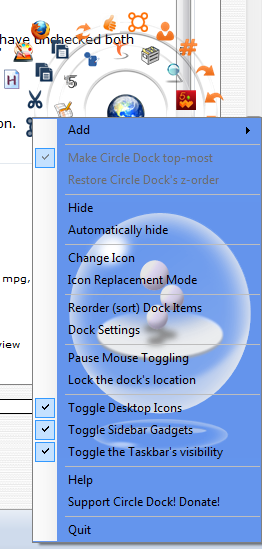
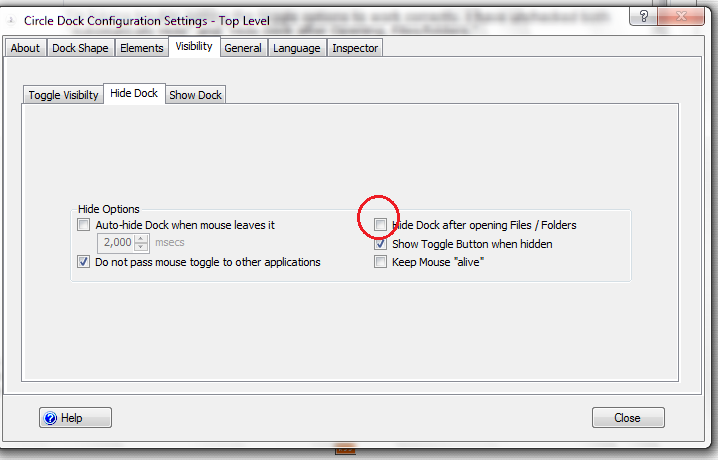
Still, when I click an icon, the dock hides after executing the action, as if the "Hide Dock after Opening, Files/folders" box were checked. I want my dock to always show so I can execute the hotkeys in one click without hitting the center button first. Perhaps I misunderstand the settings? Thanks for the help and for the best launch app ever created!
Here are my specs:


