DonationCoder.com forum
 
Read-only archive. This is a static copy of the DonationCoder.com forum. Reading and searching work as before; logging in, posting and private messages do not.
Archive of 2026-10-21 · About this archive · Main site

Author Topic: Font issue in settings dialog (dpi 96)  (Read 6,844 times)

vemundha

  • Participant
  • Joined in 2007
  • *
  • Posts: 3
Font issue in settings dialog (dpi 96)
« on: September 30, 2011, 08:31 AM »
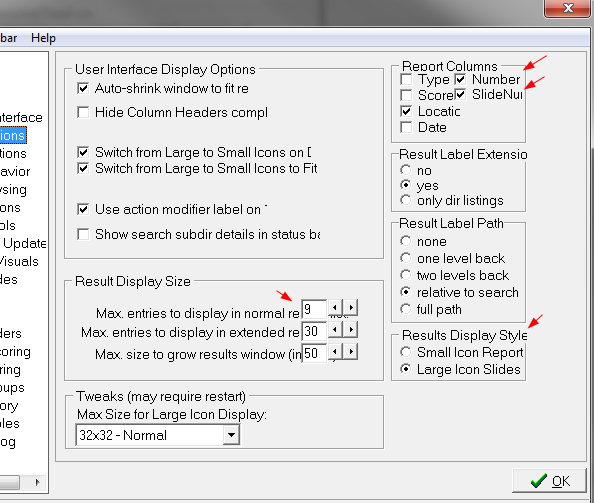
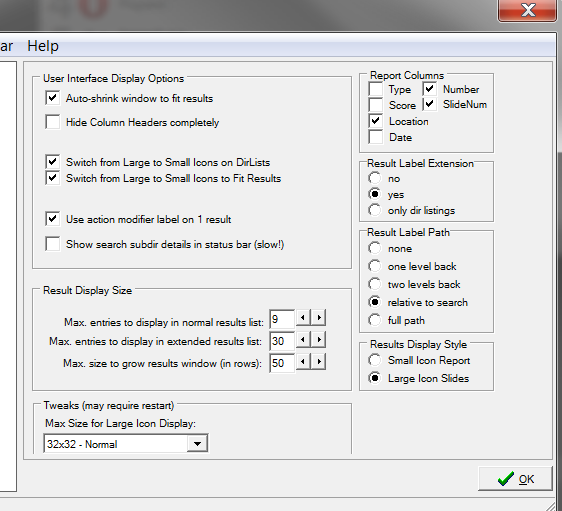
I get some large font's in the FARR's setting dialog with dpi 96 (Win7 x64). Any one have the same problem. I tested with dpi 120 (that is 125% in Win7) and then the font's are smaller (yes smaller) in FARR strange!

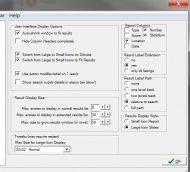
See screenshot's with 100% or 96px
FARR-dpi96.png

See screenshot with 125% or 120px
FARR-dpi120.png

ps! this is using the currently most resent release 2.99.02.
« Last Edit: September 30, 2011, 08:44 AM by vemundha »

tomos

  • Charter Member
  • Joined in 2006
  • ***
  • Posts: 11,970
    • Gathering Badge
    • Participated in NANY Challenge Once
Re: Font issue in settings dialog (dpi 96)
« Reply #1 on: September 30, 2011, 09:40 AM »
I *dont* have the display problem @ 100% - dpi 96 (Win7 x64)

but the text *is* smaller @ 125%
Tom

Stoic Joker

  • Honorary Member
  • Joined in 2008
  • **
  • Posts: 6,652
    • Cody Award
    • Participated in NANY Challenge Five Times
Re: Font issue in settings dialog (dpi 96)
« Reply #2 on: September 30, 2011, 11:24 AM »
Did you reboot between DPI changes? It can make a difference.

mouser

  • First Author
  • Administrator
  • Joined in 2005
  • *****
  • Posts: 40,931
    • Gathering Badge
    • Plugin Coding Medal
    • Participated in NANY Challenge Seventeen Times
    • Cody Award
    • Coding Snacks
    • Volunteers/Staff
Re: Font issue in settings dialog (dpi 96)
« Reply #3 on: September 30, 2011, 04:29 PM »
hi vemundha,

I've learned about an alternative way to handle large DPI and font sizes; let's talk again after my next release.

This large DPI stuff drives me crazy, I wish Microsoft had never implemented it.

Stoic Joker

  • Honorary Member
  • Joined in 2008
  • **
  • Posts: 6,652
    • Cody Award
    • Participated in NANY Challenge Five Times
Re: Font issue in settings dialog (dpi 96)
« Reply #4 on: September 30, 2011, 05:36 PM »
This large DPI stuff drives me crazy, I wish Microsoft had never implemented it.

Tehehe Try dealing with it in pure C ... That one took months (I'm assuming you remember that section of the T-Clock thread).

Really the only problems I had were with runtime generated controls and window position. Once I added the DPIAware stuff to the manifest the fonts all scaled fine on their own. Hm... IIRC TC uses a its own runtime rendered font...that could make a difference.

Now if there's an (easier) alternative, and you don't mind sharing...

mouser

  • First Author
  • Administrator
  • Joined in 2005
  • *****
  • Posts: 40,931
    • Gathering Badge
    • Plugin Coding Medal
    • Participated in NANY Challenge Seventeen Times
    • Cody Award
    • Coding Snacks
    • Volunteers/Staff
Re: Font issue in settings dialog (dpi 96)
« Reply #5 on: September 30, 2011, 06:54 PM »
Quote
Now if there's an (easier) alternative, and you don't mind sharing...

Afraid not, DPI Aware manifest was what I was referring to.

Stoic Joker

  • Honorary Member
  • Joined in 2008
  • **
  • Posts: 6,652
    • Cody Award
    • Participated in NANY Challenge Five Times
Re: Font issue in settings dialog (dpi 96)
« Reply #6 on: September 30, 2011, 09:14 PM »
Quote
Now if there's an (easier) alternative, and you don't mind sharing...

Afraid not, DPI Aware manifest was what I was referring to.

Ah! Okay... (damn) ...Guess we're in about the same place then. I was using VS05 (loved it), but had to jump to VS10 for the manifest (and hated it), and now I'm using VS08 and tolerating it because it gets me past the manifest issue (with a compiler "error") but still produces code that runs on Win2k.

Okay, honestly I've got both 05 & 08 installed and I jump back and forth depending on the project's needs.

I tried a slew of alternatives also, but the only thing that finally did work was the manifest file with the DPIAware string in it.

Original address: https://www.donationcoder.com/forum/index.php?topic=28199.0