| Originally posted: | 2011-09-19 |
| Last updated | 2014-08-07 |
Basic Info
| App Name | DiviFile (File, Bookmark and Note categorisation, tagging and association tool) |
| Thumbs-Up Rating |  Still under development. Developer currently focussed on another project. |
| App URL | http://www.qnomad.com/divifile/ |
| App Versions Reviewed | v1.0.7 (latest), v1.0.0 (previously) |
| Test System Specs | Win7-64 Home Premium, Win8.1-64 PRO |
| Supported OSes | Windows |
| Support Methods | email: support@qnomad.com, sales@qnomad.com |
| Upgrade Policy | Not applicable. |
| Trial Version Available? | Freeware |
| Pricing Scheme | Not applicable. |
1. Intro and Overview:
This is an update dated 2014-07-20 to finally do DiviFile the justice of a proper review.
I originally did a very quick Mini-Review of DiviFile on 2011-09-19, and then forgot about it as I thought I did not need it.
In that review I wrote:
Quote
Sorry, I had thought of using the Mini-review template provided by @Josh, but after looking at that template I put the idea in the "too hard" basket - that was after seeing what a constipated process it was going to be for me.
So this is just a quick heads-up from me in case it is of help/use to anyone:
Yesterday, I came across this reference to DiviFile in my Google reader feed: Organize your files into a virtual structure with DiviFile
I downloaded and installed the proggy (it's version 1.0) and played with it for a while and then uninstalled it.
I caused it to crash once, about 30 seconds after starting it.
It's a curious and potentially very useful item categorisation tool, where "items" are linked to or contained in a database:
- Files. (Linked: it is a bit like a tagging container.)
- Bookmarks. (Linked/copied: I didn't try this out.)
- Outlook items. (Linked: I didn't try this out.)
- Notes created in DivFile. (Text notes.)
I found the text notes a bit kludgy, and the user interface to be rather kludgy and unintuitive.
Despite this, I reckon it could be worth keeping an eye on DiviFile as it develops, because it seems to cut across the domains of PIMs and virtual folders.
I don't really need DiviFile anyway, as I use InfoSelect, OneNotes, Gmail, Google docs and CHS as my PIMs, and I use xplorer² for file management and virtual folders - e.g., reparsed files, Windows 7 "Library" files, virtual folder cabinets for file collections.
Since then several things have changed:
- Reducing the legacy technology: I am progressively reducing my dependency on InfoSelect and migrating its contents to OneNote on an as-and-when-needed basis, running OneNote to the Cloud (OneDrive) as a prudent approach to minimising critical database dependency on solely client device-based databases. I can access my database on and off-line.
- I have moved to Win8 PRO. Microsoft have now achieved integration of Win8 PRO with OneDrive and Outlook.com, and the MS Office suite - including Outlook, OneNote, Excel, Access, etc. It is an exceedingly well-designed integration, one of the most useful parts for me being the OneNote integration with OLE (Object Linking and Embedding), which seems to have finally come of age after a history blighted by the shattered hopes and dreams of the "Open" crowd (particularly DEC and HP).
- Google's mucking about: with Gmail, Google Docs (now Google Drive) and especially with the document type and "labelling" (categorisation) system within the latter, and then shutting down Google Reader and the coercion around forcing Google+ usage and "real names only" has all essentially broken trust and thus helped to discourage me from increasing my dependency on Google Anything. Quite the reverse in fact - I am in the process of migrating away from Google - not an easy task. So I am now moving across to the integration of Win8 PRO with Microsoft Outlook, OneDrive, and the MS Office suite.
__________________________________
Amongst my PIMs (Personal Information Managers) I continue to rely on InfoSelect and CHS and I use xplorer² for file management and virtual folders - e.g., using hard/soft links, reparsed files, "Library" files, virtual folder cabinets for file collections.
2. Description:
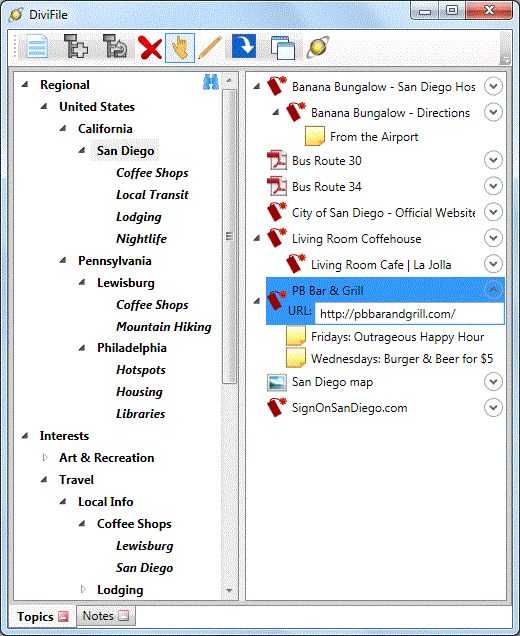
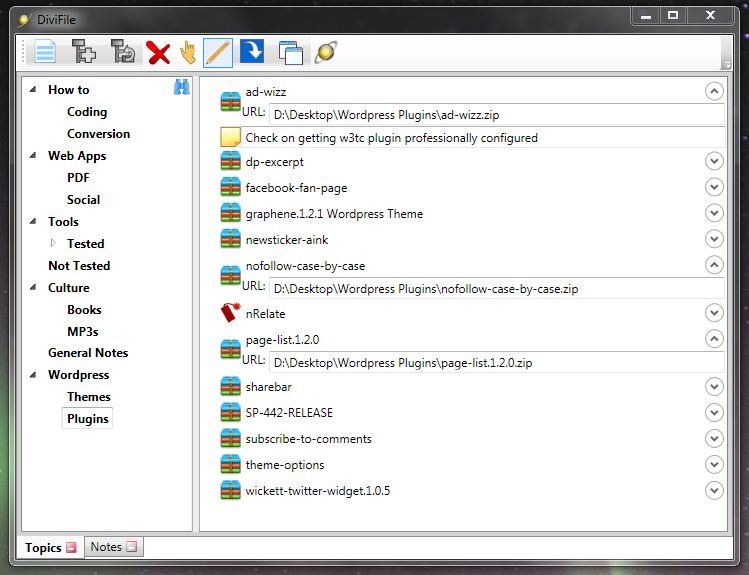
Screenshots (from the website):
This is DiviFile's deceptively simple UI, for an example of categorizing information relating to amenities in different cities:
[attach]