DonationCoder.com forum
 
Read-only archive. This is a static copy of the DonationCoder.com forum. Reading and searching work as before; logging in, posting and private messages do not.
Archive of 2026-10-21 · About this archive · Main site

Author Topic: Linux distros that work with Dell Laptops' 1397 mini-wifi card & Broadcom router  (Read 13,118 times)

kyrathaba

  • N.A.N.Y. Organizer
  • Honorary Member
  • Joined in 2006
  • **
  • Posts: 3,200
    • Participated in NANY Challenge Eight Times
    • Programming School - Deluxe Bonus Medal
    • Programming School - Stage 1 Medal
    • Coding Snacks
    • Military Service Badge - US Army
    • Writer
For anyone who owns a Dell laptop and wants to run a Linux distro:

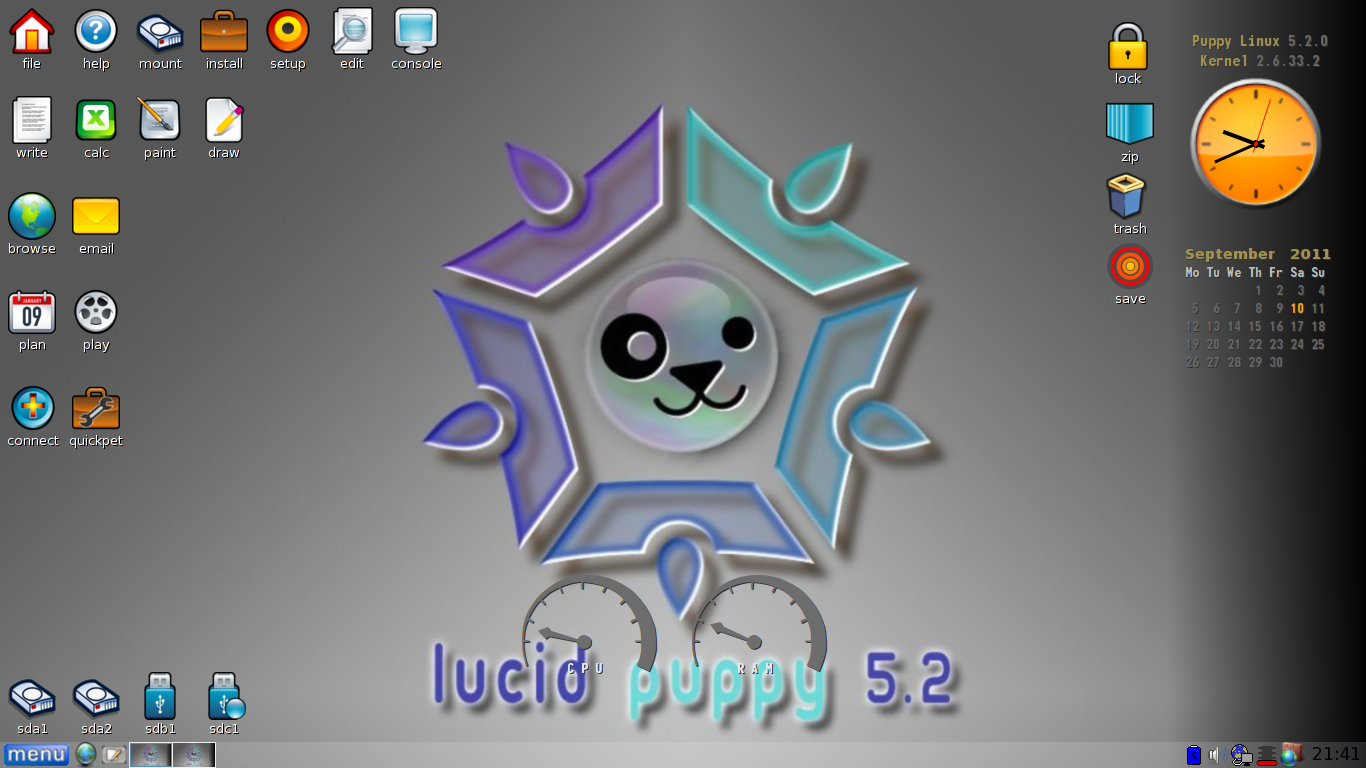
Many Dell laptops come equipped with the Dell WLAN 1397 mini-wifi card.  I've had a Dell Inspiron 1545 for several years, and have tried several Linux distros.  The only two I have found that detected my Broadcom router's wireless easily, without any hassle on my part, are xPUD and LucidPuppy.  LucidPuppy was a breeze, and looks very nice.  Very attractive icons and overall theme.

If anyone is interested, I recommended installing LucidPuppy to USB, along with a variety of recovery, antivirus, and other ISOs, via SARDU.

The only thing you may need to do to enable wireless router connection on your Dell laptop is copy any subfolders in C:\Drivers to the root of the /puppy/ folder on your USB pen-drive.

Great stuff!!  :up:

Win 10 Pro running on a 3.2 GHz CPU and 12 Gb RAM
__________________________________________

Proofreading Service: http://williammillerservices.com/proofreading

zridling

  • Friend of the Site
  • Charter Member
  • Joined in 2005
  • ***
  • Posts: 3,299
Wow, thanks for the tip, kyrathaba!
- zaine

kyrathaba

  • N.A.N.Y. Organizer
  • Honorary Member
  • Joined in 2006
  • **
  • Posts: 3,200
    • Participated in NANY Challenge Eight Times
    • Programming School - Deluxe Bonus Medal
    • Programming School - Stage 1 Medal
    • Coding Snacks
    • Military Service Badge - US Army
    • Writer
Note: at first, I was having to re-enter my wireless WEP passphrase each time I logged in, but after downloading updates, and copying my drivers to the USB, it picks it up automatically everytime I run LucidPuppy.  Firefox and Chrome seem faster too: not only more responsive, but they seem to download some large test-files a bit faster (2-5 seconds faster on 500 Mb test files).
Win 10 Pro running on a 3.2 GHz CPU and 12 Gb RAM
__________________________________________

Proofreading Service: http://williammillerservices.com/proofreading

kyrathaba

  • N.A.N.Y. Organizer
  • Honorary Member
  • Joined in 2006
  • **
  • Posts: 3,200
    • Participated in NANY Challenge Eight Times
    • Programming School - Deluxe Bonus Medal
    • Programming School - Stage 1 Medal
    • Coding Snacks
    • Military Service Badge - US Army
    • Writer
Here's a screenshot of my LucidPuppy desktop on my laptop, thus far:

[attachthumb]
Win 10 Pro running on a 3.2 GHz CPU and 12 Gb RAM
__________________________________________

Proofreading Service: http://williammillerservices.com/proofreading

Mrfwishy

  • Participant
  • Joined in 2013
  • *
  • Posts: 1
I've gone thru several distros that supposedly recognise my dell 1397 wireless card, and am now trying lucid puppy with no success. Where have I one wrong? Any advice on setting it up? I have tried the Broadcom packages that come with puppy and none of them work. Please help before I give up and go back to windows

kyrathaba

  • N.A.N.Y. Organizer
  • Honorary Member
  • Joined in 2006
  • **
  • Posts: 3,200
    • Participated in NANY Challenge Eight Times
    • Programming School - Deluxe Bonus Medal
    • Programming School - Stage 1 Medal
    • Coding Snacks
    • Military Service Badge - US Army
    • Writer
I've never had good luck getting any linux distro to connect to my wifi. LucidPuppy would intermittently connect, at best. Other distros, of which I tried Fedora, Mint, and at least four others, I couldn't do squat with -- but then I'm ignorant about Linux.
Win 10 Pro running on a 3.2 GHz CPU and 12 Gb RAM
__________________________________________

Proofreading Service: http://williammillerservices.com/proofreading

kyrathaba

  • N.A.N.Y. Organizer
  • Honorary Member
  • Joined in 2006
  • **
  • Posts: 3,200
    • Participated in NANY Challenge Eight Times
    • Programming School - Deluxe Bonus Medal
    • Programming School - Stage 1 Medal
    • Coding Snacks
    • Military Service Badge - US Army
    • Writer
What's funny is that Android, the OS underlying many tablets, is a version of Linux. It connects just fine. It's all in the engineering and how much effort gets put into making something seamlessly easy for the end-user.
Win 10 Pro running on a 3.2 GHz CPU and 12 Gb RAM
__________________________________________

Proofreading Service: http://williammillerservices.com/proofreading

40hz

  • Supporting Member
  • Joined in 2007
  • **
  • Posts: 11,861
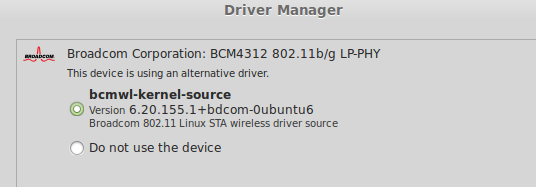
I'm running Linux Mint Cinnamon on a Dell Inspiron 1525 with no hassles.

Because the required Broadcom driver for the 1397 wifi card is proprietary, it isn't included by default although Mint does detect it's absence and offers to install it for you if needed.

[attach]

kyrathaba

  • N.A.N.Y. Organizer
  • Honorary Member
  • Joined in 2006
  • **
  • Posts: 3,200
    • Participated in NANY Challenge Eight Times
    • Programming School - Deluxe Bonus Medal
    • Programming School - Stage 1 Medal
    • Coding Snacks
    • Military Service Badge - US Army
    • Writer
Sounds like Mint Cinnamon is your best bet, Mrfwishy.
Win 10 Pro running on a 3.2 GHz CPU and 12 Gb RAM
__________________________________________

Proofreading Service: http://williammillerservices.com/proofreading

rgdot

  • Supporting Member
  • Joined in 2009
  • **
  • Posts: 2,197
Just to add my recent experience .... Mint and Realtek is a hassle though

Original address: https://www.donationcoder.com/forum/index.php?topic=27984.0