I'm not a coder, just a reasonably advanced user. However, I also have ADD, which makes it quite difficult to learn, for example, how to create scripts in AutoHotkey. AHK has a really thorough help file, but having a way to highlight, make notes, and maybe even create hyperlinks would really help, since the information I need to figure out how to code something is scattered across many pages.
I'm hoping that the coding virtuosos at DonationCoder can come up with a way to do simple highlighting and annotation of CHM (Help) files. I don't need to create, edit, port to another format, et cetera. Think of an a transparent "layer" attached over the CHM file page where I could:
Highly useful enhancements to the above:
By doing this in a "layered" format, I am thinking that it would greatly simplify the coding, with no need to open, change, recompile, etc. the real CHM file code. Maybe?
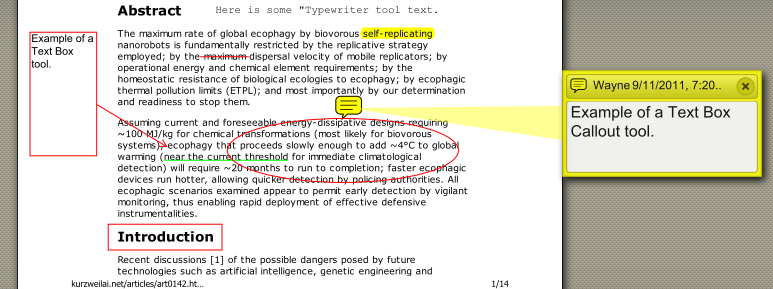
A good example of this capability can be seen in the PDF viewer PDF-XChange, but I'm thinking of the smaller, leaner, "just the essentials, ma'am" approach of DC: easy-to-use, light-weight on resources, and with only the most essential capabilities. Here is a sample of the basic annotations:
I'm hoping that the coding virtuosos at DonationCoder can come up with a way to do simple highlighting and annotation of CHM (Help) files. I don't need to create, edit, port to another format, et cetera. Think of an a transparent "layer" attached over the CHM file page where I could:
- Highlight in yellow anywhere on the page: phrases, sentences, or paragraphs of text, and, of course, remove the highlighting you just applied! ("Highlighter" tool)
- Enter text to annotate the CHM file text with red, serif, sans-serif and, at the very least, "small", "medium" and "large" fonts. ("Typewriter" tool)
- To cross out selected text, (e.g., for crossing out incorrect instructions: yes, it does happen! ("Cross-out" text tool)
- Underline selected text, at least in red. ("Underline" tool)
- Create simple text boxes. ("Text box" tool)
- Link to other pages in the CHM file. ("Hyperlink" tool)
Highly useful enhancements to the above:
- Highlighter tool: At least 3 additional colors: sky blue, pastel pink, light green
- Typewriter tool: Able to use installed "system" fonts, with all the sizes, colors, italics, bold, etc.
- Underline tool: Two additional colors: blue and green.
- "Arrow" tool: for drawing directional arrows
- "Line" tool: for drawing straight lines
- "Ellipse" tool: for drawing variously shaped circles (ovals, etc.)
- "Text box call-out" tool: An editable text box with an adjustable arrow (length and angle) to point to the selected text
By doing this in a "layered" format, I am thinking that it would greatly simplify the coding, with no need to open, change, recompile, etc. the real CHM file code. Maybe?
A good example of this capability can be seen in the PDF viewer PDF-XChange, but I'm thinking of the smaller, leaner, "just the essentials, ma'am" approach of DC: easy-to-use, light-weight on resources, and with only the most essential capabilities. Here is a sample of the basic annotations: