DonationCoder.com forum
 
Read-only archive. This is a static copy of the DonationCoder.com forum. Reading and searching work as before; logging in, posting and private messages do not.
Archive of 2026-10-21 · About this archive · Main site

Author Topic: Simple Counter Utility Wanted  (Read 11,078 times)

AndyM

  • Charter Member
  • Joined in 2006
  • ***
  • Posts: 616
Simple Counter Utility Wanted
« on: September 06, 2011, 08:56 PM »
Would someone please make me a simple Counter Program in AHK?

Two reasons:  I could use the utility and it would also serve well as an example of some of the AHK code I'd like to be more familiar with.  The GUI creation and counting subroutines would save me a lot of trial and error working the code out for myself.

There would be a simple small (~100 pixel tall x ~200 pixels wide) dialog box with:

  - Two buttons: Increment counter by 1, Decrement counter by 1.
  - Counter display (this could even be on one of the buttons)
 
The other feature would be that the counter would automatically increment by 1 each hour on the hour.  I could manually adjust the counter with the buttons for a start value, which would be incremented by 1 on the next hour (at the top of the hour, not an hour after I start).

That's all I'd need, but if you wanted to teach me one other thing, it would be to make the dialog box, buttons, counter, etc in different colors if this can be done in AHK.  You can pick the colors.

Thanks in advance to any takers!

Andy

skwire

  • I eat Coding Snacks for breakfast...
  • Global Moderator
  • Joined in 2005
  • *****
  • Posts: 5,297
    • Participated in NANY Challenge Seventeen Times
    • Coding Snacks
    • Superboy Coder
    • Cody Award
    • Volunteers/Staff
    • Gathering Badge
Re: Simple Counter Utility Wanted
« Reply #1 on: September 08, 2011, 02:39 AM »
Here's a basic example (no colours):

Code: (autohotkey)
; -------------------
; Set up environment. 
; -------------------
#NoEnv
#SingleInstance, Force
#Persistent
SetBatchLines, -1
SetControlDelay, -1
DetectHiddenWindows, On
SetWorkingDir, %A_ScriptDir%

; -------------------------
; Set any needed variables.
; -------------------------
myCounter := 0
Allow_Counter_Update := True

; -------------
; Build out GUI
; -------------
Gui, Margin, 3, 5
Gui, Font, s30
Gui, Add, Text  , xm     ym     w200 h100 0x1200 Center vCounter_txt          , % myCounter
Gui, Font
Gui, Add, Button, xm     ym+105 w95  h25                vPlus_btn    gOnButton, +1
Gui, Add, Button, xm+105 ym+105 w95  h25                vMinus_btn   gOnButton, -1
Gui, Show

SetTimer, OnHour, 1000 ; Fire every second.

Return ; End of auto-execute section.


GuiClose:
GuiEscape:
{
    ExitApp
}
Return


OnButton:
{
    If ( A_GuiControl = "Plus_btn" )
    {
        DoCounter( "Up" )
    }
    Else If ( A_GuiControl = "Minus_btn" )
    {
        DoCounter( "Down" )
    }
}
Return


OnHour:
{
    FormatTime, myNow, A_Now, HHmm
    If ( Mod( myNow, 100 ) = 0 ) ; We're at the top of an hour.
    {
        If ( Allow_Counter_Update = True )
        {
            ; Increase counter by one and then don't allow any more
            ; increases until the minute is up.  Otherwise, the
            ; counter would increase by one every second.
            DoCounter( "Up" )
            Allow_Counter_Update := False
        }
    }
    
    ; We are no longer in a top-of-the-hour minute so allow
    ; updates again for the next top-of-the-hour minute.
    If ( Mod( myNow, 100 ) != 0 )
    {
        Allow_Counter_Update := True
    }
}
Return


DoCounter( sWay )
{
    Global
    
    If ( sWay = "Up" )
    {
        myCounter++
    }
    Else If ( sWay = "Down" )
    {
        myCounter--
    }
    GuiControl, Text, Counter_txt, % myCounter
}
« Last Edit: September 08, 2011, 03:19 AM by skwire »

AndyM

  • Charter Member
  • Joined in 2006
  • ***
  • Posts: 616
Re: Simple Counter Utility Wanted
« Reply #2 on: September 08, 2011, 03:07 AM »
Ah skwire, that's just perfect, exactly what I was looking for.  And the comments are quite helpful.

Thank you!!!  :Thmbsup:

Andy

skwire

  • I eat Coding Snacks for breakfast...
  • Global Moderator
  • Joined in 2005
  • *****
  • Posts: 5,297
    • Participated in NANY Challenge Seventeen Times
    • Coding Snacks
    • Superboy Coder
    • Cody Award
    • Volunteers/Staff
    • Gathering Badge
Re: Simple Counter Utility Wanted
« Reply #3 on: September 08, 2011, 03:17 AM »
You're most welcome.  Glad I could help.  :)

skwire

  • I eat Coding Snacks for breakfast...
  • Global Moderator
  • Joined in 2005
  • *****
  • Posts: 5,297
    • Participated in NANY Challenge Seventeen Times
    • Coding Snacks
    • Superboy Coder
    • Cody Award
    • Volunteers/Staff
    • Gathering Badge
Re: Simple Counter Utility Wanted
« Reply #4 on: September 08, 2011, 03:20 AM »
BTW, I just made a change to the code that I meant to make before I posted it.  Please refresh and re-grab the code.  Sorry about that.

Winkie

  • Supporting Member
  • Joined in 2008
  • **
  • Posts: 94
    • Participated in NANY Challenge Once
Re: Simple Counter Utility Wanted
« Reply #5 on: September 09, 2011, 08:36 PM »
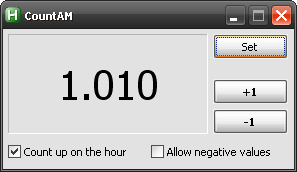
Of cource I can't beat skwire ;D, but this is how I like it:

[attach=#]
Code: (autohotkey)
#NoEnv
#SingleInstance, Force
SetBatchLines, -1
SetControlDelay, -1

iMyCount := 0
bAllowUpdate := True

Gui, 1:+LabelMainGui
Gui, 1:Margin, 5, 5
Gui, 1:Font, s30
Gui, 1:Add, Text, xm w200 h100 0x1200 Center Section vCounterCtrl, % iMyCount
Gui, 1:Font
Gui, 1:Add, Button, ys w75 h25 Section vInput_btn gInputValue, Set
Gui, 1:Font, w700
Gui, 1:Add, Button, xs ys+45 w75 h25 gCountUp, +1
Gui, 1:Add, Button, xs w75 h25 gCountDown, -1
Gui, 1:Font
Gui, 1:Add, Checkbox, xm w138 h25 Checked vbDoHourCount gToggleHourCount, Count up on the hour
Gui, 1:Add, Checkbox, x+5 w138 h25 vbAllowNegatives, Allow negative values
Gui, 1:Show, Center, CountAM

SetTimer, HourCount, 1000
Return

MainGuiClose:
MainGuiEscape:
{
	ExitApp
}
Return

CountUp:
{
	iMyCount++
	FormatAndUpdate( iMyCount )
}
Return

CountDown:
{
	Gui, 1:Submit, NoHide
	If Not bAllowNegatives
	{
		If iMyCount
			iMyCount--
	}
	Else
		iMyCount--
	FormatAndUpdate( iMyCount )
}
Return

HourCount:
{
	FormatTime, iMyNow, A_Now, HHmm
	If ( Mod( iMyNow, 100 ) = 0 ) ; We're at the top of an hour.
	{
		If ( bAllowUpdate = True )
		{
			; Increase counter by one and then don't allow any more increases until this minute is up.
			Gosub, CountUp
			bAllowUpdate := False
		}
	}
	Else
	{
		bAllowUpdate := True
	}
}
Return

ToggleHourCount:
{
	Gui, 1:Submit, NoHide
	If bDoHourCount
		SetTimer, HourCount, 1000
	Else
		SetTimer, HourCount, Off
}
Return

InputValue:
{
	Gui, 1:+Disabled
	Gui, 2:+LabelInputGui +Owner1
	Gui, 2:Margin, 12, 12
	Gui, 2:Add, Edit, xm w80 r1 Number 
	Gui, 2:Add, UpDown, Range-32767-32767 viMyInput
	Gui, 2:Add, Button, x+15 w80 Default gNewInput, OK
	Gui, 2:Show, Center, Enter a value
}
Return

InputGuiClose:
InputGuiEscape:
{
	Gui, 1:-Disabled
	Gui, 2:Destroy
}
Return

NewInput:
{
	Gui, 2:Submit, NoHide
	Gui, 2:+OwnDialogs
	If Not iMyInput
	{
		MsgBox, 36, Please confirm, Do you really want the value to be blank?
		IfMsgBox No
			Return
	}
	Gui, 1:-Disabled
	Gui, 2:Destroy
	Gui, 1:Default
	FormatAndUpdate( iMyInput )
	iMyCount := iMyInput
	iMyInput :=
}
Return

; FormatInteger -- by Winkie
FormatAndUpdate( Int )
{
	vVar := Int
	If vVar < 0
	{
		vMinus := "-"
		StringTrimLeft, vVar, vVar, 1
	}
	Loop
	{
		If vVar > 999
		{
			StringLen, vLen, vVar
			vTrim := vLen - 3
			StringTrimLeft, vPart, vVar, % vTrim
			vOut := "." vPart vOut
			StringTrimRight, vVar, vVar, 3
		}
		Else
			Break
	}
	Gui, 1:Default
	GuiControl, Text, CounterCtrl, % vMinus vVar vOut
}
« Last Edit: September 13, 2011, 06:54 PM by Winkie »

skwire

  • I eat Coding Snacks for breakfast...
  • Global Moderator
  • Joined in 2005
  • *****
  • Posts: 5,297
    • Participated in NANY Challenge Seventeen Times
    • Coding Snacks
    • Superboy Coder
    • Cody Award
    • Volunteers/Staff
    • Gathering Badge
Re: Simple Counter Utility Wanted
« Reply #6 on: September 09, 2011, 08:48 PM »
Nice job, Winkie.  Well done.  :Thmbsup:

AndyM

  • Charter Member
  • Joined in 2006
  • ***
  • Posts: 616
Re: Simple Counter Utility Wanted
« Reply #7 on: September 09, 2011, 09:15 PM »
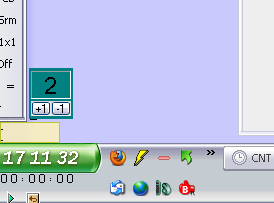
This is what I ended up with.


[attachimg=#]

skwire

  • I eat Coding Snacks for breakfast...
  • Global Moderator
  • Joined in 2005
  • *****
  • Posts: 5,297
    • Participated in NANY Challenge Seventeen Times
    • Coding Snacks
    • Superboy Coder
    • Cody Award
    • Volunteers/Staff
    • Gathering Badge
Re: Simple Counter Utility Wanted
« Reply #8 on: September 09, 2011, 11:05 PM »
Nice, AndyM.  What are you using it for?

AndyM

  • Charter Member
  • Joined in 2006
  • ***
  • Posts: 616
Re: Simple Counter Utility Wanted
« Reply #9 on: September 09, 2011, 11:22 PM »
Counting  ;D

app103

  • That scary taskbar girl
  • Global Moderator
  • Joined in 2006
  • *****
  • Posts: 5,888
    • Participated in NANY Challenge Six Times
    • Coding Snacks
    • Gathering Badge
    • Cody Award
    • Volunteers/Staff
Re: Simple Counter Utility Wanted
« Reply #10 on: September 10, 2011, 01:18 AM »
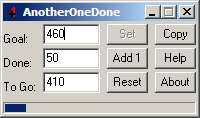
It's almost similar to what you wanted, without the automatic incrementing, and without the deincrementing, and you need to have a target goal, it has a progress bar, it saves data to the registry (so it isn't portable)...and it's not written in AHK: AnotherOneDone (something I released for GOE challenge)

Original address: https://www.donationcoder.com/forum/index.php?topic=27926.0