DonationCoder.com forum
 
Read-only archive. This is a static copy of the DonationCoder.com forum. Reading and searching work as before; logging in, posting and private messages do not.
Archive of 2026-10-21 · About this archive · Main site

Author Topic: In search of ... backup program identification  (Read 5,770 times)

barney

  • Charter Member
  • Joined in 2006
  • ***
  • Posts: 1,294
In search of ... backup program identification
« on: September 04, 2011, 02:20 PM »
:'( When it rains ...

This may be a bit odd  :-\.  I need to identify the program that made a system backup from the files that it produced.  There are several sets of files dated a week apart, including .zip and .xml files along with a few that have no extension.  (There are about six (6) months worth of files for [apparently] weekly backups.)  However, the little - darling?  yeah, that's the word! - doesn't know what program was used to perform the backups.  Memory failure  :D.

Google searches have netted nothing on this.  There many,many,many pages on how to find the files produced by various backup programs, but not a one (1) I can find on how to identify the software that produced the backup files.

Any ideas on this one?

(The little darling is a software junkie, so I can't just try what's installed ... too many  :o.)
Make a good day ... barn

Lashiec

  • Member
  • Joined in 2006
  • **
  • Posts: 2,374
Re: In search of ... backup program identification
« Reply #1 on: September 04, 2011, 02:27 PM »
Try feeding the files to TrID.

barney

  • Charter Member
  • Joined in 2006
  • ***
  • Posts: 1,294
Re: In search of ... backup program identification
« Reply #2 on: September 04, 2011, 03:40 PM »
Nice bit of software, thanks.  It didn't work  :P, but looks handy to have around  ;D.

Finally found a GlobalCatalog.wbcat, which is a Windows backup file, so apparently s/he was using Win7's backup w/o knowing.  However, all the .wbcat files were moved to a common location, "I just wanted to keep it neat, so I did some housecleaning."  :stars:  Oh, well, mebbe Win7 can figure it out  :-\.  Or I can set Explorer to display creation date, I guess.  What a mess!
Make a good day ... barn

tomos

  • Charter Member
  • Joined in 2006
  • ***
  • Posts: 11,970
    • Gathering Badge
    • Participated in NANY Challenge Once
Re: In search of ... backup program identification
« Reply #3 on: September 04, 2011, 04:35 PM »
Dunno if this is any help,
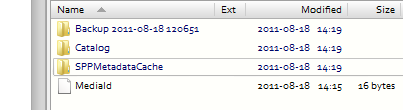
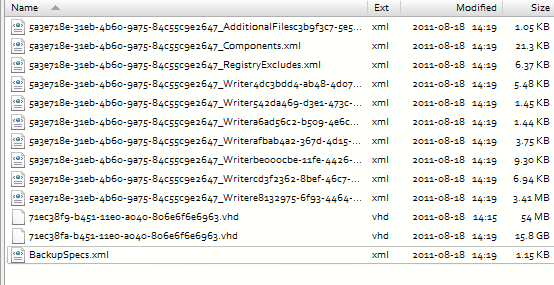
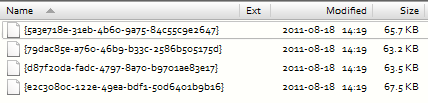
screenshots of a Win7 backup - folders/files
Spoiler (click to show/hide)
Main folder is "WindowsImageBackup" - within that is a folder which has PC name, included in that are:
[attachimg=#]

Contents of backup folder
[attachimg=#]

Contents of Catalog folder
[attachimg=#]

Contents of SPPMetadataCache
[attachimg=#]
Tom

4wd

  • Pedantic Old Bastard
  • Supporting Member
  • Joined in 2006
  • **
  • Posts: 5,652
    • Coding Snacks
Re: In search of ... backup program identification
« Reply #4 on: September 05, 2011, 04:18 AM »
"I will not follow where the path may lead, but I will go where there is no path, and I will leave a trail." - Muriel Strode, 1903

Original address: https://www.donationcoder.com/forum/index.php?topic=27855.0