DonationCoder.com forum
 
Read-only archive. This is a static copy of the DonationCoder.com forum. Reading and searching work as before; logging in, posting and private messages do not.
Archive of 2026-10-21 · About this archive · Main site

Author Topic: Windows Explorer: Desktop, Desktop, Desktop,...  (Read 5,124 times)

alxwz

  • Charter Member
  • Joined in 2006
  • ***
  • Posts: 117
Windows Explorer: Desktop, Desktop, Desktop,...
« on: August 23, 2011, 05:26 PM »
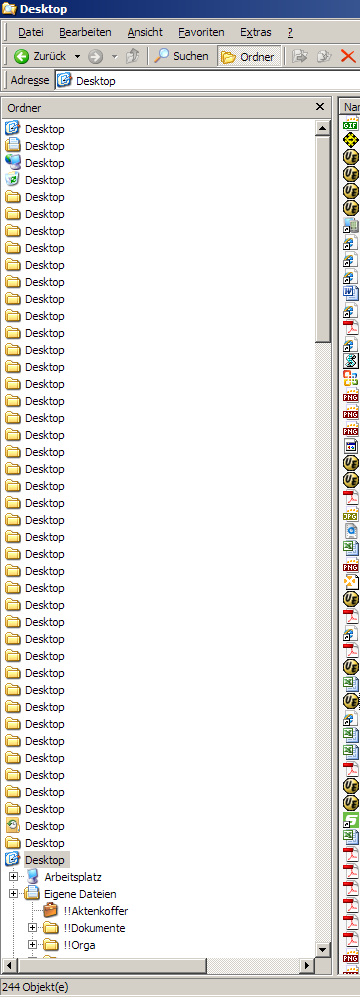
I've been getting this in Explorer's folder pane every once in a while, since back in the day of Win 98 or 2000:

[attach=#]

All folders on the desktop are labeled "Desktop" in the folder pane.
Refreshing doesn't help. Have to close the Explorer window and open a new one.

Does anyone know what causes it and if/how it could possibly be fixed?
rgdot

  • Supporting Member
  • Joined in 2009
  • **
  • Posts: 2,197
Re: Windows Explorer: Desktop, Desktop, Desktop,...
« Reply #1 on: August 23, 2011, 06:59 PM »
Have you seen this thread?
http://forums.techguy.org/windows-xp/549345-solved-explorer-tree-display-curiosity.html

alxwz

  • Charter Member
  • Joined in 2006
  • ***
  • Posts: 117
Re: Windows Explorer: Desktop, Desktop, Desktop,...
« Reply #2 on: August 23, 2011, 09:08 PM »
Have you seen this thread?
http://forums.techguy.org/windows-xp/549345-solved-explorer-tree-display-curiosity.html

No, I haven't (I actually found it quite pointless to google using keywords like "explorer" and "desktop", so I never looked too hard).
And ... tada! ... it's exactly the explanation I was looking for!
It's caused by the desktop toolbar in the task bar.

I had even forgotten I had that toolbar active.

Thanks a lot!

BTW:
1) I forgot to mention above that this is XP SP3 with the classic shell. Just for the sake of completeness.
2) Yes, my desktop is a mess. All those folder icons really are folders sittiing on my desktop.

Original address: https://www.donationcoder.com/forum/index.php?topic=27727.0