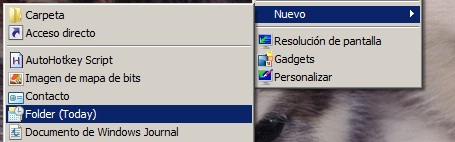
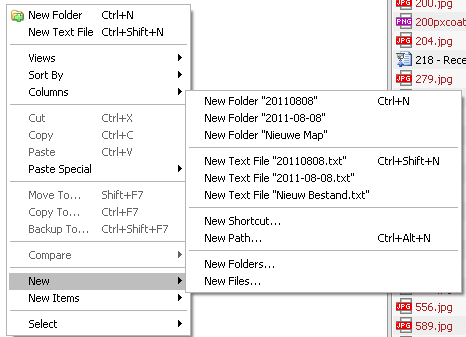
I don't think you can specifically put an entry in Shell New for a folder without displacing the default New Folder.
What I have is an AHK hotkey to paste the date in the desired format.
Let it sit in the tray. Use the New => Folder menu in Explorer as usual. This creates a folder named New folder with the "New folder" text selected. Press F10 and the date will be pasted in as the name.
You can change the hotkey by specifying another on the command line of DatePaste.
I'm supplying the source. If you wish to change the date format you can either change it in the source or add code to read from .ini file.
It includes a file of general purpose routines named MilesAhead.ahk.
Note that I'm using the latest release of AutoHotkey_L 32 bit unicode to compile.
I think it should compile with plain vanilla ahk, but if you have an issue try the _L version.
DatePaste.ahk
/*
 * * * Compile_AHK SETTINGS BEGIN * * *

[AHK2EXE]
Exe_File=%In_Dir%\DatePaste.exe
No_UPX=1

* * * Compile_AHK SETTINGS END * * *
*/

; AutoHotkey Script Template for MilesAhead
#SingleInstance force
#NoEnv  ; Recommended for performance and compatibility with future AutoHotkey releases.
SendMode Input  ; Recommended for new scripts due to its superior speed and reliability.
SetWorkingDir %A_ScriptDir%  ; Ensures a consistent starting directory.
#Include MilesAhead.ahk
progname := _FileBaseName(A_ScriptFullPath)
Menu Tray,NoStandard
Menu Tray,Add,Donate,DoDonate
Menu Tray,Add,Visit Hotkey Page,DoVisit
Menu Tray,Add,About,DoAbout
Menu Tray,Add
Menu Tray,Add,Quit,DoQuit
Menu Tray,Default,About
if (A_IsCompiled)
  Menu Tray,Icon,%A_ScriptFullPath%,1
Menu Tray,Tip,%progname%


if 0 = 1
{
	carg = %1%
}
else
{
	carg := "F10"
}

GroupAdd,DesktopGroup, ahk_class CabinetWClass
GroupAdd,DesktopGroup, ahk_class ExploreWClass
GroupAdd,DesktopGroup, ahk_class Progman
GroupAdd,DesktopGroup, ahk_class WorkerW

Hotkey, IfWinActive, ahk_Group DesktopGroup
Hotkey,%carg%,DoHotKey,UseErrorLevel
If ErrorLevel
{
  MsgBox, 4112, %progname%, %carg% is not a valid Hotkey
  ExitApp
}
_EmptyWorkingSet()
Return

DoHotKey:
  FormatTime, DateString,A_Now,yyyyMMdd
  ClipSaved := ClipboardAll ; save entire clipboard
  Clipboard =
  Send ^c
  Clipwait,0
  if (Clipboard = "New folder")
  {
    Send %DateString%
    Send {Enter}
  }
  Clipboard := ClipSaved
  ClipSaved = ; free memory
Return

DoAbout:
  FileGetVersion,filever,%progname%.exe
  MyMsg =
  (
%progname% v %filever% Copyright (c) 2011 www.FavesSoft.com`n
After creating a new folder press %carg% to paste the date as name`n
Specify another hotkey on command line if desired`n
  )
  MsgBox, 4160, About %progname%, %MyMsg%
Return

DoDonate:
  Run,"http://www.favessoft.com/donate.html"
Return

DoVisit:
  Run,"http://www.favessoft.com/hotkeys.html"
Return

DoQuit:
  ExitApp
MilesAhead.ahk
;
; MilesAhead include script with a few system related functions
;

; returns non 0 if program is running
_IsRunning(program)
{
	Process,Exist,%program%
	Return errorlevel
}

_LoWord(arg)
  {
    Return arg & 0xFFFF
  }

_HiWord(arg)
  {
    Return arg >> 16
  }

_LoByte(arg)
  {
    Return arg & 0x00FF
  }

_HiByte(arg)
  {
    Return (arg & 0xFF00) >> 8
  }

_WinVersionMajor()
  {
    Return _LoByte(_LoWord(DllCall("kernel32.dll\GetVersion", "UInt", -1)))
  }

_WinVersionMinor()
  {
    Return _HiByte(_LoWord(DllCall("kernel32.dll\GetVersion", "UInt", -1)))
  }

_WinVersion()
  {
    dwVersion := DllCall("kernel32.dll\GetVersion", "UInt", -1)
    Return _LoByte(_LoWord(dwVersion)) . "."
    . _HiByte(_LoWord(dwVersion))
  }

;call EmptyWorkingSet in AHK
_EmptyWorkingSet()
  {
    Return DllCall("psapi.dll\EmptyWorkingSet", "UInt", -1)
  }

;reduce memory footprint by calling EmptyWorkingSet
_ReduceMemory()
  {
    If _WinVersionMajor() > 4
    {
      Return _EmptyWorkingSet()
    }
    Return false
  }

;function by HotKeyIt on AHK forums
FormatMessageFromSystem(ErrorCode)
  {
    VarSetCapacity(Buffer, 2000)
    DllCall("FormatMessage"
            , "UInt", 0x1000      ; FORMAT_MESSAGE_FROM_SYSTEM
            , "UInt", 0
            , "UInt", ErrorCode
            , "UInt", 0x800 ;LANG_SYSTEM_DEFAULT (LANG_USER_DEFAULT=0x400)
            , "UInt", &Buffer
            , "UInt", 500
            , "UInt", 0)
    VarSetCapacity(buffer,-1)
    Return Buffer
  }

_GetWorkArea(ByRef left, ByRef top, ByRef right, ByRef bottom)
  {
    VarSetCapacity(work_area,16,0)
    success := DllCall( "SystemParametersInfo", "uint", 0x30, "uint", 0, "uint", &work_area, "uint", 0 )
    If success =
    {
      Return 0
    }
    left := NumGet(work_area,0)
    top := NumGet(work_area,4)
    Right := NumGet(work_area,8)
    Bottom := NumGet(work_area,12)
    Return 1
  }

_MarginWorkArea(ByRef left, ByRef top, ByRef right, ByRef bottom, ByRef margin = 4)
  {
    If _GetWorkArea(left, top, Right, Bottom)
    {
      If Margin is Integer
      {
        If (Margin < 0) or (Margin > 12)
          Margin := 4
      }
      Else
        Margin := 4
      left += Margin
      top += Margin
      Right -= Margin
      Bottom -= Margin
      Return 1
    }
    Return 0
  }

_TaskbarGapArea(ByRef left, ByRef top, ByRef right, ByRef bottom,  percentgap = 5)
{
  _GetWorkArea(left, top, right, bottom)
  If (right - left = A_ScreenWidth) And (bottom - top = A_ScreenHeight)
  {
    Return
  }
  Else If (bottom < A_ScreenHeight)
  {
    bottom -= (bottom // 100 * percentgap)
  }
  Else If (top > 0)
  {
    top += (bottom - top) // 100 * percentgap
  }
  Else If (left > 0)
  {
    left += (right - left) // 100 * percentgap
  }
  Else
 {
    right -= (right - left) // 100 * percentgap
 }
}

_GlassEnabled()
  {
    isEnabled = false
    If _WinVersionMajor() < 6
    {
      Return false
    }
    DllCall("dwmapi.dll\DwmIsCompositionEnabled", "UInt", &isEnabled)
    Return %isEnabled%
  }

_EnableBlurBehind(hwnd)
  {
    VarSetCapacity(struct, 16, 0)
    NumPut(1, struct, 0, "UInt")Â  ; dwFlags=DWM_BB_Enable
    NumPut(1, struct, 4,  "Int")  ; fEnable=TRUE
    DllCall("dwmapi.dll\DwmEnableBlurBehindWindow", "UInt", hwnd, "UInt", &struct)
  }

;returns string, wrapped in quotes when conataining spaces
_WrapQuotes(str)
  {
    If InStr(str," ")
    {
      str := """" . str . """"
    }
    Return str
  }

_FileBaseName(path)
  {
    SplitPath,path,,,,basename
    Return basename
  }

_FileDir(path)
  {
    SplitPath,path,,fdir
    Return fdir
  }

_FileDirWithSlash(path)
  {
    Return _FileDir(path) . "\"
  }

_KillOtherCopies()
{
	local nkilled := 0
	if !A_IsCompiled
		return
	PID := DllCall("GetCurrentProcessId")
	for proc in ComObjGet("winmgmts:").ExecQuery("Select * from Win32_Process")
    if (proc.Name = A_ScriptName) && (proc.ProcessID != PID)
		{
			PPID := proc.ProcessID
			;MsgBox, 4160, , Killing %PPID%, 2
			Process,close,%PPID%
			nkilled += 1
		}
		return nkilled
}

_CheckForUpdate(url="http://www.favessoft.com/",ininame="FavesVersions.ini")
  {
    urlfile := url . ininame
    localfile := A_ScriptDir . "\" . ininame
    param := _FileBaseName(A_ScriptFullPath)
    If (FileExist(localfile))
    {
      FileDelete,%localfile%
    }
    ;MsgBox, 4160, , localfile is %localfile%
    URLDownloadToFile,%urlfile%,%localfile%
    If ErrorLevel
    {
      MsgBox, 4112, %param%, Server access failed!
      Return
    }
    IniRead,onlinever,%localfile%,Versions,%param%,%A_Space%
    IniRead,zipfile,%localfile%,Downloads,%param%,%A_Space%
    FileGetVersion,localver,%A_ScriptFullPath%
    If localver =
    {
      MsgBox, 4112, %param%, local Version Info Not Found!
      Return
    }
    If onlinever =
    {
      MsgBox, 4112, %param%, Online Version Info Not Found!
      Return
    }
    ;MsgBox, 4160, URLDown Online Verson, %onlinever%
    ;MsgBox, 4160, URLDown local Verson, %localver%

    If (onlinever > localver)
    {
      If zipfile =
      {
        MsgBox, 4112, %param%, Could not determine Download Filename!
        Return
      }
      MsgBox, 0x1024, %param%, Current Version is %localver% : Download %onlinever% ?
      IfMsgBox Yes
      {
        urlfile := url . zipfile
        ziplocalfile := A_ScriptDir . "\" . zipfile
        URLDownloadToFile,%urlfile%,%ziplocalfile%
        If ErrorLevel
        {
          MsgBox, 4112, %param%, Download attempt failed!!
          Return
        }
        Run,%ziplocalfile%
        Run,%A_ScriptDir%
        If (FileExist(localfile))
        {
          FileDelete,%localfile%
        }
        ExitApp
      }
    }
    Else
    {
      MsgBox, 4160, %param%, %localver% is the Latest Version
    }
    If (FileExist(localfile))
    {
      FileDelete,%localfile%
    }
    Return
  }