DonationCoder.com forum
 
Read-only archive. This is a static copy of the DonationCoder.com forum. Reading and searching work as before; logging in, posting and private messages do not.
Archive of 2026-10-21 · About this archive · Main site

Author Topic: Right click shortcut or executable and pick the priority it will run with  (Read 8,079 times)

paulw

  • Supporting Member
  • Joined in 2010
  • **
  • Posts: 4
I have need of this, instead of running the shortcut or exe file first then going into the taskmanager
and changing priority, I would like to be able to right click exe or shortcut, click on priority then pick from
the list, Have searched around and couldn't find an app of this sort. Thanks P.S. This will be for Win XP Pro/SP3
« Last Edit: June 19, 2011, 09:57 PM by paulw »

skwire

  • I eat Coding Snacks for breakfast...
  • Global Moderator
  • Joined in 2005
  • *****
  • Posts: 5,297
    • Participated in NANY Challenge Seventeen Times
    • Coding Snacks
    • Superboy Coder
    • Cody Award
    • Volunteers/Staff
    • Gathering Badge
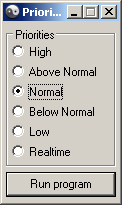
Here you go:  Priority Run

Some notes/caveats:

  1. DO NOT, DO NOT, DO NOT run it from the zip file.  Extract it to its permanent install folder first and then run it from there.
  2. For anybody testing this under Vista or Windows 7, you will almost certainly have to run it as Administrator.

Obviously, it's had minimal testing here but seems to work smoothly.  Let me know how it works for you.  Thanks.

2011-06-19_195431.png

paulw

  • Supporting Member
  • Joined in 2010
  • **
  • Posts: 4
Thats exactly what I wanted and it works fine here, Thanks very much Skwire  :Thmbsup:

skwire

  • I eat Coding Snacks for breakfast...
  • Global Moderator
  • Joined in 2005
  • *****
  • Posts: 5,297
    • Participated in NANY Challenge Seventeen Times
    • Coding Snacks
    • Superboy Coder
    • Cody Award
    • Volunteers/Staff
    • Gathering Badge
You're welcome.  Thanks for the feedback.

pilgrim

  • Cogito ergo ?
  • Supporting Member
  • Joined in 2008
  • **
  • Posts: 316
Just installed this in XP-SP3 Home, it is showing up in Task Manager when I right click on an exe but the GUI is not opening?
I spent 25 years training to be an eccentric then I woke up one morning and realised that I'd cracked it.
I've not had to try since.

I wonder what happens if I click on thi

Original address: https://www.donationcoder.com/forum/index.php?topic=27091.0