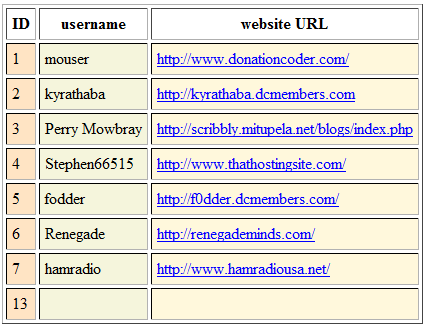
This database would hold the submitted files?
Re: functional C# class/component to upload to my DC space via explicit FTP over TLS
« Reply #25 on: May 14, 2011, 07:31 PM »


 Topic: functional C# class/component to upload to my DC space via explicit FTP over TLS (Read 43,409 times)





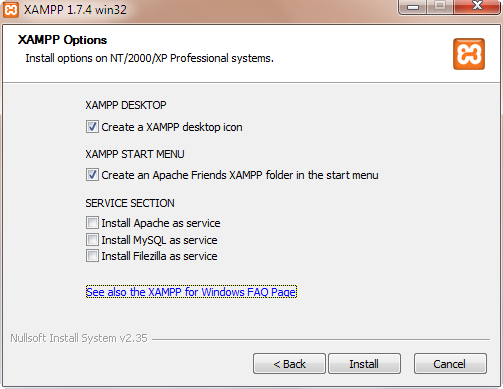


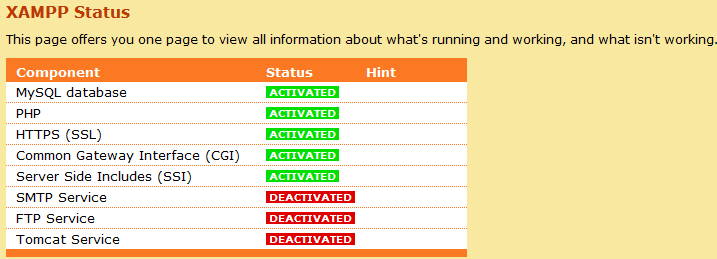
XAMPP isn't in PortableApps.com Format, but it easily integrates with the PortableApps.com Suite by using the XAMPP Launcher 1.4 and installing XAMPP in the root directory of your portable device (as recommended).

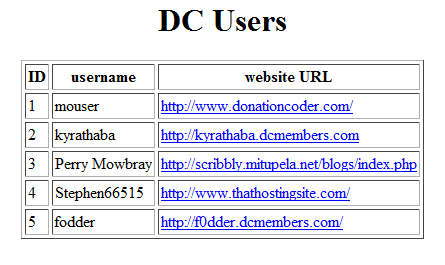 dcUsersViaPHP.png
(8.4 KB, 445x265 - viewed 6146 times.)
dcUsersViaPHP.png
(8.4 KB, 445x265 - viewed 6146 times.) addressBook.zip
(1.6 KB - downloaded 571 times.)
addressBook.zip
(1.6 KB - downloaded 571 times.)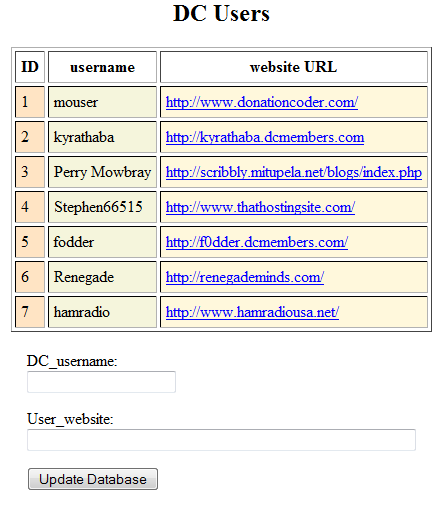 successfulFormPostToDB.png
(14.3 KB, 440x510 - viewed 6718 times.) addressBook.zip
(2.1 KB - downloaded 1715 times.)
successfulFormPostToDB.png
(14.3 KB, 440x510 - viewed 6718 times.) addressBook.zip
(2.1 KB - downloaded 1715 times.)Mouser, don't you think that what I'm wanting to do with 'highScore' data from the game I'm developing falls along the lines of what this example accomplishes? Basically, I could have my game app programmatically use such a form post-action to send its data to an online database, right?
            string URI = "http://localhost/addressBook/update.php";

            WebClient wc = new WebClient();
            NameValueCollection NC = new NameValueCollection();
            NC.Add("sampleUserName","sampleWebsiteURL");
            byte[] response = wc.UploadValues(URI,NC);
            string responseString = Encoding.ASCII.GetString(response);
MessageBox.Show(responseString);Give me a few minutes to edit my JottiQ code to remove some passwords and other stuff you don't need, and you'll have a sample. smiley
using System;
using System.Collections.Generic;
using System.Linq;
using System.Text;

using System.Net;
using System.Xml;
using System.IO;

using System.Reflection;
using System.ComponentModel;
using System.Threading;

namespace JottiQ
{
    public enum HttpMethod
    {
        Get,
        Post,
    }

    public class UserCanceledException : Exception
    {
        public UserCanceledException()
            : base()
        {
        }

        public UserCanceledException(string message)
            : base(message)
        {
        }

        public UserCanceledException(string message, Exception inner)
            : base(message, inner)
        {
        }
    }

    class XmlHelper
    {
        static private NetworkCredential ApiCredentials = new NetworkCredential("Wouldn't_You", "Like_To_Know");
        static private string userAgent = null;

        public static string UserAgent
        {
            get
            {
                if (userAgent == null)
                {
                    System.Reflection.Assembly assembly = System.Reflection.Assembly.GetExecutingAssembly();
                    System.Reflection.AssemblyName name = assembly.GetName();
                    System.Version version = name.Version;

                    userAgent = name.Name + " v" + version.ToString();
                }

                return userAgent;
            }
        }

        public class FileUploadData : INotifyPropertyChanged, Status.IProgressStatusReporter
        {
            public event PropertyChangedEventHandler PropertyChanged;

            public delegate bool CanContinueDelegate();

            private string filename;
            private Stream stream;
            private JottiItem ji;   /* TODO: Temporary. Please fix! */
            private CanContinueDelegate ccd;

            public string FileName
            {
                get { return this.filename; }
            }

            public Stream Stream
            {
                get { return this.stream; }
            }

            public JottiItem JI
            {
                get { return ji; }
            }

            public CanContinueDelegate CanContinue
            {
                get { return ccd; }
            }

            public FileUploadData(string filename, Stream stream, JottiItem ji, CanContinueDelegate canContinue)
            {
                this.filename = filename;
                this.stream = stream;
                this.ji = ji;
                this.ccd = canContinue;
            }

            protected void OnPropertyChanged(string name)
            {
                if (PropertyChanged != null)
                {
                    PropertyChanged(this, new PropertyChangedEventArgs(name));
                }
            }

            /* IProgressStatusReporter implementation */
            public long Min
            {
                get
                {
                    return 0;
                }
            }

            public long Max
            {
                get
                {
                    return (this.stream != null) ? this.stream.Length : 0;
                }
            }

            public long Progress
            {
                get
                {
                    return (this.stream != null) ? this.stream.Position : 0;//(this.stream.Position*10)/this.stream.Length : 0;
                }
            }

            public void Update()
            {
                OnPropertyChanged("Progress");
            }
        }

        static public XmlDocument getXmlResponse(string inURL, HttpMethod hm, Dictionary<string, object> fields)
        {
            /* HTTPWebRequest, XMLDocument */
            HttpWebRequest myHttpWebRequest;
            HttpWebResponse myHttpWebResponse;
            XmlDocument myXMLDocument;
            XmlTextReader myXMLReader;

            try
            {
                if ((hm == HttpMethod.Get) && (fields != null))
                {
                    StringBuilder sb = new StringBuilder();
                    sb.Append(inURL);
                    sb.Append("?");

                    foreach (KeyValuePair<string, object> pair in fields)
                    {
                        sb.Append(pair.Key);
                        sb.Append("=");
                        sb.Append(pair.Value);
                        sb.Append("&");

                    }

                    inURL = sb.ToString();
                }

                //Create Request
                myHttpWebRequest = (HttpWebRequest)HttpWebRequest.Create(inURL);
                myHttpWebRequest.Credentials = ApiCredentials;
                myHttpWebRequest.PreAuthenticate = true;
                myHttpWebRequest.UserAgent = UserAgent;

                if (hm == HttpMethod.Get)
                {
                    myHttpWebRequest.Method = "GET";
                    myHttpWebRequest.ContentType = "application/x-www-form-urlencoded; encoding='utf-8'"; //"text/xml; encoding='utf-8'";
                }
                else if (fields == null)
                {
                    /* If there's no parameters to send, we don't need to be difficult either. */
                    myHttpWebRequest.Method = "POST";
                }
                else
                {
                    myHttpWebRequest.Method = "POST";
                    // The value "multipart/form-data" should be used in combination with the INPUT element, type="file".

                    /* When we're uploading a good chunk of data, there is a huge chance of a
                     * KeepAlive bug crashing us halfway through. Disable those. */
                    myHttpWebRequest.KeepAlive = false;
                    myHttpWebRequest.Timeout = 6 * 60 * 60 * 1000;   // 6 hours should be enough for everyone.

                    /* Since we are using multipart/form-data, we need to be difficult with boundaries. */
                    string boundary = "----------------------------" + DateTime.Now.Ticks.ToString("x");
                    myHttpWebRequest.ContentType = "multipart/form-data; boundary=" + boundary;

                    // Get the boundary in bytes
                    byte[] boundarybytes = System.Text.Encoding.ASCII.GetBytes("\r\n--" + boundary + "\r\n");

                    // 1. Calculate total length of entire message (by fake-building it)
                    // 2. Send content-length.
                    // 3. Send actual multipart stuff. This avoids having a huge file upload in memory.

                    // --BOUNDARY
                    // Content-Disposition: form-data; name="<NAME>"
                    //
                    // sadfasdfasdf
                    // --BOUNDARY
                    // Content-Disposition: form-data; name="<NAME>"; filename="C:\file1.txt"
                    // Content-Type: application/octet-stream
                    // --BOUNDARY--

                    long contentLength = 0;
                    string fileTemplate = "Content-Disposition: form-data; name=\"{0}\";filename=\"{1}\"\r\nContent-Type: application/octet-stream\r\n\r\n";
                    string miscTemplate = "Content-Disposition: form-data; name=\"{0}\"\r\n\r\n";

                    foreach (KeyValuePair<string, object> pair in fields)
                    {
                        if (pair.Value is FileUploadData)
                        {
                            FileUploadData fud = (FileUploadData)pair.Value;
                            string fileHeader = string.Format(fileTemplate, pair.Key, fud.FileName);

                            //convert the header to a byte array
                            byte[] bytes = System.Text.Encoding.UTF8.GetBytes(fileHeader);

                            contentLength += boundarybytes.Length + bytes.Length + fud.Stream.Length;
                        }
                        else
                        {
                            string miscHeader = string.Format(miscTemplate, pair.Key);
                            byte[] bytes = System.Text.Encoding.UTF8.GetBytes(miscHeader);
                            contentLength += boundarybytes.Length + bytes.Length + pair.Value.ToString().Length;
                        }
                    }

                    contentLength += boundarybytes.Length + 2;   /* extra 2 -- at the end of final boundary */
                    myHttpWebRequest.ContentLength = contentLength;

                    /* Step 3. Send the actual data and stuff. */
                    Stream requestStream = myHttpWebRequest.GetRequestStream();

                    foreach (KeyValuePair<string, object> pair in fields)
                    {
                        requestStream.Write(boundarybytes, 0, boundarybytes.Length);

                        if (pair.Value is FileUploadData)
                        {
                            FileUploadData fud = (FileUploadData)pair.Value;
                            string fileHeader = string.Format(fileTemplate, pair.Key, fud.FileName);
                            byte[] bytes = System.Text.Encoding.UTF8.GetBytes(fileHeader);
                            requestStream.Write(bytes, 0, bytes.Length);

                            // Use 4096*2 for the buffer / make that *4 to streamline IO over UI updates
                            byte[] buffer = new byte[4096*4];

                            int bytesRead = 0;
                            int bytesTotal = 0;
                            // Loop through whole file uploading parts in a stream.
                            while ((bytesRead = fud.Stream.Read(buffer, 0, buffer.Length)) != 0)
                            {
                                requestStream.Write(buffer, 0, bytesRead);
                                requestStream.Flush();

                                /* Temporary solution for live updates. */
                                bytesTotal += bytesRead;
                                fud.JI.StatusMessage = "Upload " + ((bytesTotal * 100) / fud.Stream.Length).ToString() + "% complete.";

                                fud.Update();
                                if (!fud.CanContinue())
                                    throw new UserCanceledException("Upload has been canceled by user.");
                            }
                            fud.JI.StatusMessage = "Upload done.";
                        }
                        else
                        {
                            string miscHeader = string.Format(miscTemplate, pair.Key);
                            byte[] bytes = System.Text.Encoding.UTF8.GetBytes(miscHeader);
                            requestStream.Write(bytes, 0, bytes.Length);

                            bytes = System.Text.Encoding.UTF8.GetBytes(pair.Value.ToString());
                            requestStream.Write(bytes, 0, bytes.Length);
                        }
                    }

                    // Write out the final boundary
                    boundarybytes = System.Text.Encoding.ASCII.GetBytes("\r\n--" + boundary + "--\r\n");
                    requestStream.Write(boundarybytes, 0, boundarybytes.Length);

                    // Close our stream.
                    requestStream.Close();
                }

                //Get Response
                myHttpWebResponse = (HttpWebResponse)myHttpWebRequest.GetResponse();

                //Now load the XML Document
                myXMLDocument = new XmlDocument();

                //Load response stream into XMLReader
                myXMLReader = new XmlTextReader(myHttpWebResponse.GetResponseStream());
                myXMLDocument.Load(myXMLReader);
            }
            catch (Exception myException)
            {
                throw new Exception("Error Occurred in getXMLResponse()", myException);
                //return null;
            }
            finally
            {
                myHttpWebRequest = null;
                myHttpWebResponse = null;
                myXMLReader = null;
            }

            return myXMLDocument;
        }

    }
}XmlHelper.FileUploadData fud = new XmlHelper.FileUploadData(
System.IO.Path.GetFileName(ji.FilePath),
fileStream, ji,
delegate() { return !_terminated; });
//getXmlResponseWrapper() wraps various error-handling stuffs.
XmlDocument xml = getXmlResponseWrapper(ji, true, inURL, HttpMethod.Post,
new Dictionary<string, object>()
{
{"token", token},
{"scanfile", fud}
}
);XmlDocument xml = getXmlResponse(inURL, HttpMethod.Post,
new Dictionary<string, object>()
{
{"user", getUsernameString()},
{"uid", getUniqueID()}
}
);Original address: https://www.donationcoder.com/forum/index.php?topic=26742.0