DonationCoder.com forum
 
Read-only archive. This is a static copy of the DonationCoder.com forum. Reading and searching work as before; logging in, posting and private messages do not.
Archive of 2026-10-21 · About this archive · Main site

Author Topic: Icons are not shown  (Read 7,690 times)

Thunder5

  • Participant
  • Joined in 2008
  • *
  • Posts: 2
Icons are not shown
« on: April 25, 2011, 07:16 PM »
I have a folder with some portable apps in it - one of it is FARR.

The folder structure is like this:
\PortableApps\CCleaner
\PortableApps\Find and Run Robot
\PortableApps\foobar2000

I run FARR in portable mode and I added the search folder "%FARRDIR%\.." in the options.
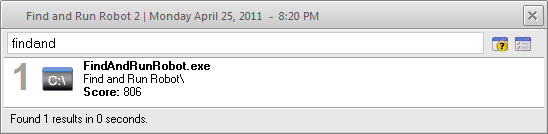
When I search for "findand" the executable of FARR is shown with a standard icon (see attachment). Its the same with all tools in the folder PortableApps.
I tried it with "%FARRDRIVE%\PortableApps" with the same result.
But when I add the whole path "C:\PortableApps" the correct icon is shown.

I checked it on Windows XP SP3 32bit and Windows 7 64bit.
mouser

  • First Author
  • Administrator
  • Joined in 2005
  • *****
  • Posts: 40,931
    • Gathering Badge
    • Plugin Coding Medal
    • Participated in NANY Challenge Seventeen Times
    • Cody Award
    • Coding Snacks
    • Volunteers/Staff
Re: Icons are not shown
« Reply #1 on: April 25, 2011, 07:24 PM »
hi thunder.

Quote
But when I add the whole path "C:\PortableApps" the correct icon is shown.

that's a big clue.

here's my guess --  maybe extra \ being added to %FARRDIR% or %FARRDRIVE% -- can you try: %FARRDRIVE%PortableApps and see if that works.
if so i'll try to fix my code so it's not needed.

Thunder5

  • Participant
  • Joined in 2008
  • *
  • Posts: 2
Re: Icons are not shown
« Reply #2 on: April 25, 2011, 07:44 PM »
That's a fast answer.

I tried it with "%FARRDIR%.." with no success.

And I have to correct my first post.
"%FARRDRIVE%\PortableApps" and "%FARRDRIVE%PortableApps" doesn't find anything in "C:\PortableApps".

murdock01

  • Participant
  • Joined in 2010
  • *
  • Posts: 13
Re: Icons are not shown
« Reply #3 on: April 28, 2011, 02:11 PM »
I also have an issue with icons but maybe not the same issue.
I use farr on 2 different computers that I keep in sync with my usb drive. On the xp machine if I type "helpfarr" I get the results with nice icons. On my win 7 system I do the same and I get the proper results but the icons are generic; by generic I mean they look like a sheet of paper with the corner folded down.

JaneDC

  • Participant
  • Joined in 2007
  • *
  • Posts: 36
Re: Icons are not shown
« Reply #4 on: January 01, 2012, 03:39 AM »
/icon=%Farrdir%icons\someicon.ico doesn't show icons.

Typing out the full path does eg /icon=c:\farr\icons\someicon.ico.

So i just used the %aliasdir% variable instead. Example /icon=%aliasdir%..\..\icons\someicon.ico

Ath

  • Supporting Member
  • Joined in 2006
  • **
  • Posts: 3,649
    • Participated in NANY Challenge Eleven Times
    • Coding Snacks
    • Linux User
    • Hardware Hacker
Re: Icons are not shown
« Reply #5 on: January 01, 2012, 12:30 PM »
/icon=%Farrdir%icons\someicon.ico doesn't show icons.
Did you also try with %FARRDIR% in all caps? that might help...
/Ton
Ath's software collection, Quote: "A problem well stated is a problem half-solved." (Charles Kettering)

JaneDC

  • Participant
  • Joined in 2007
  • *
  • Posts: 36
Re: Icons are not shown
« Reply #6 on: January 01, 2012, 01:34 PM »
thanks for the suggestion. I'll give it a try when i get back to the desktop. Does the variable work in yours?

Filipe Meira Castro

  • Supporting Member
  • Joined in 2010
  • **
  • Posts: 104
Re: Icons are not shown
« Reply #7 on: January 13, 2012, 10:53 AM »
Hi,

I have the same problem on network folders (\\Computername\...)
...all the icons are the same: a blue backgound with a "c:\" text...

Any suggestions?

Great day for everyone :)

Original address: https://www.donationcoder.com/forum/index.php?topic=26537.0