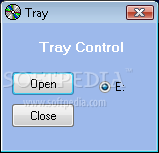
I created this script because it has happened to me lots of times forgetting a cd (dvd) inside the computer after shuting it down.
It's really anoying to have to be always turning the computer on again to get that cd.
But fear not, Eject! comes in salvation of those who suffer from the same bad as I do.
This script opens the cd tray right before shutdown if there is any cd inside!
I didn't make it open all cd trays because some people might have virtual drives, and that might have strange behaviours.
But on it's first run, it creates a ini file that can be edited to contain all the drives you want.
The attached compressed file has the executable, the ahk source and the example ini file.
Hope you like it.
(note: this script can easily be added to other ahk scripts you have running.)
.exe version: http://jgpaiva.dcmembers.com/CS/Eject/Eject.exe
.ahk version: http://jgpaiva.dcmembers.com/CS/eject/Eject.exe
It's really anoying to have to be always turning the computer on again to get that cd.
But fear not, Eject! comes in salvation of those who suffer from the same bad as I do.
This script opens the cd tray right before shutdown if there is any cd inside!
I didn't make it open all cd trays because some people might have virtual drives, and that might have strange behaviours.
But on it's first run, it creates a ini file that can be edited to contain all the drives you want.
The attached compressed file has the executable, the ahk source and the example ini file.
Hope you like it.
(note: this script can easily be added to other ahk scripts you have running.)
.exe version: http://jgpaiva.dcmembers.com/CS/Eject/Eject.exe
.ahk version: http://jgpaiva.dcmembers.com/CS/eject/Eject.exe