DonationCoder.com forum
 
Read-only archive. This is a static copy of the DonationCoder.com forum. Reading and searching work as before; logging in, posting and private messages do not.
Archive of 2026-10-21 · About this archive · Main site

Author Topic: DONE: Single Application Instance  (Read 41,646 times)

richardsugg

  • Reclaiming the Mind for Christ
  • Charter Member
  • Joined in 2005
  • ***
  • Posts: 4
DONE: Single Application Instance
« on: March 03, 2006, 05:32 PM »
I would love to see an application that would prevent more than one instance of an application from opening.  For instance, I use Bibleworks, but it allows multiple instances, which I don't like.  It also opens up other windows that are a part of an instance of the application.  In other words, The single instance application can't go by the window title, but would have to go by the process name.

Thanks!
Richard
Richard
http://www.reclaimingthemind.org
« Last Edit: March 07, 2006, 07:35 AM by brotherS »

mouser

  • First Author
  • Administrator
  • Joined in 2005
  • *****
  • Posts: 40,931
    • Gathering Badge
    • Plugin Coding Medal
    • Participated in NANY Challenge Seventeen Times
    • Cody Award
    • Coding Snacks
    • Volunteers/Staff
Re: Single Application Instance
« Reply #1 on: March 03, 2006, 05:55 PM »
richard, this is a nice idea that can be reasonably added to a program like our find+run robot and new launch bar program - i will be adding such features in the near future, so that you can tell it that it should bring any currently running instance to the foreground instead of launching a new process.

skrommel

  • Fastest code in the west
  • Developer
  • Joined in 2005
  • ***
  • Posts: 933
    • Participated in NANY Challenge Twice
    • Coding Snacks
Re: Single Application Instance
« Reply #2 on: March 03, 2006, 08:03 PM »
:) I seem to remember that my SingleApp tool will do this if you specify the class.

You find the thread here: http://www.donationcoder.com/forum/index.php?topic=1826.0.


Sorry, months since I made that one... But maybe a v2.0 is needed?

Skrommel
« Last Edit: March 03, 2006, 08:06 PM by skrommel »

wr975

  • Charter Member
  • Joined in 2005
  • ***
  • Posts: 369
    • Coding Snacks
Re: Single Application Instance
« Reply #3 on: March 03, 2006, 09:46 PM »
Until mouser or skrommel come up with some better solution, you could just use a custom Authotkey script to start your application. Just change PROCESSNAME and PATH/APP.EXE.

Code
process,exist,PROCESSNAME
if errorlevel = 0
    run,PATH/APP.EXE
else
    WinActivate, ahk_pid %errorlevel%
« Last Edit: March 03, 2006, 09:50 PM by wr975 »

skrommel

  • Fastest code in the west
  • Developer
  • Joined in 2005
  • ***
  • Posts: 933
    • Participated in NANY Challenge Twice
    • Coding Snacks
Re: Single Application Instance
« Reply #4 on: March 04, 2006, 08:45 PM »
:) Try this one!

SingleInstance - Only allow one instance of a program to run.

Features:
- User defined programs.
- Option to detect hidden programs.
- Won't close instances started before SingleInstance.

You'll find the downloads and more info at 1 Hour Software by Skrommel.

AutoHotkey doesn't support global messagehooks, so I couldn't catch the programs before they were created, but I hope you can live with the "flicker".

Skrommel
« Last Edit: March 04, 2006, 08:59 PM by skrommel »

Hirudin

  • Charter Member
  • Joined in 2005
  • ***
  • Posts: 543
Re: DONE: Single Application Instance
« Reply #5 on: March 30, 2006, 07:38 AM »
Whoa, don't turn the response time down to "0"! I had it like that for a while, then noticed my CPU usage was at 50%! After turning off Single Instance it dropped down to ~0%, and after starting SI again it went to 50% again!
After starting Single Instance again, confirming the CPU usage was 50% I changed the response time back to "1" which brought the CPU usage back to ~0%.

Screenshot - 3_30_2006 , 12_24_54 AM.png

saddler

  • Participant
  • Joined in 2007
  • *
  • Posts: 2
Re: DONE: Single Application Instance
« Reply #6 on: August 29, 2007, 01:36 PM »
hi!

can you make this application to find the duplicated application by performing a window title check instead of PID?
i've seen that you can put something like this:
WinGetTitle, title, ahk_id %wID%,,,$ 
to get the window title but i don't know this scripting language to modify your tool, so can you help?
i need a program to monitor the programs are running by the window_title because i need to block some users in the company i work to open more than one specific web-based application, but in the same time to still have access to other sites.
For eg. let's say we have Test1 web-based application and the IE window title will be Test1 - Microsoft Internet Explorer. They also use Test2 and Test3 from IE, but Test1 should be opened only once.

So... anyone with an idea? Can you give me the code, at least, and to compile it by myself?

Thanks in advance!
Cristian

I tryed google to find something like this and your application was the closest to what i want. There is also another one, PWone.exe, a command line tool but that one can't be found for download anymore.

mouser

  • First Author
  • Administrator
  • Joined in 2005
  • *****
  • Posts: 40,931
    • Gathering Badge
    • Plugin Coding Medal
    • Participated in NANY Challenge Seventeen Times
    • Cody Award
    • Coding Snacks
    • Volunteers/Staff
Re: DONE: Single Application Instance
« Reply #7 on: August 29, 2007, 11:09 PM »
Quote
So... anyone with an idea? Can you give me the code, at least, and to compile it by myself?

I think all of skrommel's downloads come with source code in ahk format.

ps. don't forget to consider sending skrommel a donation if you like his stuff  :up:

saddler

  • Participant
  • Joined in 2007
  • *
  • Posts: 2
Re: DONE: Single Application Instance
« Reply #8 on: August 29, 2007, 11:36 PM »
i know he has posted the source code but my programming skills aren't that good  8)
that's why i'm asking help here :)

mouser

  • First Author
  • Administrator
  • Joined in 2005
  • *****
  • Posts: 40,931
    • Gathering Badge
    • Plugin Coding Medal
    • Participated in NANY Challenge Seventeen Times
    • Cody Award
    • Coding Snacks
    • Volunteers/Staff
Re: DONE: Single Application Instance
« Reply #9 on: August 30, 2007, 12:01 AM »
Oh sorry i misunderstood your request for the source code, now i see you were asking for some help with the not yet written source code for the features you are asking for. sorry! hopefully one of the ahk coders here will help.

RobC

  • Supporting Member
  • Joined in 2007
  • **
  • Posts: 23
Re: DONE: Single Application Instance
« Reply #10 on: December 03, 2009, 01:05 PM »
I am trying to prevent multiple instances of FireFox.
I tried with SingleInstance, but cannot get it to work (with FF).
Is there a trick as to what I should list in your Options Dialog ?
EG any of these ? 
firefox
firefox.exe
C:\Program Files\Mozilla Firefox\firefox.exe

Thanks,
Rob

skwire

  • I eat Coding Snacks for breakfast...
  • Global Moderator
  • Joined in 2005
  • *****
  • Posts: 5,297
    • Participated in NANY Challenge Seventeen Times
    • Coding Snacks
    • Superboy Coder
    • Cody Award
    • Volunteers/Staff
    • Gathering Badge
Re: DONE: Single Application Instance
« Reply #11 on: December 03, 2009, 01:53 PM »
Please try this bit of AHK code.  I've written it as a shell hook that should only allow one instance of Firefox to exist.

Code: (autoit)
Gui +LastFound
hWnd := WinExist()
DllCall( "RegisterShellHookWindow", UInt, hWnd )
MsgNum := DllCall( "RegisterWindowMessage", Str, "SHELLHOOK" )
OnMessage( MsgNum, "ShellMessage" )
DetectHiddenWindows, On
SetTitleMatchMode, 2

ShellMessage( wParam, lParam )
{
    WinGetClass, myClass, ahk_id %lParam%
    
    If ( wParam = 1 ) ; HSHELL_WINDOWCREATED
    {
        If ( InStr( myClass, "MozillaUIWindowClass" ) )
        {
            WinGet, myList, List, ahk_class MozillaUIWindowClass
            If ( myList > 1 )
            {
                WinClose, % "ahk_id " . lParam
            }
        }
    }
}

RobC

  • Supporting Member
  • Joined in 2007
  • **
  • Posts: 23
Re: DONE: Single Application Instance
« Reply #12 on: December 03, 2009, 05:02 PM »
Thanks for that.
Could you advise what program to use to 'compile' it, and how to do it ?
Or, attach a compiled version.

Rob

srhamy

  • Participant
  • Joined in 2009
  • *
  • Posts: 3
Re: DONE: Single Application Instance
« Reply #13 on: December 03, 2009, 08:03 PM »

skwire

  • I eat Coding Snacks for breakfast...
  • Global Moderator
  • Joined in 2005
  • *****
  • Posts: 5,297
    • Participated in NANY Challenge Seventeen Times
    • Coding Snacks
    • Superboy Coder
    • Cody Award
    • Volunteers/Staff
    • Gathering Badge
Re: DONE: Single Application Instance
« Reply #14 on: December 03, 2009, 08:52 PM »
Here you go.  Source/binary download

dpoljak

  • Participant
  • Joined in 2017
  • *
  • Posts: 3
Single Application Instance
« Reply #15 on: December 03, 2017, 10:43 AM »
Thanks for this software, but i need help.
It doesn't work properly on Windows 10.

Ath

  • Supporting Member
  • Joined in 2006
  • **
  • Posts: 3,649
    • Participated in NANY Challenge Eleven Times
    • Coding Snacks
    • Linux User
    • Hardware Hacker
Re: DONE: Single Application Instance
« Reply #16 on: December 03, 2017, 11:15 AM »
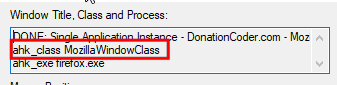
The code above (posted by Skwire) uses "MozillaUIWindowClass" (twice), but the current FireFox (v57.x) has the classname "MozillaWindowClass", so you might want to adjust the code, compile, then re-try.

Screenshot - 3-12-2017 , 12_15_00.png

And maybe it needs to be compiled for 64 bit, as FireFox by default is now installed in its 64 bit incarnation.
/Ton
Ath's software collection, Quote: "A problem well stated is a problem half-solved." (Charles Kettering)

dpoljak

  • Participant
  • Joined in 2017
  • *
  • Posts: 3
Re: DONE: Single Application Instance
« Reply #17 on: December 03, 2017, 12:30 PM »
My programming skills are bad.
Can you please post compiled version that will work on Windows 10?

Thanks a lot,

Dario

dpoljak

  • Participant
  • Joined in 2017
  • *
  • Posts: 3
Re: DONE: Single Application Instance
« Reply #18 on: December 03, 2017, 01:32 PM »
Heh, looks like it works :)

A program that i want to lock is older and works fine so far.

Thanks,

Dario

skwire

  • I eat Coding Snacks for breakfast...
  • Global Moderator
  • Joined in 2005
  • *****
  • Posts: 5,297
    • Participated in NANY Challenge Seventeen Times
    • Coding Snacks
    • Superboy Coder
    • Cody Award
    • Volunteers/Staff
    • Gathering Badge
Re: DONE: Single Application Instance
« Reply #19 on: December 03, 2017, 05:58 PM »
Here's an updated version that should work with the new Firefox:  Source/binary download

Original address: https://www.donationcoder.com/forum/index.php?topic=2634.0