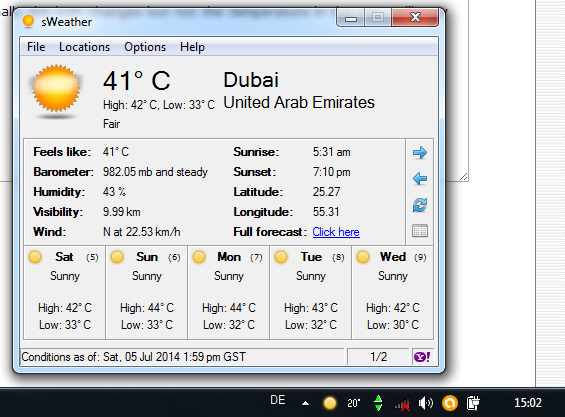
works fine after a reboot, thanks!
If it does that again, please send me your config.ini file before rebooting or shutting down sWeather.


 Topic: Release: sWeather (tray-based weather app) (Read 755,706 times)


works fine after a reboot, thanks!



1) When the mouse cursor is placed over the current Wind readout in the main window, the conversion message in the status bar at the bottom of the window says “Converted visibility: [...]” instead of “Converted wind: [...]”, though it does give the properly converted wind speed.
2) When the text message (“PM Thunderstorms,” “Few Showers,” “Scattered Thunderstorms,” etc.) in the extended forecast box for a given day is more than two lines/rows of text long, the additional lines are cut off and can’t be read; all that can be seen is the top two or three rows of pixels of the third line of text. Perhaps a change could be made to show the complete text in the status bar when mousing over such truncated text(?).
3) When the main window is displayed and the mouse cursor is off to the side (not hovering over the window), the message in the status bar doesn’t always display “Conditions as of: [date & time of last Yahoo! update]” (as I suspect it should); it often displays the Converted temp of some random day of the week.
4) The “Feels like” temperature displayed on the main window is always the same as the actual current temperature (for all locations) and does not reflect the “Feels like” temperature on the Yahoo! Full forecast Web page.
1) The ancient mariner in me would like to see latitude and longitude displayed in degrees° minutes' seconds" N/S E/W format.
2) A Moon Phase indicator in the main window, preferably an icon with text (e.g., “Waxing Crescent”), but text-only would get the job done too.
3) A Precipitation indicator in the main window showing the amount of precipitation received in the last 24 hours or since midnight (or both). The Yahoo! Full forecast Web page doesn’t seem to show this info, so I don’t know if this info is available in its feed, but the associated Weather Channel page does provide this info.
I like the simple and efficient nature of sWeather, especially as I have an old, out-of-date computer that doesn't handle lots of fancy graphics too well. Thanks for going to the trouble of providing the program.

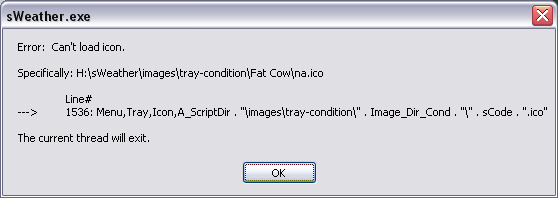
Installed this last night and found this on my screen this morning. Presumably something missing but not sure what.


! Fixed missing "na.ico" file in the Fat Cow tray condition theme.I recall to have seen other themes with missing .ico files in the past (add-on I can't recall where I got them from, presumably this or another sWeather thread) and I just stopped using them
(Thanks, Brothbeard)
 .
.Could adding idiot-proof errorhandling to the routine that shows the icons be helpful as being a more generic solution?

Here you go, Dirge:
Website | Download
v1.5.3 - 2014-07-02
+ Added DMS (degree, minute, second) format option for latitude and
longitude readings. (Thanks, Dirge)
! Fixed missing "na.ico" file in the Fat Cow tray condition theme.
(Thanks, Brothbeard)
! Converted wind speed text string was incorrect. (Thanks, Dirge)

When i change the location to Lisbon and then back again to Dubai, normally the icon changes but not the temperature in the tray. It'll stay reflecting the Lisbon temperature still...
Second question: Normally temperatures here go easily above 40 degrees Celsius, but the "tray temperature" it seems to stop around 38/40... never shows the 43 our 44 (for example). The tray temperature does not refresh (will attach a Print Screen).. probably it's the same problem as in my first question. I don't know.. It changes to the current temperature if i choose a different font color
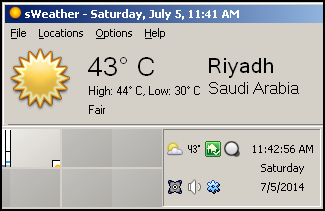
Hm, tested here on W7/x64 with Aero theme, and it updates the numbers in the tray every time I change in my list of ~6 locations. Can this be related to having just 2 locations in the list ? (the off-by-1 anomaly)
 I have over 70 locations in my list and I've never experienced the issue.
 One thing i've noticed.. everytime i restart windows the icon (sun, rain, etc.) always disappear from the tray.. back to the "Only show notifications" status. The temperature one is always there on the tray without problems
BTW.. it would be a good idea to put a link for this forum at the Help tab (for example)
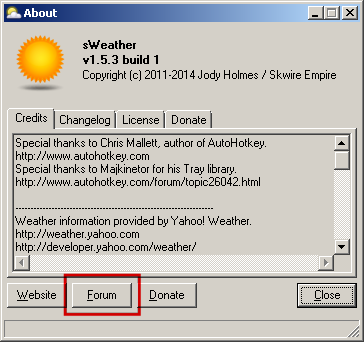
 My bad about missing the forum button
Ok.. tried again and again.. The icon always disappears from my tray after a re-start and the "Reset tray icon positions" does not solve the problem. Tried in the menu and with the right click/reset in both icon and temperature... also the F6
All the rest is working perfectly after adding a 3rd location..
 Unfortunately, I'm not sure how to fix it.
  I really like the program, and your support to it. Will keep on following your developments! Thanks!
It's not a major issue, specially if it's only happening with me

Original address: https://www.donationcoder.com/forum/index.php?topic=25940.0