My coworker and I need to share a task list (To-do list). Is there a nice, simple software that will allow us to do this? Something that we install on both computers and share a file over the network? Is there anything like that?


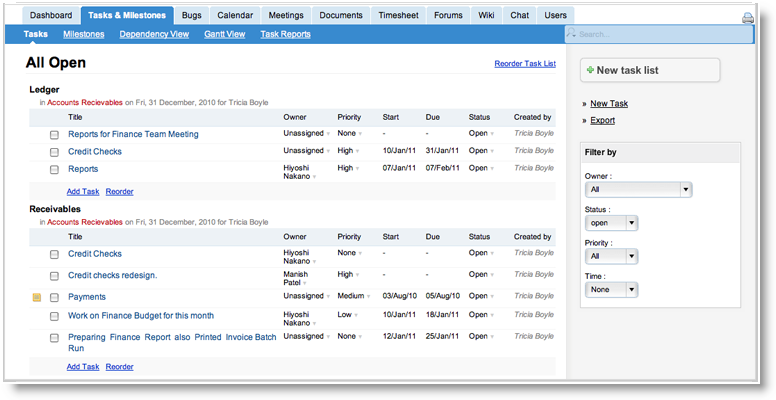
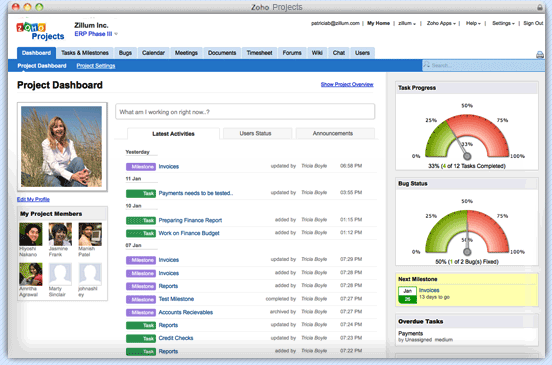
Zoho Projects is an online project management software combined with collaboration and bug tracking that allows project teams to collaborate and get work done faster. Planning and Tracking helps you keep your project on schedule. Collaboration helps improve the communication within the team and keep everyone on the same page. And the new Bug Tracking module allows you to organize and track the bugs that software projects are bound to generate and fix them all in time.

It's probably just me, but I dislike those online collaboration sites. Unless it's installed on my PC, and shared on my VPN, I'm paranoid that one day it will all be lost.


Plus they all have that same soft, flabby Appley look don't they?


FWIW, I used to feel that way about web apps. But over time (and now that most of the weaklings have been purged from the herd) I've grown to grudgingly accept that there are times when web apps aren't just a viable solution, they're also the only practical solution for many small businesses with tight (or nonexistent) IT budgets.I've searched long and hard for an easy setup solution for a VPN. But I haven't found anything. everything is a pretty major hassle. I must have at least two threads about this. All I want is a way for me to share files and folders with other users. Just like an ftp, but more smooth. Like a networked drive...that actually works. i don't need to be able to stream. I just need to be able to read/write...for example, edit a word document through the VPN. There's gotta be a way to do this, how has somebody not created a simple solution for this? Why does everything have to be so painful to configure with this VPN stuff? I don't see why it can't be like an ftp server/client thing. You open the server program, setup the usernames/logins, ports, etc. Then use a client or something that sets it up as a networked drive. Why does all the rest of it have to be so...manual?

Dropbox plus my little todo list app?That's nice! That may just do fine. Thanks app!
http://appsapps.info/todolist.php
Small, lightweight, portable, so simple it really needs no instructions.
It saves in 2 plain text files, one for todo and one for done. It autosorts all entries alphabetically, so if you want to group or sort them by priority, just add a prefix of category or rank number to the entry.
All I want is a way for me to share files and folders with other users.
)
For this particular request (todo list), I think app's will be perfect. If my coworker doesn't like it, then Excel is our other choice. We have networked shared drives, so we can share any files with each other. So I don't need Skydrive.All I want is a way for me to share files and folders with other users.
For basic todo, I'd definitely try April's suggestion above. Almost Zen-like in it's simplicity. (I really like it. Yay April!)
For basic file sharing I'd go with Microsoft's free Skydrive.
If either of those are too complicated for your partner, then it's spreadsheet time.
But the best solution would be a networked drive that can work over WAN. I need to be able to work with the files in the actual folders they are in. Not with some kind of two-step sync method (dropbox, skydrive).
I have a feeling this doesn't exist because it would basically lead to closed loop p2p activities. But it sure would be cool to be able to access your friends' folders/files in a way that it appears as a regular folder in your file manager. That seems to me to be a very convenient tool.

I believe some if the private VPN apps like Hamachi will let you map a connected computer's folders and drives to your machine. Don't know if the free versions allow mapping. I know they definitely allow file transfers.

I was going to recommend TuDuMo. It was originally supposed to be a pc version of TaskPaper, a plain text to-do app for the mac. It had many advantages: Plain text files. Very simple, and keyboard shortcuts. Not free, but very reasonable for the power.You know, this reminds me of a nifty text based task organizer I saw last year. It was all text files, but the way it was controlled was with certain prefixes for each line. It was simple and neat. i wish I remember where I saw it or the name.
But, now it uses XML files. And they're still decipherable, but a long way from the old format. In the old format, each todo was a line in the file. Tags were @tags at the end of the line. When a task was done, it was flagged with a - before the line. The app interpreted all of this into its interface, but it was beautiful. But now it's an example of what happens when someone decides to do too much with their original idea.
It's still a cool app, but I weep for what it was before.
Maybe I can make one that does what it used to do...
Original address: https://www.donationcoder.com/forum/index.php?topic=25813.0