DonationCoder.com forum
 
Read-only archive. This is a static copy of the DonationCoder.com forum. Reading and searching work as before; logging in, posting and private messages do not.
Archive of 2026-10-21 · About this archive · Main site

Author Topic: Never Defragment an SSD ?  (Read 9,068 times)

Armando

  • Charter Member
  • Joined in 2005
  • ***
  • Posts: 2,727
    • Coding Snacks
Never Defragment an SSD ?
« on: February 17, 2011, 02:58 AM »
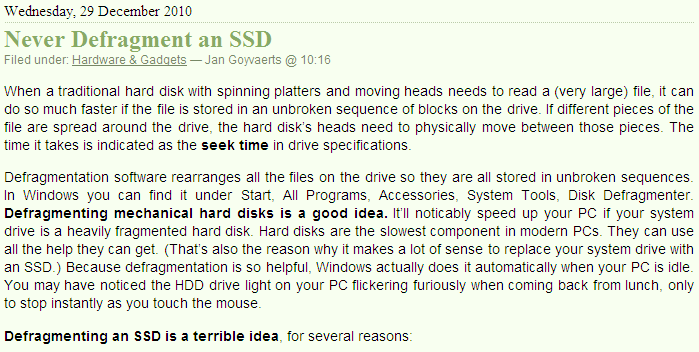
I found that article interesting. The author, Jan Goyvaerts, is the developer behind "Just Great Software" (RegexBuddy, EditPad, etc.) -- he also wrote several great books.

[attach]
"I suppose it can be said that I'm an absent-minded driver. It's true that I've driven through a number of red lights on occasion, but on the other hand, I've stopped at a lot of green ones but never gotten credit for it."
Glenn Gould

f0dder

  • [Well, THAT escalated quickly!]
  • Charter Honorary Member
  • Joined in 2005
  • ***
  • Posts: 9,153
    • Participated in NANY Challenge Once
Re: Never Defragment an SSD ?
« Reply #1 on: February 17, 2011, 10:12 AM »
I'm not sure he's entirely correct in saying the following:
Quote
Reading adjacent blocks of data is no faster than reading blocks that are spread out over the drive. Fragmentation does not affect SSD drive speed.
If you look at benchmarks, all the SSDs have different speed characteristics when dealing with linear reads/writes compared to scattered smaller I/O. It can matter a lot for writes, but also matters for reads.

I agree fully that defragmenting SSDs is a bad idea, because of the limited amount of erase-cycles of the flash cells. It might make sense to defragment individual files if they're heavily fragmented; you'd do that by moving the file to another drive (on a mechanical disk, prefarably), then moving it back to the SSD (using a tool that tries to allocate the entire chunk contiguously).

Also, I see a guy in the comments recommending a single defrag after you installed all your apps. Don't do that - if you want the SSD defragged, start by installing to a mechanical disk, defrag that, and move the install to the SSD using, for instance, Paragon Virtualization Manager.

Similarly, if your SSD ends up heavily fragmented, create a disk image of it to a mechanical drive, defrag that image, do a single-pass wipe of the SSD (to let the drive know all sectors blocks are blank, useful for the reallocation algorithms), then transfer the defragged image back.
- carpe noctem
« Last Edit: February 17, 2011, 10:15 AM by f0dder »

MerleOne

  • 4D thinking
  • Supporting Member
  • Joined in 2006
  • **
  • Posts: 957
Re: Never Defragment an SSD ?
« Reply #2 on: February 17, 2011, 02:02 PM »
Some people are apparently working on improving this : http://flashfire.org/xe/
.merle1.

Stoic Joker

  • Honorary Member
  • Joined in 2008
  • **
  • Posts: 6,652
    • Cody Award
    • Participated in NANY Challenge Five Times
Re: Never Defragment an SSD ?
« Reply #3 on: February 17, 2011, 05:25 PM »
Also, I see a guy in the comments recommending a single defrag after you installed all your apps. Don't do that - if you want the SSD defragged, start by installing to a mechanical disk, defrag that, and move the install to the SSD using, for instance, Paragon Virtualization Manager.

Similarly, if your SSD ends up heavily fragmented, create a disk image of it to a mechanical drive, defrag that image, do a single-pass wipe of the SSD (to let the drive know all sectors blocks are blank, useful for the reallocation algorithms), then transfer the defragged image back.

Now granted I haven't gotten into the SSD thing yet, but... Given this:
Quote from: From the Article
Modern SSDs even lie to the operating system. If the operating system tells the drive to save a file in blocks 728, 729, and 730, the drive may decide to write it to blocks 17, 7829, and 78918 instead, if it determines that those blocks haven’t been worn out as much yet. The drive keeps a lookup table of all its blocks, so that when the OS wants to read blocks 728 through 730, the drive reads blocks 17, 7829, and 78918. With such drives, defragmentation software can’t possibly work. The software will think and tell the user that file X was nicely defragmented and stored in blocks 728, 729, and 730, while it actually has no idea where the data is stored physically on the drive.

So apposed to what is normally (IDE/SCSI/SATA) perceived as a defrag. - accounting for the hardware lieing - Wouldn't that really just be somewhere between damage control and a placebo effect?

CWuestefeld

  • Supporting Member
  • Joined in 2006
  • **
  • Posts: 1,009
    • Participated in NANY Challenge Once
Re: Never Defragment an SSD ?
« Reply #4 on: February 17, 2011, 05:58 PM »
If you look at benchmarks, all the SSDs have different speed characteristics when dealing with linear reads/writes compared to scattered smaller I/O. It can matter a lot for writes, but also matters for reads.

That's true. But I think that the scales are different. Disc blocks are relatively big. We're not talking about defragging at the byte scale. Even if a file has hundreds of fragments, it's not going to make any noticeable (or probably even measurable) difference in the overall access times.


f0dder

  • [Well, THAT escalated quickly!]
  • Charter Honorary Member
  • Joined in 2005
  • ***
  • Posts: 9,153
    • Participated in NANY Challenge Once
Re: Never Defragment an SSD ?
« Reply #5 on: February 17, 2011, 07:17 PM »
So apposed to what is normally (IDE/SCSI/SATA) perceived as a defrag. - accounting for the hardware lieing - Wouldn't that really just be somewhere between damage control and a placebo effect?
A little knowledge is a dangerous thing.

Yup, all the decent SSDs do remapping in order to improve lifetime. But that's not the only stuff they do - there's a lot going on in SSD firmwares (I believe some of them are using fully-fledged ARM7 cores). OCZ, for instace, does compression of blocks to achieve some speedup. Writes are cached and combined so blocks don't have to be needlessly erased multiple times, and there might be predictive read-ahead going on...

So, we can all sit down and guess what the firmware does and make nice half-assed guesses to what it does for performance, but benchmarks show that there's quite a difference in speed between doing sequential reads/write as opposed to scattered smaller I/O.

This will translate to a performance difference for fragmented filesystems - how much it matters is debatable, and I haven't seen anybody doing a benchmark of it (it's a pretty darn hard thing to set up for a realistic real-world scenario), but my personal guess is that it's a small enough problem that I'm definitely not defragmenting my SSDs... and if I notice performance dropping, I'll be doing the above-mentioned disk imaging based "defragment".
- carpe noctem

f0dder

  • [Well, THAT escalated quickly!]
  • Charter Honorary Member
  • Joined in 2005
  • ***
  • Posts: 9,153
    • Participated in NANY Challenge Once
Re: Never Defragment an SSD ?
« Reply #6 on: February 17, 2011, 07:24 PM »
That's true. But I think that the scales are different. Disc blocks are relatively big. We're not talking about defragging at the byte scale.
Defragging is never done at the byte scale, and not even at the sector scale - so yes, relatively large chunks (for my NTFS filesystems, generally 4kb clusters).

Even if a file has hundreds of fragments, it's not going to make any noticeable (or probably even measurable) difference in the overall access times.
Do you know this to be true? Have you measured it? For every possible combination of SSD firmware, file fragmentation level, and application + access pattern? :)

Not all applications are good at doing proper I/O. On my system partition, excluding .log files which are truly hopeless, I see stuff like a ~14meg file in 739 fragments, the 11.2meg installer for paint.net in 316 fragments, the 1.2meg Internet Explorer cache index in 71 fragments, et cetera.

And keep in mind that those would be cluster-size fragments, which are might be located very differently on the SSD because it deals with erase-block-size blocks :)
- carpe noctem

Armando

  • Charter Member
  • Joined in 2005
  • ***
  • Posts: 2,727
    • Coding Snacks
Re: Never Defragment an SSD ?
« Reply #7 on: February 18, 2011, 05:29 AM »
Thanks for the contributions. So... 1-defragmenting an SSD in the "traditional way" would not be a particularly brilliant idea ("limited amount of erase-cycles of the flash cells"... windows 7 defrag system skips SSDs for that very reason), 2- the fragmentation that'll inevitably occur will somewhat affect performance. 3- According to f0dder the only "defraging" remedy would be to
Quote
create a disk image of it to a mechanical drive, defrag that image, do a single-pass wipe of the SSD (to let the drive know all sectors blocks are blank, useful for the reallocation algorithms), then transfer the defragged image back.
"I suppose it can be said that I'm an absent-minded driver. It's true that I've driven through a number of red lights on occasion, but on the other hand, I've stopped at a lot of green ones but never gotten credit for it."
Glenn Gould

f0dder

  • [Well, THAT escalated quickly!]
  • Charter Honorary Member
  • Joined in 2005
  • ***
  • Posts: 9,153
    • Participated in NANY Challenge Once
Re: Never Defragment an SSD ?
« Reply #8 on: February 18, 2011, 11:55 AM »
#2: it will somewhat impact performance, yes, but whether it's going to be measurable will depend heavily on your disk as well as usage patterns - my guess is that most people won't feel much of a difference. Some people have reported that some SSDs get noticeably slower after a lot of use, but that's more likely because of the block remapping done by the wear-leveling algorithms.

#3: IMHO, yes. The whole image back-and-forth jig is because you don't want to use up your erase-cycles... defragging is very disk intensive, and defraggers tend to move stuff more back and forth than "necessary" (to reduce the risk of data loss on power-out, and because computing the optimal way to shuffle stuff around is not an easy problem).

The "wipe disk" (using vendor-supplied tool) step before re-applying the defragged image is to help the drive's wear-leveling algorithms, and as I understand things shouldn't stress the drive (much) more than simply re-applying the image: it's the erase-block cycles that are limited, not the writes.
- carpe noctem

worstje

  • The Gent with the White Hat
  • Honorary Member
  • Joined in 2009
  • **
  • Posts: 589
    • Coding Snacks
    • Participated in NANY Challenge Three Times
Re: Never Defragment an SSD ?
« Reply #9 on: February 18, 2011, 12:07 PM »
I don't know much about SSDs at all, but how is writing different from erasing (or erasing different from writing)? Writing is the act of putting a bit to either a 1 or a 0. Erasing is the act of writing 0s in the most conventional case, although more secure versions tend to randomize whatever they write. Either way, erasing would be implemented as the act of writing, so I still believe it is write-cycles you are worried about. The only 'trick' about writing on SSDs is that entire blocks of data need to be rewritten when you change a single bit, and that is what helps wear down on SSDs so much, if I understand it all properly.

f0dder

  • [Well, THAT escalated quickly!]
  • Charter Honorary Member
  • Joined in 2005
  • ***
  • Posts: 9,153
    • Participated in NANY Challenge Once
Re: Never Defragment an SSD ?
« Reply #10 on: February 18, 2011, 12:11 PM »
worstje: it's the way flash ram works. I don't claim to understand the specifics, but there's anandtech (and other) explanations... flipping bits to 0 = hard & stressful for the drive, flipping them to 1 not so much. Also, erase is done at one (large) block-size, writes are done at a smaller block-size.

I don't know if you need to use the vendors' "low-level format" tools for all drives in order to help the wear-leveling algorithms, or whether firmwares are smart enough to look at all-zero writes and do the right thing, but I'd personally use the vendor tools.

Drives with TRIM support and an OS that supports it should reduce the need for formatting-to-help-wear-leveling, but I'd still do such a pass when re-imaging a drive.
- carpe noctem

Original address: https://www.donationcoder.com/forum/index.php?topic=25735.0