DonationCoder.com forum
 
Read-only archive. This is a static copy of the DonationCoder.com forum. Reading and searching work as before; logging in, posting and private messages do not.
Archive of 2026-10-21 · About this archive · Main site

Author Topic: In search of a partition identifier ...  (Read 10,527 times)

barney

  • Charter Member
  • Joined in 2006
  • ***
  • Posts: 1,294
In search of a partition identifier ...
« on: February 05, 2011, 09:28 PM »
Folk,

I thought this would be simplicity ... definitely misthought!

Been searching for something, preferably portable, that will identify the currently active OS partition.

OK, that's prolly not clear, so here's an example.

Take a desktop with multiple partitions on the HD(s).  Four (4) of these [bootable] partitions are loaded with the same OS, although there are variants within each.  OK, sounds stupid, but special circumstances make some sense of it.  Personally, I'd have done this with VMs, but, oh, well.

So what I'm trying to find is something that will let me identify the active partition w/o having to reboot.  Drive letters are not reliable in this instance, as they can be changed within each OS partition.

I really thought this was going to be simple, but it's turned out to be a bear.  Any thoughts that might be helpful?
Make a good day ... barn

MilesAhead

  • Supporting Member
  • Joined in 2009
  • **
  • Posts: 7,736
    • Coding Snacks
Re: In search of a partition identifier ...
« Reply #1 on: February 05, 2011, 09:55 PM »
If nobody on BootLand forum knows, then I don't know who would:

http://reboot.pro/index.php?

sword

  • Charter Member
  • Joined in 2005
  • ***
  • Posts: 200
Re: In search of a partition identifier ...
« Reply #2 on: February 05, 2011, 10:47 PM »
PowerQuest PartitionMagic v7 lists:
Disk | Partition |...| Status |...
1      C...            Active

MilesAhead

  • Supporting Member
  • Joined in 2009
  • **
  • Posts: 7,736
    • Coding Snacks
Re: In search of a partition identifier ...
« Reply #3 on: February 05, 2011, 11:17 PM »
There are some WinAPI calls to get volume information but I haven't used them myself to know if the info can be easily meaningfully interpreted. Just about everything at BootLand is boot related so there must be some programmers there willing to share some of their secrets.

4wd

  • Pedantic Old Bastard
  • Supporting Member
  • Joined in 2006
  • **
  • Posts: 5,652
    • Coding Snacks
Re: In search of a partition identifier ...
« Reply #4 on: February 05, 2011, 11:57 PM »
Been searching for something, preferably portable, that will identify the currently active OS partition.

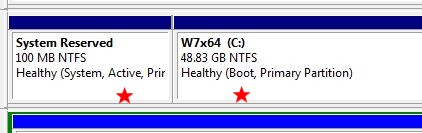
When you say 'active' do you mean the partition that is marked as Active that carries the MBR, (I only have one per all drives), or do you mean the current System partition ?

ie. In the picture below: The Active or the Boot partition?

2011-02-06_10-50-09.jpg

Try the attached compiled AutoIt script, it's console only, (so you can stick it in batch file or something), let me know if you want GUI instead.

Quote
D:\My Docs\AutoIt>whatboot a
\Device\Harddisk2\Partition1
D:\My Docs\AutoIt>whatboot b
\Device\Harddisk2\Partition2
D:\My Docs\AutoIt>whatboot o
Microsoft Windows 7 Home Premium
D:\My Docs\AutoIt>whatboot s
C:\Windows
D:\My Docs\AutoIt>whatboot e
\Device\Harddisk2\Partition1
Microsoft Windows 7 Home Premium
C:\Windows
\Device\Harddisk2\Partition2

D:\My Docs\AutoIt>whatboot
WhatBoot [A|O|B|S|E]
Where: A - Active partition
      O - Operating System
      B - Boot partition
      S - System directory
      E - Everything
D:\My Docs\AutoIt>

EDIT: Should have mentioned, numbering starts at 1 for partitions.
"I will not follow where the path may lead, but I will go where there is no path, and I will leave a trail." - Muriel Strode, 1903
« Last Edit: February 06, 2011, 02:59 AM by 4wd »

barney

  • Charter Member
  • Joined in 2006
  • ***
  • Posts: 1,294
Re: In search of a partition identifier ...
« Reply #5 on: February 06, 2011, 03:22 AM »
When you say 'active' do you mean the partition that is marked as Active that carries the MBR, (I only have one per all drives), or do you mean the current System partition ?

OK, active refers to the partition which supports the OS version I'm using at the moment, i.e., the partition which carries the currently active OS.  Perhaps booted partition would be more clear.

Anyway, curse you, 4wd :P for making me learn another scripting bit - your WhatBoot seems to do what's needful here.  So I'll order the O'Reilly/Safari AutoIt V3:  Your Quick Guide and pray that it really is.  (I hate ebooks.)

Oh, yeah, about that curse ... many, many thanks, as well  :Thmbsup: :Thmbsup:.
Make a good day ... barn

4wd

  • Pedantic Old Bastard
  • Supporting Member
  • Joined in 2006
  • **
  • Posts: 5,652
    • Coding Snacks
Re: In search of a partition identifier ...
« Reply #6 on: February 06, 2011, 03:46 AM »
It that case, perhaps you should sign up for the AutoHK Programming School, (which I'm currently going through in AutoIt) ;)

Here's the source, (a heavily edited version of the CompInfo UDF), but I could have also used AutoIt ScriptOMatic to generate and butcher.

I took the easier route.

Code: (autoit)
#Region ;**** Directives created by AutoIt3Wrapper_GUI ****
#AutoIt3Wrapper_UseUpx=n
#AutoIt3Wrapper_UseX64=n
#AutoIt3Wrapper_Change2CUI=y
#EndRegion ;**** Directives created by AutoIt3Wrapper_GUI ****

#region Global Variables and Constants
If Not(IsDeclared("$cI_CompName")) Then
	Global	$cI_CompName = @ComputerName
EndIf
Global Const $cI_VersionInfo		= "00.03.08"
Global Const $cI_aName				= 0, _
			 $cI_aDesc				= 4
Global	$wbemFlagReturnImmediately	= 0x10, _	;DO NOT CHANGE
$wbemFlagForwardOnly		= 0x20				;DO NOT CHANGE
Global	$ERR_NO_INFO				= "Array contains no information", _
		$ERR_NOT_OBJ				= "$colItems isnt an object"
#endregion Global Variables and Constants

#region Boot Configuration
Dim $BootConfig
_ComputerGetBootConfig($BootConfig)
If @error Then
	$error = @error
	$extended = @extended
	Switch $extended
		Case 1
			_ErrorMsg($ERR_NO_INFO)
		Case 2
			_ErrorMsg($ERR_NOT_OBJ)
	EndSwitch
EndIf
#endregion Boot Configuration

#region ComputerOS Configuration
Dim $OSs
_ComputerGetOSs($OSs)
If @error Then
	$error = @error
	$extended = @extended
	Switch $extended
		Case 1
			_ErrorMsg($ERR_NO_INFO)
		Case 2
			_ErrorMsg($ERR_NOT_OBJ)
	EndSwitch
EndIf
#endregion ComputerOS Configuration

$CompOS = StringSplit($OSs[1][0],'|')
$CompOS[0] = $BootConfig[1][0]

If $CmdLine[0] = 1 Then
	Switch $CmdLine[1]
		Case 'A', 'a'
			ConsoleWrite($CompOS[0])
		Case 'O', 'o'
			ConsoleWrite($CompOS[1])
		Case 'B', 'b'
			ConsoleWrite($CompOS[3])
		Case 'S', 's'
			ConsoleWrite($CompOS[2])
		Case 'E', 'e'
			For $i = 0 To 3
				ConsoleWrite($CompOS[$i] & @CRLF)
			Next
		Case Else
	EndSwitch
Else
	$info = 'WhatBoot [A|O|B|S|E]' & @CRLF & 'Where: A - Active partition' & @CRLF & '       O - Operating System' & _
				@CRLF & '       B - Boot partition' & @CRLF & '       S - System directory' & @CRLF & '       E - Everything'
	ConsoleWrite($info)
EndIf

Exit

Func _ComputerGetBootConfig(ByRef $aBootConfigInfo)
	Local $colItems, $objWMIService, $objItem
	Dim $aBootConfigInfo[1][8], $i = 1

	$objWMIService = ObjGet("winmgmts:\\" & $cI_Compname & "\root\CIMV2")
	$colItems = $objWMIService.ExecQuery("SELECT * FROM Win32_BootConfiguration", "WQL", $wbemFlagReturnImmediately + $wbemFlagForwardOnly)

	If IsObj($colItems) Then
		For $objItem In $colItems
			ReDim $aBootConfigInfo[UBound($aBootConfigInfo) + 1][8]
			$aBootConfigInfo[$i][0]  = $objItem.Description
			$i += 1
		Next
		$aBootConfigInfo[0][0] = UBound($aBootConfigInfo) - 1
		If $aBootConfigInfo[0][0] < 1 Then
			SetError(1, 1, 0)
		EndIf
	Else
		SetError(1, 2, 0)
	EndIf
EndFunc ;_ComputerGetBootConfig

Func _ComputerGetOSs(ByRef $aOSInfo)
	Local $colItems, $objWMIService, $objItem
	Dim $aOSInfo[1][60], $i = 1

	$objWMIService = ObjGet("winmgmts:\\" & $cI_Compname & "\root\CIMV2")
	$colItems = $objWMIService.ExecQuery("SELECT * FROM Win32_OperatingSystem", "WQL", $wbemFlagReturnImmediately + $wbemFlagForwardOnly)

	If IsObj($colItems) Then
		For $objItem In $colItems
			ReDim $aOSInfo[UBound($aOSInfo) + 1][60]
			$aOSInfo[$i][0]  = $objItem.Name
			$i += 1
		Next
		$aOSInfo[0][0] = UBound($aOSInfo) - 1
		If $aOSInfo[0][0] < 1 Then
			SetError(1, 1, 0)
		EndIf
	Else
		SetError(1, 2, 0)
	EndIf
EndFunc ;_ComputerGetOSs

#region ---- Internal Functions
Func _ErrorMsg($message, $time = 0)
	ConsoleWrite("Error! - " & $message)
EndFunc
#endregion Internal Functions

Happy it worked  :D

You might not need the ebook, I find the examples in the help docs and throughout the AutoIt forum are usually enough to get me either headed in the right direction or almost exactly what I require.  The hard part is getting the search terms right.  Many a time I've started writing a function to do something then searched in the forum to find that it's included in a UDF so all I need is a function call  :-[

ATM I can't work out how to tell whether or not the program is run via CLI or GUI which would allow me to add both types of output.  I'm sure it's really easy but stuffed if I can find a variable, (or process), to check for so I can do it.
"I will not follow where the path may lead, but I will go where there is no path, and I will leave a trail." - Muriel Strode, 1903
« Last Edit: February 06, 2011, 04:17 AM by 4wd »

MilesAhead

  • Supporting Member
  • Joined in 2009
  • **
  • Posts: 7,736
    • Coding Snacks
Re: In search of a partition identifier ...
« Reply #7 on: February 06, 2011, 09:47 AM »
I found this console detection code. I have no idea if it really works though. :)

http://www.autoitscript.com/forum/topic/112127-macro-for-compiled-console/page__p__787423__hl__determine+console+app__fromsearch__1#entry787423

(scroll up to the post by GodlessSinner for the script)

Not exactly great for doing it inside the file you're checking but you can probably work around it somehow. :)

Also there's a new UDF WinApiEx.au3 that has tons of stuff. It's by the guy who figured out how to get the translucent blue glass dialogs on Windows Seven Aero.
« Last Edit: February 06, 2011, 09:50 AM by MilesAhead »

4wd

  • Pedantic Old Bastard
  • Supporting Member
  • Joined in 2006
  • **
  • Posts: 5,652
    • Coding Snacks
Re: In search of a partition identifier ...
« Reply #8 on: February 06, 2011, 10:25 AM »
Great!  Thanks Miles, I'll have a look at it - had a look at the WinApiEx UDF earlier but couldn't see anything.

I couldn't believe they didn't have a macro, (eg. @console), already available.

EDIT: Seems that you need to have UPX'd the compiled script for it to work...bummer!  Still, might be able to adapt it.

Found something here, ie. get the parent process - if it's explorer.exe then it was run via double-click, if it's cmd.exe it's via CLI.
"I will not follow where the path may lead, but I will go where there is no path, and I will leave a trail." - Muriel Strode, 1903
« Last Edit: February 06, 2011, 11:13 AM by 4wd »

MilesAhead

  • Supporting Member
  • Joined in 2009
  • **
  • Posts: 7,736
    • Coding Snacks
Re: In search of a partition identifier ...
« Reply #9 on: February 06, 2011, 10:42 PM »
Thanks for the link.  Added it to my code snippets. :)

I also found a port of the Linux "file" command:

http://www.vowles-home.demon.co.uk/utils/windows_file_exe.htm

One of the infos output is console or gui when run against an exe file.
C Source is included.  Assuming it works it's some good info on PE fields.
I'm not sure if the exes "compiled" by AutoIt3 conform to the standard.
« Last Edit: February 06, 2011, 10:56 PM by MilesAhead »

4wd

  • Pedantic Old Bastard
  • Supporting Member
  • Joined in 2006
  • **
  • Posts: 5,652
    • Coding Snacks
Re: In search of a partition identifier ...
« Reply #10 on: February 06, 2011, 11:35 PM »
I'm not sure if the exes "compiled" by AutoIt3 conform to the standard.

Excellent!  Works in detecting CUI/GUI compiled AutoIt...now to apply my meager C knowledge in working out how they do it :)

EDIT: Here's a AutoIt conversion, not the whole file.exe program, just up to the part I was interested in.  Seems to work OK as long as the AutoIt program hasn't been UPX'd of course.

Now to turn it into a function.

Code: (autoit)
#Region ;**** Directives created by AutoIt3Wrapper_GUI ****
#AutoIt3Wrapper_UseUpx=n
#AutoIt3Wrapper_UseX64=n
#AutoIt3Wrapper_Change2CUI=y
#EndRegion ;**** Directives created by AutoIt3Wrapper_GUI ****
; file.au3

$maxfilesize = 8192
Dim $buffer[$maxfilesize]

If $CmdLine[0] = 0 Then Exit

$hFile = FileOpen($CmdLine[1], 16)
If $hFile = -1 Then
	MsgBox(0, 'Error!', 'Failed to open file.')
	Exit
EndIf
For $i = 0 To 8191
	$buffer[$i] = Dec(StringMid(FileRead($hFile, 1), 3))
	If @error Then ExitLoop
Next

FileClose($hFile)

; Test for executable
If ($buffer[0]=77 And $buffer[1]=90) Or ($buffer[0]=90 And $buffer[1]=77) Then ; MZ or ZM
	ConsoleWrite('DOS/Win executable')
Else
	ConsoleWrite('Not DOS/Win executable')
EndIf

$offset=0
$format=0

; Test for NE/PE format
$neoffset=($buffer[61] + $buffer[60]) * 256
If ($buffer[$neoffset] = 78 And $buffer[$neoffset + 1] = 69) Then
	$format = 3
	$offset = $neoffset
EndIf

$peoffset = $buffer[60]
If ($peoffset > $maxfilesize) Then
	$peoffset = 0
EndIf

If ($buffer[$peoffset] = 80 And $buffer[$peoffset + 1] = 69) Then
	$format = 1
	$offset = $peoffset
EndIf

If ($format = 0) Then
	$i = 0
	While (($format = 0) And ($i < $maxfilesize - 4))
		If ($buffer[$i] = 80) And ($buffer[$i + 1] = 69) And ($buffer[$i + 2] = 0) And ($buffer[$i + 3] = 0) Then
			$offset = $i
			$format = 2
		EndIf
		$i += 1
	WEnd
EndIf

; Depending on the type of Format try to gain further information about the file
If ($format = 1 Or $format = 2) Then
	If ($buffer[$offset + 4] = 0 And $buffer[$offset + 5] = 0) Then ConsoleWrite(', defined as an ANY / unknown machine type executable')
	If ($buffer[$offset + 4] = 76 And $buffer[$offset + 5] = 1) Then ConsoleWrite(', i386 32bit executable')
	If ($buffer[$offset + 4] = 100 And $buffer[$offset + 5] = 134) Then ConsoleWrite(', x86-64 64bit executable')
	If ($buffer[$offset + 4] = 0 And $buffer[$offset + 5] = 2) Then ConsoleWrite(', Intel Itanium executable')
	If ($buffer[$offset + 4] = 240 And $buffer[$offset + 5] = 1) Then ConsoleWrite(', Power PC (little endian) executable')
	If ($buffer[$offset + 4] = 241 And $buffer[$offset + 5] = 1) Then ConsoleWrite(', Power PC (with floating point support) executable')
	If ($buffer[$offset + 4] = 211 And $buffer[$offset + 5] = 1) Then ConsoleWrite(', Matsushita AM33')
	If ($buffer[$offset + 4] = 192 And $buffer[$offset + 5] = 1) Then ConsoleWrite(', ARM little endian')
	If ($buffer[$offset + 4] = 188 And $buffer[$offset + 5] = 14) Then ConsoleWrite(', EFI byte code')
	If ($buffer[$offset + 4] = 65 And $buffer[$offset + 5] = 144) Then ConsoleWrite(', Mitsubishi M32R little endian')
	If ($buffer[$offset + 4] = 102 And $buffer[$offset + 5] = 2) Then ConsoleWrite(', MIPS16')
	If ($buffer[$offset + 4] = 102 And $buffer[$offset + 5] = 3) Then ConsoleWrite(', MIPS with FPU')
	If ($buffer[$offset + 4] = 102 And $buffer[$offset + 5] = 4) Then ConsoleWrite(', MIPS 16 with FPU')
	If ($buffer[$offset + 4] = 102 And $buffer[$offset + 5] = 1) Then ConsoleWrite(', MIPS little endian / R4000')
	If ($buffer[$offset + 4] = 162 And $buffer[$offset + 5] = 1) Then ConsoleWrite(', Hitachi SH3')
	If ($buffer[$offset + 4] = 163 And $buffer[$offset + 5] = 1) Then ConsoleWrite(', Hitachi SH3 DSP')
	If ($buffer[$offset + 4] = 166 And $buffer[$offset + 5] = 1) Then ConsoleWrite(', Hitachi SH4')
	If ($buffer[$offset + 4] = 168 And $buffer[$offset + 5] = 1) Then ConsoleWrite(', Hitachi SH5')
	If ($buffer[$offset + 4] = 194 And $buffer[$offset + 5] = 1) Then ConsoleWrite(', Thumb')
	If ($buffer[$offset + 4] = 105 And $buffer[$offset + 5] = 1) Then ConsoleWrite(', MIPS little-endian WCE v2')
	If ($buffer[$offset + 4] = 132 And $buffer[$offset + 5] = 1) Then ConsoleWrite(', Alpha')
	If ($buffer[$offset + 4] = 104 And $buffer[$offset + 5] = 2) Then ConsoleWrite(', Motorola 68000')
	If ($buffer[$offset + 4] = 144 And $buffer[$offset + 5] = 2) Then ConsoleWrite(', PA-RISC')

	If ($buffer[$offset + 23] = 32 And $buffer[$offset + 22] > 0) Then ConsoleWrite(', dll')
	If ($buffer[$offset + 23] = 10 And $buffer[$offset + 22] > 0) Then ConsoleWrite(', system file')

	If ($buffer[$offset + 92] = 0 And $buffer[$offset + 93] = 0) Then ConsoleWrite(', unknown system')
	If ($buffer[$offset + 92] = 1 And $buffer[$offset + 93] = 0) Then ConsoleWrite(', native')
	If ($buffer[$offset + 92] = 2 And $buffer[$offset + 93] = 0) Then ConsoleWrite(', GUI')
	If ($buffer[$offset + 92] = 3 And $buffer[$offset + 93] = 0) Then ConsoleWrite(', console/cmd')
	If ($buffer[$offset + 92] = 7 And $buffer[$offset + 93] = 0) Then ConsoleWrite(', POSIX')
EndIf

Exit

EDIT: Got sidetracked, while it will tell how the program was compiled it still won't tell you how it was run...but at least I can make a single program that covers both compilation options.

Here's a function, returns True if compiled for GUI, False for anything else.

Code: (autoit)
MsgBox(0, '', _GUITest(@ScriptFullPath))

Func _GUITest($file)
	Local $maxfilesize = 8192, $hFile, $offset, $buffer, $i, $format, $neoffset, $peoffset
	Dim $buffer[$maxfilesize]

	$hFile = FileOpen($file, 16)
	For $i = 0 To 8191
		$buffer[$i] = Dec(StringMid(FileRead($hFile, 1), 3))
		If @error Then ExitLoop
	Next
	FileClose($hFile)

	$offset=0
	$format=0

	$peoffset = $buffer[60]
	If ($peoffset > $maxfilesize) Then
		$peoffset = 0
	EndIf

	If ($buffer[$peoffset] = 80 And $buffer[$peoffset + 1] = 69) Then
		$format = 1
		$offset = $peoffset
	EndIf

	If ($format = 0) Then
		$i = 0
		While (($format = 0) And ($i < $maxfilesize - 4))
			If ($buffer[$i] = 80) And ($buffer[$i + 1] = 69) And ($buffer[$i + 2] = 0) And ($buffer[$i + 3] = 0) Then
				$offset = $i
				$format = 2
			EndIf
			$i += 1
		WEnd
	EndIf

; Depending on the type of Format try to gain further information about the file
If ($format = 1 Or $format = 2) Then
	If ($buffer[$offset + 92] = 2 And $buffer[$offset + 93] = 0) Then
		Return True
	Else
		Return False
	EndIf
EndIf
EndFunc
"I will not follow where the path may lead, but I will go where there is no path, and I will leave a trail." - Muriel Strode, 1903
« Last Edit: February 07, 2011, 03:32 AM by 4wd »

Original address: https://www.donationcoder.com/forum/index.php?topic=25531.0