DonationCoder.com forum
 
Read-only archive. This is a static copy of the DonationCoder.com forum. Reading and searching work as before; logging in, posting and private messages do not.
Archive of 2026-10-21 · About this archive · Main site

Last post Author Topic: DONE: Utility: Convert Multiple Columns in Excel to a Single Column  (Read 33,581 times)

Renegade

  • Tell me something you don't know...
  • Charter Member
  • Joined in 2005
  • ***
  • Posts: 13,291
    • Participated in NANY Challenge Three Times
    • Furry Fandom Badge - Furry Fandom
    • Linux User
A fellow I work with is not very techno-savvy, and needs to collapse multiple columns in Excel into a single value.

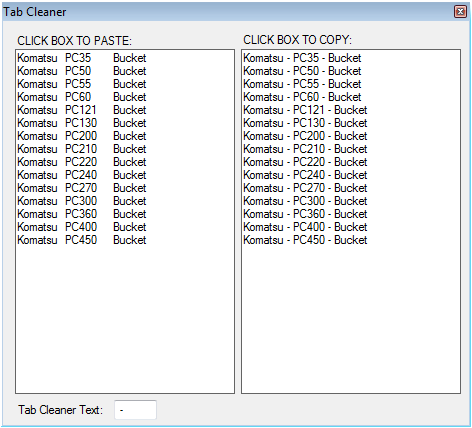
I wrote a little utility to let him copy columns from Excel, paste into the utility, then copy back into a single column in Excel.

UTILITY (Tab Cleaner):
Screenshot - 2011-01-10 , 4_41_40 PM.png

DOWNLOAD:
TabToSpaceCleaner.exe (159.5 KB)

PURPOSE:
Combine multiple columns (and rows) into a single column.

USAGE:
1) Copy columns (and rows) from MS Excel
2) Click first "PASTE" text box in the program
3) In Excel, double click a cell to deselect
4) Select a cell to paste new value(s)
5) Click second "COPY" text box in the program
6) In Excel, paste the value(s)
7) Done.

To change the separator, change the value in the "Tab Cleaner Text" box, e.g. change " - " to " " or ", " or whatever suits your purpose.

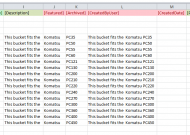
Here's an example showing columns I, J, and combined into column L:
Screenshot - 2011-01-10 , 3_55_07 PM.png


While I'm sure few people here would need it, I'm guessing that someone will find a use.


EDIT (forgot the requirements):

REQUIREMENTS:
Microsoft Windows 2000 or higher
.NET 2.0

Slow Down Music - Where I commit thought crimes...

Freedom is the right to be wrong, not the right to do wrong. - John Diefenbaker
« Last Edit: January 10, 2011, 05:57 AM by Renegade »

skwire

  • I eat Coding Snacks for breakfast...
  • Global Moderator
  • Joined in 2005
  • *****
  • Posts: 5,297
    • Participated in NANY Challenge Seventeen Times
    • Coding Snacks
    • Superboy Coder
    • Cody Award
    • Volunteers/Staff
    • Gathering Badge
Re: Utility: Convert Multiple Columns in Excel to a Single Column
« Reply #1 on: January 10, 2011, 05:55 AM »
Nicely done.  :Thmbsup:

Target

  • Honorary Member
  • Joined in 2006
  • **
  • Posts: 1,840
    • Coding Snacks
Re: Utility: Convert Multiple Columns in Excel to a Single Column
« Reply #2 on: January 10, 2011, 06:45 AM »
sorry, don't mean to critical, but couldn't you have just used a concatenation formula (=columnA & columnB & columnC)?

you could use a VBA macro to fill it in and paste the values (no dependencies, apart from Excel)
Alcohol is photoshop, bottled
Askhole - someone who ask for advice, then ignores it
"Look wise, say nothing, and grunt. Speech was given to conceal thought" - Sir William Osler

Renegade

  • Tell me something you don't know...
  • Charter Member
  • Joined in 2005
  • ***
  • Posts: 13,291
    • Participated in NANY Challenge Three Times
    • Furry Fandom Badge - Furry Fandom
    • Linux User
Re: Utility: Convert Multiple Columns in Excel to a Single Column
« Reply #3 on: January 10, 2011, 07:28 AM »
sorry, don't mean to critical, but couldn't you have just used a concatenation formula (=columnA & columnB & columnC)?

you could use a VBA macro to fill it in and paste the values (no dependencies, apart from Excel)

Nope. Not possible. Like I said, "A fellow I work with is not very techno-savvy." :P :)

He'd have to do WAY too much BS to get things working. He can copy, and he can paste, and he can click. Macros? Waaaayyyy out. Get him to copy concatenation formulas (and have dependent cells)? Not gonna fly.

Nope. This was a quick hack to help him get column concatenated quickly without any extra information being needed.

It's hard working with anything in Excel given the funky way that Excel works with the clipboard, so there's that extra step to de-focus/de-select in there, but that's the only thing that's kind of icky.

But normally, yeah -- there are many other ways. This is just designed to work for a particular work-style.
Slow Down Music - Where I commit thought crimes...

Freedom is the right to be wrong, not the right to do wrong. - John Diefenbaker

Renegade

  • Tell me something you don't know...
  • Charter Member
  • Joined in 2005
  • ***
  • Posts: 13,291
    • Participated in NANY Challenge Three Times
    • Furry Fandom Badge - Furry Fandom
    • Linux User
Re: Utility: Convert Multiple Columns in Excel to a Single Column
« Reply #4 on: January 10, 2011, 08:38 AM »
Just for interest sake:

Code: (csharp)
        private void textBox1_MouseClick(object sender, MouseEventArgs e)
        {
            this.textBox1.Text = Clipboard.GetText();
            this.textBox2.Text = Clipboard.GetText().Replace("\t", this.textBox3.Text);
        }

        private void textBox2_MouseClick(object sender, MouseEventArgs e)
        {
            Clipboard.SetText(this.textBox2.Text);
        }

Stupidly simple. (Should have error checking and stuff, but meh... whatever...)

Slow Down Music - Where I commit thought crimes...

Freedom is the right to be wrong, not the right to do wrong. - John Diefenbaker

techidave

  • Supporting Member
  • Joined in 2007
  • **
  • Posts: 1,046
Re: Utility: Convert Multiple Columns in Excel to a Single Column
« Reply #5 on: January 10, 2011, 12:35 PM »
Nice Renegade and Thanks for sharing! :Thmbsup: :Thmbsup:

This will come in handy at my school since I have users who aren't tech savy enough to do the concatenation feature.  Heck, I don't use it all that much because I find it too time consuming.  But heck, I have to look up how to do it each and every time I want to combine a few columns.

This will make it so much easier!

Target

  • Honorary Member
  • Joined in 2006
  • **
  • Posts: 1,840
    • Coding Snacks
Re: Utility: Convert Multiple Columns in Excel to a Single Column
« Reply #6 on: January 10, 2011, 11:28 PM »
Nope. Not possible. Like I said, "A fellow I work with is not very techno-savvy." :P :)

He'd have to do WAY too much BS to get things working. He can copy, and he can paste, and he can click. Macros? Waaaayyyy out. Get him to copy concatenation formulas (and have dependent cells)? Not gonna fly.

Nope. This was a quick hack to help him get column concatenated quickly without any extra information being needed.

It's hard working with anything in Excel given the funky way that Excel works with the clipboard, so there's that extra step to de-focus/de-select in there, but that's the only thing that's kind of icky.

But normally, yeah -- there are many other ways. This is just designed to work for a particular work-style.

Seemed like you were cracking a walnut with a sledgehammer is all, but I figured there was probably a reason.

I still think it could be done without the copy and paste steps via a macro, but I suspect the user will be using this on lots of different source documents

<rant>
Actually this sort of thing really burns me.  I have more than a few colleagues like that (I had someone doing important calculations ask me what the numbers in red were...) and even though they work with Excel all day every day they can't or won't take the time to learn some basics that will make their (working) lives easier
</rant>

Alcohol is photoshop, bottled
Askhole - someone who ask for advice, then ignores it
"Look wise, say nothing, and grunt. Speech was given to conceal thought" - Sir William Osler

cranioscopical

  • Friend of the Site
  • Supporting Member
  • Joined in 2006
  • **
  • Posts: 4,776
    • Cody Award
    • Official Forum Clown
    • rotten turkey sandwich - Rotten Turkey Sandwich
Re: Utility: Convert Multiple Columns in Excel to a Single Column
« Reply #7 on: January 11, 2011, 02:02 AM »
I had someone doing important calculations ask me what the numbers in red were...

And I suppose you told him you sweated blood to get them there…
Chris

Renegade

  • Tell me something you don't know...
  • Charter Member
  • Joined in 2005
  • ***
  • Posts: 13,291
    • Participated in NANY Challenge Three Times
    • Furry Fandom Badge - Furry Fandom
    • Linux User
Re: Utility: Convert Multiple Columns in Excel to a Single Column
« Reply #8 on: January 11, 2011, 02:12 AM »
Seemed like you were cracking a walnut with a sledgehammer is all, but I figured there was probably a reason.

I still think it could be done without the copy and paste steps via a macro, but I suspect the user will be using this on lots of different source documents

Yes, yes and yes. :)

Since he'll be using it on different documents, getting him to start using macros and saving them into different files is simply way beyond practical.

It is using a sledgehammer, but anyone can use a sledgehammer. Figuring out how to use some dainty, dancing nutcracker just doesn't work sometimes.
Slow Down Music - Where I commit thought crimes...

Freedom is the right to be wrong, not the right to do wrong. - John Diefenbaker

Target

  • Honorary Member
  • Joined in 2006
  • **
  • Posts: 1,840
    • Coding Snacks
Re: Utility: Convert Multiple Columns in Excel to a Single Column
« Reply #9 on: January 11, 2011, 02:49 AM »
Quote
And I suppose you told him you sweated blood to get them there…

no, but it sure gave me pores when she said it...
Alcohol is photoshop, bottled
Askhole - someone who ask for advice, then ignores it
"Look wise, say nothing, and grunt. Speech was given to conceal thought" - Sir William Osler

AndyM

  • Charter Member
  • Joined in 2006
  • ***
  • Posts: 616
Re: Utility: Convert Multiple Columns in Excel to a Single Column
« Reply #10 on: January 11, 2011, 03:04 AM »
<rant>
Actually this sort of thing really burns me.  I have more than a few colleagues like that (I had someone doing important calculations ask me what the numbers in red were...) and even though they work with Excel all day every day they can't or won't take the time to learn some basics that will make their (working) lives easier
</rant>

Oh yeah, spot on!  

But I'm either getting older and wiser, or just older and wore out.  I was going to chime in with Concatenation Formula! or VBA! (and the code could go in personal.xls to always be available).  But even before Renegade posted his explanation I got to thinking, "if his people are like my people, this really is a simpler solution and will most likely work better because they can't break it".

Renegade

  • Tell me something you don't know...
  • Charter Member
  • Joined in 2005
  • ***
  • Posts: 13,291
    • Participated in NANY Challenge Three Times
    • Furry Fandom Badge - Furry Fandom
    • Linux User
Re: Utility: Convert Multiple Columns in Excel to a Single Column
« Reply #11 on: January 11, 2011, 03:12 AM »
<rant>
Actually this sort of thing really burns me.  I have more than a few colleagues like that (I had someone doing important calculations ask me what the numbers in red were...) and even though they work with Excel all day every day they can't or won't take the time to learn some basics that will make their (working) lives easier
</rant>

Oh yeah, spot on! 

But I'm either getting older and wiser, or just older and wore out.  I was going to chime in with Concatenation Formula! or VBA! (and the code could go in personal.xls to always be available).  But even before Renegade posted his explanation I got to thinking, "if his people are like my people, this really is a simpler solution and will most likely work better because they can't break it".

;)

Setup cost with the program I wrote: Double-click to run.  :Thmbsup:

Setup cost with VBA/macros: Step 1) lose all sanity...  :o

Need I say more? ;)

For anyone that has spent an hour trying to explain over the phone how to open a file... and failed... hehehe -- yeah... it happens... Sometimes ya gotta just pick yer battles. :)
Slow Down Music - Where I commit thought crimes...

Freedom is the right to be wrong, not the right to do wrong. - John Diefenbaker

AndyM

  • Charter Member
  • Joined in 2006
  • ***
  • Posts: 616
Re: Utility: Convert Multiple Columns in Excel to a Single Column
« Reply #12 on: January 11, 2011, 03:26 AM »
Quote
For anyone that has spent an hour trying to explain over the phone how to open a file... and failed...
stop, please.  I need to go to sleep and I can't if I'm laughing this hard.

Target

  • Honorary Member
  • Joined in 2006
  • **
  • Posts: 1,840
    • Coding Snacks
Re: Utility: Convert Multiple Columns in Excel to a Single Column
« Reply #13 on: January 11, 2011, 03:28 AM »
the code could go in personal.xls to always be available

actually the easiest way is to put it in an addin (XLA) - save it to the XLSTART directory and put a button on the toolbar...

don't know about that last bit in versions past 2003 (we finally got 'upgraded' about 2 months ago and I'm still struggling with all those productivity gains...)
Alcohol is photoshop, bottled
Askhole - someone who ask for advice, then ignores it
"Look wise, say nothing, and grunt. Speech was given to conceal thought" - Sir William Osler

Target

  • Honorary Member
  • Joined in 2006
  • **
  • Posts: 1,840
    • Coding Snacks
Re: Utility: Convert Multiple Columns in Excel to a Single Column
« Reply #14 on: January 11, 2011, 03:48 AM »
For anyone that has spent an hour trying to explain over the phone how to open a file... and failed... hehehe -- yeah... it happens... Sometimes ya gotta just pick yer battles. :)

i think you meant bottles...
Alcohol is photoshop, bottled
Askhole - someone who ask for advice, then ignores it
"Look wise, say nothing, and grunt. Speech was given to conceal thought" - Sir William Osler

Renegade

  • Tell me something you don't know...
  • Charter Member
  • Joined in 2005
  • ***
  • Posts: 13,291
    • Participated in NANY Challenge Three Times
    • Furry Fandom Badge - Furry Fandom
    • Linux User
Re: Utility: Convert Multiple Columns in Excel to a Single Column
« Reply #15 on: January 11, 2011, 04:20 AM »
For anyone that has spent an hour trying to explain over the phone how to open a file... and failed... hehehe -- yeah... it happens... Sometimes ya gotta just pick yer battles. :)

i think you meant bottles...

Hahahah~! :P Yep.
Slow Down Music - Where I commit thought crimes...

Freedom is the right to be wrong, not the right to do wrong. - John Diefenbaker

cranioscopical

  • Friend of the Site
  • Supporting Member
  • Joined in 2006
  • **
  • Posts: 4,776
    • Cody Award
    • Official Forum Clown
    • rotten turkey sandwich - Rotten Turkey Sandwich
Re: Utility: Convert Multiple Columns in Excel to a Single Column
« Reply #16 on: January 11, 2011, 04:48 AM »
o, but it sure gave me pores when she said it...
You shouldn't have been on your cell!
Chris

Target

  • Honorary Member
  • Joined in 2006
  • **
  • Posts: 1,840
    • Coding Snacks
Re: Utility: Convert Multiple Columns in Excel to a Single Column
« Reply #17 on: January 11, 2011, 05:10 AM »
Quote
You shouldn't have been on your cell!

I was only there to help her with her division

Alcohol is photoshop, bottled
Askhole - someone who ask for advice, then ignores it
"Look wise, say nothing, and grunt. Speech was given to conceal thought" - Sir William Osler

Perry Mowbray

  • N.A.N.Y. Organizer
  • Charter Member
  • Joined in 2005
  • ***
  • Posts: 1,817
    • Participated in NANY Challenge Three Times
    • Plugin Coding Medal
Re: Utility: Convert Multiple Columns in Excel to a Single Column
« Reply #18 on: January 11, 2011, 05:19 AM »
actually the easiest way is to put it in an addin (XLA) - save it to the XLSTART directory and put a button on the toolbar...

don't know about that last bit in versions past 2003 (we finally got 'upgraded' about 2 months ago and I'm still struggling with all those productivity gains...)

It would be interesting to know how you go... I've got lots of Excel and Word toolbars around the building and we're looking at upgrading shortly...

cranioscopical

  • Friend of the Site
  • Supporting Member
  • Joined in 2006
  • **
  • Posts: 4,776
    • Cody Award
    • Official Forum Clown
    • rotten turkey sandwich - Rotten Turkey Sandwich
Re: Utility: Convert Multiple Columns in Excel to a Single Column
« Reply #19 on: January 11, 2011, 05:22 AM »
Quote
You shouldn't have been on your cell!

I was only there to help her with her division

On the plus side, at least it wasn't done under the table.
Chris

Target

  • Honorary Member
  • Joined in 2006
  • **
  • Posts: 1,840
    • Coding Snacks
Re: Utility: Convert Multiple Columns in Excel to a Single Column
« Reply #20 on: January 11, 2011, 06:24 AM »
It would be interesting to know how you go... I've got lots of Excel and Word toolbars around the building and we're looking at upgrading shortly...

I only have the one, but it's used all over the country.  If and when I do something about it I'll let you know 8)

FYI you're old toolbars will still showup, just not like they used to (they appear under the ADDINS tab of the ribbon, and they can be attached to the quick launch bar)

I have mixed feelings about the 'upgrade' - there are good things (substantially larger worksheets for one), but the interface changes are so drastic that my productivity took a huge hit (this has been discussed elsewhere).  Even 2 months on I still have to go searching for things I used to use all the time
Alcohol is photoshop, bottled
Askhole - someone who ask for advice, then ignores it
"Look wise, say nothing, and grunt. Speech was given to conceal thought" - Sir William Osler

Target

  • Honorary Member
  • Joined in 2006
  • **
  • Posts: 1,840
    • Coding Snacks
Re: Utility: Convert Multiple Columns in Excel to a Single Column
« Reply #21 on: January 11, 2011, 06:32 AM »
On the plus side, at least it wasn't done under the table.

but we never did get to the root of the problem
Alcohol is photoshop, bottled
Askhole - someone who ask for advice, then ignores it
"Look wise, say nothing, and grunt. Speech was given to conceal thought" - Sir William Osler

Shades

  • Member
  • Joined in 2006
  • **
  • Posts: 2,954
Re: Utility: Convert Multiple Columns in Excel to a Single Column
« Reply #22 on: January 11, 2011, 10:06 PM »
Why not? The square is not that far away...
The easy path is usually downhill...

Renegade

  • Tell me something you don't know...
  • Charter Member
  • Joined in 2005
  • ***
  • Posts: 13,291
    • Participated in NANY Challenge Three Times
    • Furry Fandom Badge - Furry Fandom
    • Linux User
Re: Utility: Convert Multiple Columns in Excel to a Single Column
« Reply #23 on: January 11, 2011, 10:27 PM »
Some people are just too chicken, and always ask Y they must X the road...
Slow Down Music - Where I commit thought crimes...

Freedom is the right to be wrong, not the right to do wrong. - John Diefenbaker

Target

  • Honorary Member
  • Joined in 2006
  • **
  • Posts: 1,840
    • Coding Snacks
Re: Utility: Convert Multiple Columns in Excel to a Single Column
« Reply #24 on: January 11, 2011, 10:35 PM »
Why not? The square is not that far away...

I simply don't have the power

Some people are just too chicken, and always ask Y they must X the road...

it's because the cars sometimes don't algebraic in time
Alcohol is photoshop, bottled
Askhole - someone who ask for advice, then ignores it
"Look wise, say nothing, and grunt. Speech was given to conceal thought" - Sir William Osler

Original address: https://www.donationcoder.com/forum/index.php?topic=25175.0