
No hurry on this end -- hope your investigation goes well 


 Topic: DONE: On Screen Button That Sends Keyboard Commands (Read 315,325 times)


And it was a small borders issueFWIW, using :dropList: (example below), I see the behavior I expected for :dropItem: / :dropItem1:I'll have a look later today (at work ATM), but that looks like a buglet of some sort
 , would have worked for 1 file if you had dropped 2 or more files on the button.
Clicking on the close button does not appear to have any visible effect.I can find no issues with either the Close button or pressing <Esc> with WinButtons having focus. Is there perhaps an extra (older) instance of WinButtons running that's waiting for a condition/hanging/cycling perpetually? (You could check that using Process Explorer or Task manager)


Clicking on the close button does not appear to have any visible effect.
I can find no issues with either the Close button or pressing <Esc> with WinButtons having focus. Is there perhaps an extra (older) instance of WinButtons running that's waiting for a condition/hanging/cycling perpetually? (You could check that using Process Explorer or Task manager)I don't think there was, and I reproduced the issue just now. I am also running XP SP3. Similar results to cranioscopical -- pressing the escape key works while clicking on the close button doesn't seem to.
Update will be posted later this evening.
Ath, FWIW close button doesn't work for me (XP SP3). Escape always works.
Similar results to cranioscopical -- pressing the escape key works while clicking on the close button doesn't seem to.I've already found out it is to do with the Extended Style parameters of the window. Guess Vista/Win7 enforce the minimum required to have a working Close button, while XP doesn't
 Been fighting this before to get rid of a border when having a background color set

 )
)
So, a usable solution for the non-functional Close button on Windows XP was found: It shouldn't be combined with the movable option.
In this particular case (XP, and options: border, closebutton and movable) the movable option is ignored. 'movable' was originally implemented to be able to move a border-less WinButtons window, but the caption bar is available so the window can still be moved around the screen (the movable option could easily be mis-interpreted
Also fixed was the defective :dropItem1: feature

I'll be searching for a final solution for this Closebutton/movable/Windows XP combination-issue...
if I choose both closebutton and movable, I won't be able to move the window via the borderAlmost correct.
If movable is set, then the window can be dragged around by clicking on the window-background and dragging it.
If border + closebutton are set, then you can drag it around by grabbing the window by it's caption.

I'll repeat my earlier questionI saw your original question, but I've been thinking about a) what you meant exactly, and b) what exactly you meant
associate a different .something file extension with WBEOh
 you want to register the file extension, ah, that can be done, but I'll think/search about the extension to use, as most 3-letter combinations are in use already.)
BTW, any chance of being able to drop WinButtons config files on WinButtonEdit.exe to have the config file opened up in WBE?Would you expect it to run 3 instances of WBE, if 3 files are dropped on a single instance, or just open the first and ignore the rest?
I'll repeat my earlier questionI saw your original question, but I've been thinking about a) what you meant exactly, and b) what exactly you meant
OhI guess it depends on what, if anything is untaken — wbi?
I'll combine that, as good as it goes, with this request:Again speaking personally, I'd expect it to anticipate correctly my intention and act accordingly. Surely that's within you programming power? No, you say? Fie!BTW, any chance of being able to drop WinButtons config files on WinButtonEdit.exe to have the config file opened up in WBE?Would you expect it to run 3 instances of WBE, if 3 files are dropped on a single instance, or just open the first and ignore the rest?
I think the former would be more useful, but wonder about the potential persistence-consistency issue for multiple instances of WBE running...When I wrote my request, I was sloppy in my wording. What I had in mind might be more accurately described by:BTW, any chance of being able to drop WinButtons config files on WinButtonEdit.exe to have the config file opened up in WBE?Would you expect it to run 3 instances of WBE, if 3 files are dropped on a single instance, or just open the first and ignore the rest?
I'd prefer that it not be a requirement for a system's registry to be modifiedThat is for sure not a requirement, just an additional option, available from the Options menu, and by selecting it again it will be fully removed assuming the proper privileges are available (else it should silently fail both actions). (It's finished already, but I'm testing it some more)

able to drop a WinButtons config file on WinButtonEdit.exe to have the config file opened up in WBEAnd that's also nearly finished and it will be an Option to either drop and open a single file or open extra WBE instances with the extra files. It's under the same testing regime as above
Preferred file extension changed from .ini to .wbuc (WinButtons Configuration)If .wbuc is now the preferred file extension, do you think it would make sense for the default WinButtons.ini to be renamed to use the new file extension?
WinButtonEdit 0.9.0.0 (RC6)This worked for me.
Buttons can now be moved between groups (Treeview context menu)
WBE supports Drag&Drop, configurable for either a single file or multiple files into multiple (new) WBE sessions (details in the readme)This works for me sometimes. My current guess is that it works for .wbuc files but not .ini files.
Sorry if my phrasing was unclear / wrong. Do you think this "drop on to .exe" feature is a possibility?If .wbuc is now the preferred file extension, do you think it would make sense for the default WinButtons.ini to be renamed to use the new file extension?I didn't do that on purpose, as users would be surprised to see the original WinButtons configuration where they may have created a personal one with the old filename, and the .wbuc file gets preference...
It should work equally well for both .wbuc and .ini files (these are the only supported extensions, ATM). One peculiarity you could see is that if the current WBE instance has a file opened that is in the set of files dropped. That already open file is kinda ignored, but left open in the original WBE instance. If multiple drop files is enabled and more are dropped, the extra files should open in new WBE instances. If multiple drop files is disabled, nothing might happen when multiple files are dropped that include the file already open in WBE.Quote from: AthWBE supports Drag&Drop, configurable for either a single file or multiple files into multiple (new) WBE sessions (details in the readme)This works for me sometimes. My current guess is that it works for .wbuc files but not .ini files.
Do you think this "drop on to .exe" feature is a possibility?I'd have to figure out how to do that, I'm not familiar with that feature (aka: I never open files that way myself). If the file association is set to open with WBE, a double click would suffice
Ah, the joys of backward-compatibility...If .wbuc is now the preferred file extension, do you think it would make sense for the default WinButtons.ini to be renamed to use the new file extension?I didn't do that on purpose, as users would be surprised to see the original WinButtons configuration where they may have created a personal one with the old filename, and the .wbuc file gets preference...
I'm sorry to say that it doesn't seem to work here for ini files that I have tried. I created a file via WBE called "Test.ini" (a new file, one button, saved as "Test.ini", quit WBE, open WinButtons.ini, then drop "Test.ini" on to the treeview). Whether the "Multiple files dropped..." is enabled or disabled appears to make no difference.It should work equally well for both .wbuc and .ini files (these are the only supported extensions, ATM).Quote from: AthWBE supports Drag&Drop, configurable for either a single file or multiple files into multiple (new) WBE sessions (details in the readme)This works for me sometimes. My current guess is that it works for .wbuc files but not .ini files.
Hmm...well if it's too much trouble, please punt on it (at least for now...). Since I don't do file associations because of the registry involvement, context menu entries in Windows Explorer fall under the same class of things I don't go for either, so unless someone else asks for it...Do you think this "drop on to .exe" feature is a possibility?I'd have to figure out how to do that, I'm not familiar with that feature (aka: I never open files that way myself). If the file association is set to open with WBE, a double click would suffice
If preferred I could add 'Edit with WinButtonEdit' to the context menu in Explorer? (And change 'Open' to 'Open with WinButtonEdit')
don't have both *.wbuc and *.ini for their value in "Save as type"? For example, "New" and "Save as..." both lead to one where the value is only *.wbuc...They are both there (that's the same dialog, btw), but I seem to remember having naming-issues when both specs where there in the same selection. I'll retest that. Maybe I should add *.* to that dialog too?
Ah, btw, choosing File -> New and then pressing the Cancel button leads to the file dialog appearing again here...I get a feeling of Deja Vu.That's on purpose, you have to choose a filename (sorry for the fuss, though).
by dropping any of the other appropriate *.ini files on to the treeview -- the result was no change in the treeview.Ah, re-tested and confirmed as a bug (a round brace a few characters too far to the left
). Fixed in the next release.I think I'll re-do this option a bit for the next release.Ah, btw, choosing File -> New and then pressing the Cancel button leads to the file dialog appearing again here...I get a feeling of Deja Vu.That's on purpose, you have to choose a filename (sorry for the fuss, though).
don't have both *.wbuc and *.ini for their value in "Save as type"? For example, "New" and "Save as..." both lead to one where the value is only *.wbuc...They are both there
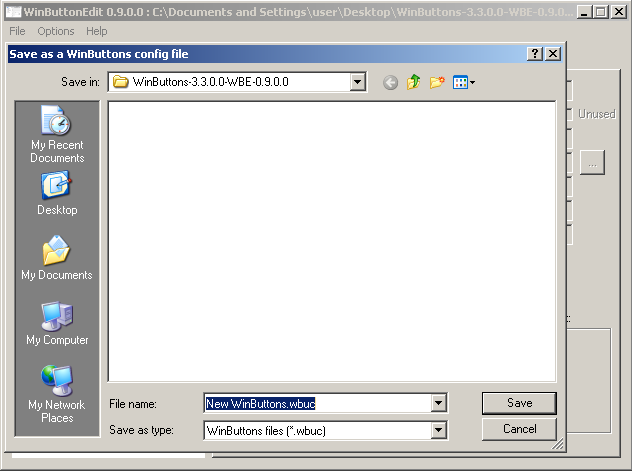
Maybe I should add *.* to that dialog too?I don't have an opinion on this...yet
Original address: https://www.donationcoder.com/forum/index.php?topic=25167.0