


Ok... so it's a bit late, but I wanted to release something... hope that's ok 
Description
N.A.N.Y. 2011 caught me in a bit of a rush. I didn't complete my original entry, but I had started on this because of a request that turned out to be specified incorrectly, so I finished it according to what I had originally specified it to be.
It uses a configuration file to specify several different dictionary type sites, and queries all of them on one word at the same time, showing the results. It uses regular expressions to parse the page, so is only as good as the regular expression specified in the site definitions. You can also specify different versions of the same site so that if a site might put it's definitions in more than one format, you can use the one that's appropriate (or query for more than one at once).
It's a bit rough around the edges still, and there are a couple of features that I haven't included that I want to include (for example the ability to remove spurious words that you might include to specify the definition, but that are not part of the definition). But it's currently functional, and a bit slick if I do say so myself.
Features
Planned Features
Screenshots
Usage
Installation
Requires .NET 3.5 framework, but other than that, unzip and run.
Using the Application
Add sites from the drop down, though no site definition can be added more than once. Then enter the word to be defined, and click Get Definition.
The definitions are specified in the WordCaster.exe.config file in the executable directory in the following format.
<add siteName="<Unique Site Name>" description ="<Description of Entry>" definitionRegex="<RegEx for Definition>" url="<Enter URL Here, specifying place to put word to be defined by {Term}>"/>
Uninstallation
Delete application
Known Issues
Very minimal error handling at this point.
The regular expressions are rudimentary to be kind. They don't handle a few cases, so I'll need to tighten them up. As I do so, the configuration file can be downloaded separately at the link above.
NANY 2011 Entry Information
| Application Name | WordCaster |
| Version | 1.0 |
| Short Description | Utility that checks definitions on multiple sites at the same time and displays them in one interface. |
| Supported OSes | Windows |
| Other Requirements | .NET Framework 3.5 |
| Web Page | My Software |
| Download Link | http://www.wraith808.com/files/WordCaster.zip |
| Configuration File | http://wraith808.com/files/WordCaster.exe.config |
| Version History |
|
| Inspiration Credited To: | this coding snack request, though this isn't what the asker had in mind. |
| Author | wraith808 |
Description
N.A.N.Y. 2011 caught me in a bit of a rush. I didn't complete my original entry, but I had started on this because of a request that turned out to be specified incorrectly, so I finished it according to what I had originally specified it to be.
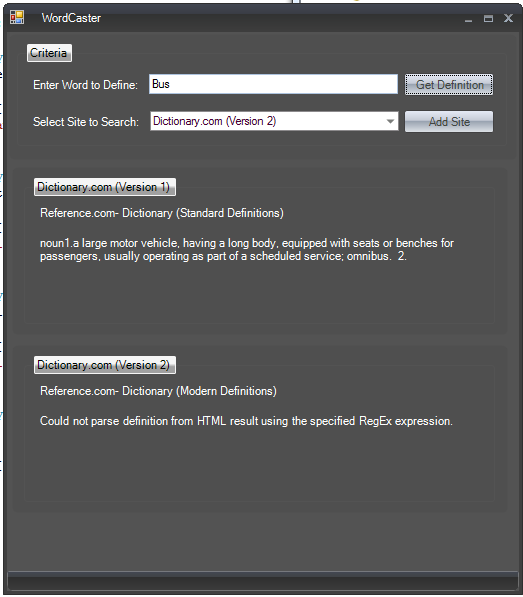
It uses a configuration file to specify several different dictionary type sites, and queries all of them on one word at the same time, showing the results. It uses regular expressions to parse the page, so is only as good as the regular expression specified in the site definitions. You can also specify different versions of the same site so that if a site might put it's definitions in more than one format, you can use the one that's appropriate (or query for more than one at once).
It's a bit rough around the edges still, and there are a couple of features that I haven't included that I want to include (for example the ability to remove spurious words that you might include to specify the definition, but that are not part of the definition). But it's currently functional, and a bit slick if I do say so myself.
Features
- Free for personal or educational use
- Very configurable
- Can query from multiple sites, or the same site more than once
Planned Features
- Remove extraneous words from the returned text
- Edit configuration from within program
- More default configurations
Screenshots
Usage
Installation
Requires .NET 3.5 framework, but other than that, unzip and run.
Using the Application
Add sites from the drop down, though no site definition can be added more than once. Then enter the word to be defined, and click Get Definition.
The definitions are specified in the WordCaster.exe.config file in the executable directory in the following format.
<add siteName="<Unique Site Name>" description ="<Description of Entry>" definitionRegex="<RegEx for Definition>" url="<Enter URL Here, specifying place to put word to be defined by {Term}>"/>
Uninstallation
Delete application
Known Issues
Very minimal error handling at this point.
The regular expressions are rudimentary to be kind. They don't handle a few cases, so I'll need to tighten them up. As I do so, the configuration file can be downloaded separately at the link above.


 More than OK... we don't mind late


 Download the config file and overwrite, or the zip, and the normal cases should work. I have to figure out why it thinks that monkey doesn't match.