
excellent!
Re: NANY 2011 Release: Color Warlock
« Reply #75 on: May 10, 2012, 01:06 AM »


 Topic: NANY 2011 Release: Color Warlock (Read 190,134 times)


It's claimed that this post is rather old, but it's listed on the "contact us" in the help, so..
I'm using 2.0.0.11.
It would be nice if it were possible to set the text/foreground color for one or all of the colors in the list.
If the colors is to be used as background colors, then it's nice to have a way to see if it 'fits'
the expected foreground color (and the other way around).
Apparently the code is mostly present already, as the foreground seem to change on its own
at times (example Random Colors: #800080 has white foreground, while #D5FB14 have a black(ish) foreground).
It'd be nice if there was a way to generate a variable number of of colors fitting a certain foreground color
optionally as far from eachother as possible, i.e easily distinguishable from eachother, and where the text can
also be easily read.
I encountered the latter function in a program several years ago, but I can't remember which program it was (it had to
do with css/html editing though).

Right now the foreground color is checked against the brightness of the background color. Your idea seems like one I may implement soon on the color or at least have the option of overriding the contrasting feature to set your own global foreground color. That way it could be either user set or use the color warlock function that determines what it should be based on the brightness of it. I cant promise when I can get around to working on it again, but hopefully sometime in the next few weeks.If you go with the "set your own global foreground color", please make it so you can set it straight from the menu or something.


Great tool.
Is there a quick way to edit the currently active palette?
Other than having to open it all over again from the ChartBuilder?
I auto-paste RGB values into standard color dialogs with this tool here:
http://rolandtoth.hu/PasteColor/
Maybe Warlock could even perform this auto-typing all by itself?
The way it works = you put the cursor into the RED-field of a standard color diaolg, then trigger the auto-type and it will
1) overwrite the value for the RED-field
2) Tab to Green and replace the GREEN-field
3) Tab to Blue and replace that value
Thank you for this awesome color archiver.
Let me look into it when real life slows down some.Awesome. Take your time. No Rush.
Let me look into it when real life slows down some.Awesome. Take your time. No Rush.
Thanks for keeping this project alive.
1. Would automatically loading the current displayed chart into the chart builder work for the quick way to edit the current chart...Yes, that would suffice. To make it obvious, the Charts menu might sport an entry "Edit current chart" and if necessary "Refresh current chart" - unless it auto-refreshes whenever new colors added in the builder.
2. What format would the values you want to be pasted into be in for RGB? Like 255, 255, 255 or other? If so I could probably do a paste button to convert it to the correct format for the chart builder.Not sure I understand. Generally speaking, yes I think 255, 255, 255 is more compatible than RGB(255, 255, 255) when it comes to exchanging RGB codes. I were useful to have 255, 255, 255 as an (additional?) option for the Copy Click Actions.
Yes, that would suffice. To make it obvious, the Charts menu might sport an entry "Edit current chart" and if necessary "Refresh current chart" - unless it auto-refreshes whenever new colors added in the builder.
The Chart Builder itself needs to take over the "Always on top" setting. It's tedious to always bring it back to front while picking dozens of colors from a picture or website.
I were useful to have 255, 255, 255 as an (additional?) option for the Copy Click Actions.
Would it make sense to offer ALL click actions directly with the right-click? Personally, I find it hard to remember 3 different button codes. For me it were easier to have my favorite on left, and the rest on right-click. Much faster than waiting for the nested flyouts under Options whenever I need a different code than my usual.
I was wondering, however, if Warlock could do the auto-typing all by itself. Not meaning to be greedy, just putting it up in the air. You'd be the first color picker/archiver I know of that integrates this function.
Newer Net-version: Sounds good to me, no objections.
With everything else you said I fully agree.
Thank you for being open to suggestions.


BTW...I was thinking at least .NET 4.0 for the .net version. Thoughts?Well, .NET 4.0 is the last one supported on Windows XP, so for the ~3 users still on that platform it would be ideal...

Well, .NET 4.0 is the last one supported on Windows XP, so for the ~3 users still on that platform it would be ideal...
Haven't tried Color Warlock on *nix (and haven't scanned this thread if someone already did that), but it could possibly run there using Mono, so you may want to keep the current release available for 'backward compatibility', as not all .NET 4.0 features are ported to Mono (yet).
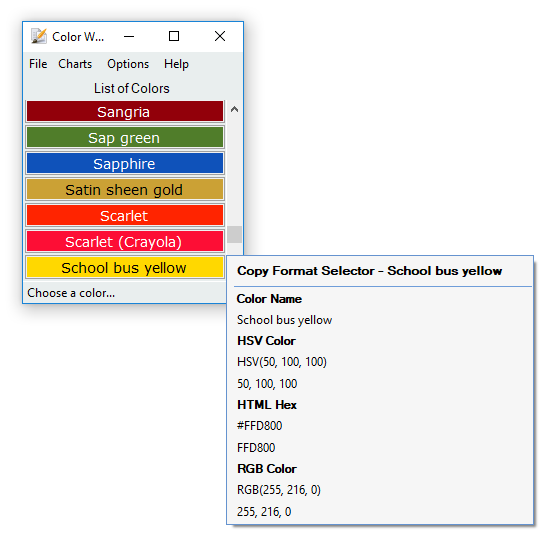
 And much sooner than I had possibly hoped for.
One last thing:
Loading/switching charts were much faster if we could have an entry "Open Custom Chart" right in the Charts main menu. Below or above "Open Temporary" for instance.
Your alphabetical flyouts are well-intended. I can imagine them being very useful for organized folks who maintain a large database of clients/ websites. Me, I juggle 10-12 charts that I mainly use.
Too many to remember what Alt-shortcut goes with what chart, so I click on "Explore Custom Directory" to see what I have, then back again via the hover-flyouts to wait for the letters of the alphabet, only to be reminded that these are not tied to the file names I just googled via "Explore Custom Directory". I'd have to open them one by one and prefix their chart-name (not file name) to see them all at one quick glance under 1_ oder _underscore flyouts.
What about if I create a new option named like Organize Custom Charts which would put them into those sub menus if checked. If not checked it would show them as just a single list that way for those who doesn't want them organized by the first letter can still see the color preview as well...thoughts on that?
What about if I create a new option named like Organize Custom Charts which would put them into those sub menus if checked. If not checked it would show them as just a single list that way for those who doesn't want them organized by the first letter can still see the color preview as well...thoughts on that?Great idea.
The Beta is excellent except for the on-top feature of the ChartBuilder which is probably not implemented yet. Quick editing of a chart works fine including the pre-filled file name upon save and the refresh in the main program.
Nice work, ham
Add some new screenshots to this thread maybe?
Original address: https://www.donationcoder.com/forum/index.php?topic=24872.0