DonationCoder.com forum
 
Read-only archive. This is a static copy of the DonationCoder.com forum. Reading and searching work as before; logging in, posting and private messages do not.
Archive of 2026-10-21 · About this archive · Main site

Author Topic: pdf fonts  (Read 4,259 times)

kalos

  • Member
  • Joined in 2006
  • **
  • Posts: 1,824
pdf fonts
« on: December 12, 2010, 03:33 PM »
hello

I try to edit the text of a pdf with a pdf editor and I get the error message that the font is not installed/available

what can I do? I have installed (I think) the font into the pc, but is that enough? maybe I have to encorporate it into the pdf file?

thanks

tomos

  • Charter Member
  • Joined in 2006
  • ***
  • Posts: 11,970
    • Gathering Badge
    • Participated in NANY Challenge Once
Re: pdf fonts
« Reply #1 on: December 12, 2010, 05:23 PM »
I presume you didnt get the error message before editing?
When you resaved the PDF were you given options? in particular to embed fonts?  (or see if you can change the default save settings somewhere in options or wherever)

You could use one of the (almost) universal fonts - they dont need to be embedded - the PDF will take them by defaultfrom the PC where the file is opened.
I dont know will this work with mac, and I'm not sure what the font list is (there's 13 of them I think. The usual suspects: Arial, Times, etc.)
Tom

Curt

  • Supporting Member
  • Joined in 2006
  • **
  • Posts: 7,565
Re: pdf fonts
« Reply #2 on: December 12, 2010, 07:05 PM »
... I get the error message that the font is not installed/available

what can I do? I have installed (I think) the font into the pc,...

No, you don't have the font installed. You can read the text because Windows is displaying a substitute font, for your convenience, but if you want to edit the text, you will first need the original font.

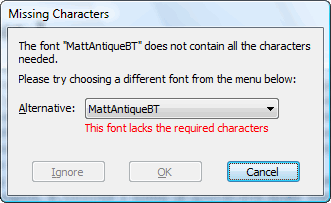
As an example, I have just READ this e-book, but when I wanted to EDIT the text, I got this:

[attachimg=#]

kalos

  • Member
  • Joined in 2006
  • **
  • Posts: 1,824
Re: pdf fonts
« Reply #3 on: December 12, 2010, 09:33 PM »
yes, something like that
there is problem with the embeded fonts, etc

what is the solution?
how can I use universal fonts?
maybe the pdf file is somehow 'locked' for editing ?

Curt

  • Supporting Member
  • Joined in 2006
  • **
  • Posts: 7,565
Re: pdf fonts
« Reply #4 on: December 12, 2010, 11:39 PM »
A PDF file can easily be locked, making it almost impossible to edit, (sometimes "A-PDF Restrictions Remover" can help.), but we know nothing about your file - apart that it apparently not really is your file. In general, a PDF file should never come with special fonts unless they are embedded. If you are lucky, chances are that it is enough to mark all the text (page by page) and change the font into universal fonts like Arial or Times New Roman, or simply convert the file from PDF into RTF or Word format, and then edit.

Edited:
But you better begin with installing the missing font.
« Last Edit: December 12, 2010, 11:42 PM by Curt »

Original address: https://www.donationcoder.com/forum/index.php?topic=24867.0