DonationCoder.com forum
 
Read-only archive. This is a static copy of the DonationCoder.com forum. Reading and searching work as before; logging in, posting and private messages do not.
Archive of 2026-10-21 · About this archive · Main site

Author Topic: I just gotta vent  (Read 6,192 times)

timns

  • Veni, vidi, debuggi
  • Supporting Member
  • Joined in 2007
  • **
  • Posts: 1,211
    • Participated in NANY Challenge Four Times
I just gotta vent
« on: December 11, 2010, 07:05 PM »
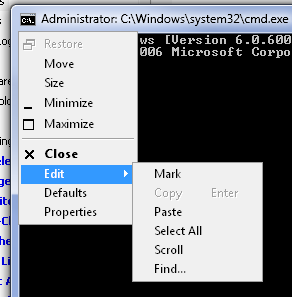
In the name of all that's holy, who put 'Close' next to 'Edit' in the cmd window's menu? What's 'Close' even DOING in the MIDDLE of the menu?  :'(

Sweet cracker sandwich! Just closed two windows in a row when trying to paste...  >:(


mouser

  • First Author
  • Administrator
  • Joined in 2005
  • *****
  • Posts: 40,931
    • Gathering Badge
    • Plugin Coding Medal
    • Participated in NANY Challenge Seventeen Times
    • Cody Award
    • Coding Snacks
    • Volunteers/Staff
Re: I just gotta vent
« Reply #1 on: December 11, 2010, 07:06 PM »
i must admit that's a bit naff.

timns

  • Veni, vidi, debuggi
  • Supporting Member
  • Joined in 2007
  • **
  • Posts: 1,211
    • Participated in NANY Challenge Four Times
Re: I just gotta vent
« Reply #2 on: December 11, 2010, 07:16 PM »
Don't MS have some sort of style guide for menu layouts?

I mean, ok, it happens because I wave the mouse around wildly and click randomly, but come on...

4wd

  • Pedantic Old Bastard
  • Supporting Member
  • Joined in 2006
  • **
  • Posts: 5,652
    • Coding Snacks
Re: I just gotta vent
« Reply #3 on: December 11, 2010, 08:46 PM »
Turn on Quick Edit Mode under Properties->Options then you only need to right-click in the window to paste.  To copy text, left-click drag-select, (ie. highlight), then right-click.

The almost absolute first thing I do on a new install ;)
"I will not follow where the path may lead, but I will go where there is no path, and I will leave a trail." - Muriel Strode, 1903
« Last Edit: December 11, 2010, 08:55 PM by 4wd »

timns

  • Veni, vidi, debuggi
  • Supporting Member
  • Joined in 2007
  • **
  • Posts: 1,211
    • Participated in NANY Challenge Four Times
Re: I just gotta vent
« Reply #4 on: December 11, 2010, 08:56 PM »
Turn on Quick Edit Mode under Properties->Options then you only need to right-click in the window to paste.  To copy text, left-click drag-select, (ie. highlight), then right-click.

The almost absolute first thing I do on a new install ;)

Nice. Live and learn eh?

Thanks.  :Thmbsup:
« Last Edit: December 11, 2010, 09:06 PM by timns »

Deozaan

  • Charter Member
  • Joined in 2006
  • ***
  • Posts: 9,827
    • Participated in NANY Challenge Eight Times
    • Cody Award
Re: I just gotta vent
« Reply #5 on: December 11, 2010, 09:27 PM »
Turn on Quick Edit Mode under Properties->Options then you only need to right-click in the window to paste.  To copy text, left-click drag-select, (ie. highlight), then right-click.

The almost absolute first thing I do on a new install ;)

That's not enabled by default? I've never enabled that and I can right-click the window to paste.

Not sure about highlight and right-click to copy, though.

...

Okay, I just tested: You can right-click the window to paste by default, but you have to enable Quick Edit to copy text as you described.

4wd

  • Pedantic Old Bastard
  • Supporting Member
  • Joined in 2006
  • **
  • Posts: 5,652
    • Coding Snacks
Re: I just gotta vent
« Reply #6 on: December 11, 2010, 09:40 PM »
On XP, it's not enabled by default and right-clicking will only popup the edit menu - you still need to select Paste from it.

On 7 it's enabled by default - well put it this way, I don't specifically recall enabling it but hey, I could be wrong - 10 months is a long time :)

Correction: It's the same in Win7, not enabled by default and just opens a popup menu - at least it is in my base W7Ultimate VM.
"I will not follow where the path may lead, but I will go where there is no path, and I will leave a trail." - Muriel Strode, 1903
« Last Edit: December 11, 2010, 09:53 PM by 4wd »

Renegade

  • Tell me something you don't know...
  • Charter Member
  • Joined in 2005
  • ***
  • Posts: 13,291
    • Participated in NANY Challenge Three Times
    • Furry Fandom Badge - Furry Fandom
    • Linux User
Re: I just gotta vent
« Reply #7 on: December 11, 2010, 10:32 PM »
+1

Also on CHM help files... It's a PITA.
Slow Down Music - Where I commit thought crimes...

Freedom is the right to be wrong, not the right to do wrong. - John Diefenbaker

Deozaan

  • Charter Member
  • Joined in 2006
  • ***
  • Posts: 9,827
    • Participated in NANY Challenge Eight Times
    • Cody Award
Re: I just gotta vent
« Reply #8 on: December 11, 2010, 10:35 PM »
On XP, it's not enabled by default and right-clicking will only popup the edit menu - you still need to select Paste from it.

On 7 it's enabled by default - well put it this way, I don't specifically recall enabling it but hey, I could be wrong - 10 months is a long time :)

Correction: It's the same in Win7, not enabled by default and just opens a popup menu - at least it is in my base W7Ultimate VM.

Ah, I may have misunderstood. So with Quick Edit enabled, right-clicking pastes instantly? I guess that is pretty quick.

So yeah, without it enabled, right-clicking the cmd window brings up a context menu that allows you to select Paste (among other things).

4wd

  • Pedantic Old Bastard
  • Supporting Member
  • Joined in 2006
  • **
  • Posts: 5,652
    • Coding Snacks
Re: I just gotta vent
« Reply #9 on: December 11, 2010, 11:04 PM »
Ah, I may have misunderstood. So with Quick Edit enabled, right-clicking pastes instantly? I guess that is pretty quick.

So yeah, without it enabled, right-clicking the cmd window brings up a context menu that allows you to select Paste (among other things).

Instant paste and faster Select/Copy but yes you lose the Select All, Scroll and Find... features available from the popup.  But since I never used any of those it was a win-win choice for me ;)

I believe any Windows version originally based on NT has it.
"I will not follow where the path may lead, but I will go where there is no path, and I will leave a trail." - Muriel Strode, 1903

Original address: https://www.donationcoder.com/forum/index.php?topic=24860.0