"Scan with JottiQ" is a tiny bit inaccurate as you say, but i still think it may be the best option.
Re: NANY 2011 Teaser: JottiQ
« Reply #25 on: December 17, 2010, 02:29 AM »


 Topic: NANY 2011 Release: JottiQ (Read 335,508 times)


How about -
JottiQ Scan
To me, the quickest and most effective context menus tell me the app first, because then I immediately remember what they're going to do for me.


JottiQ
v0.9.2 (2010-12-19)

REQUEST TO TESTERS:
    Please test _everything_!  Things I need tested in order of priority:

    XP 32-bit
    Vista 32-bit
    Vista 64-bit
    Seven 32-bit

    The part I think needs most testing above all is everything to do with
    the file context menus, as those are probably a total mess (esp. on XP.)


For more information, see the official JottiQ (NANY 2011) topic:

    http://www.donationcoder.com/forum/index.php?topic=24663.0


VERSION HISTORY
---------------

v0.9.2 (2010-11-15)

    First public beta.

    So many features were added that any list is going to prove pointless.
    Nevertheless, here it goes:

      Added: Settings window with plenty of settings
      Added: IDropTarget support. (Infinite amount of dropped files.)
      Added: JQcm.dll for both 32 and 64-bit. Handles the file context menus.
      Added: Lots of pretty icons. Especially the lady bug.
      Added: Better handling of multiple selections in queue.
      Added: Support for Jotti's server-side rate-limiting.
      Added: Context menus for files in the queue.
      Added: Shortcuts for easy keyboard access.
      Added: Privacy Policy Agreement requirement (one time only).
      Added: About box.

0.7.1 alpha 1 (2010-12-01)

    Initial (screenshot-only) release.
    Too many bugs, too ugly for words, so not really worth mentioning.
    (I blurred the very first screenshot with a good reason, yo.)


KNOWN ISSUES
------------
1) There is no installer just yet.

2) Shell extension registration is always for the 'Local Machine'.
     If I figure out a proper way to support both 'Current User' and
     'Local Machine', both in JottiQ and the installer that is yet to be
     written, I will implement it. Currently, I find 'Local Machine' the more
     useful of the two, thus that is the only option currently available.

3) JottiQ has not been tested on anything other than Windows 7. Especially
     testing on Windows XP systems is required, as I expect at least the icon
     of the file context menus to break on there. Microsoft has made a mess
     out of the images-on-menu-items thing. (I do very little OS testing in
     the hope that some stuff just works as I expect it to in regards to
     the file context menu stuff, so please test on WXP 32-bit systems!)

4) The configuration file has an obscene name and is hidden in a stupid place.
     And I have no clue how to change it, since .NET comes up with that rather
     idiotic path all by itself, and thus far I haven't found a good way to
     influence it yet. It should be something under

       AppData\Local Settings\Gholam_Inc.\XXXXX

     If anyone can explain to me how to get rid of that disaster, I would
     appreciate it. Right now, version upgrades won't remember settings, and
     I would really prefer to have them remember it without me going through
     endless hoops to fix that stuff. Seriously, who puts hashes in directory
     names with settings in them? Argh!

     (No, I am not planning to use .MSIs for my deployment as it is pure hell
     once you work with the hell that is 32-bit and 64-bit context menu
     extensions, and I don't have that patience nor time.)


CREDITS
-------

Thanks to...

* Jotti for Jotti's malware scan and going out of his way to support this
  application after I contacted him with the idea I had @
    http://virusscan.jotti.org/

* Vladi for the awesome lady bug icon @
    http://www.rw-designer.com/user/vlasta
    http://www.rw-designer.com/icon-detail/4513

* Raymond Chen for his awesome blog  @
    http://blogs.msdn.com/b/oldnewthing/

* Lukas von Hohnhorst who gave me permission to use his magnifying glass @
    http://lukasiniho.deviantart.com/art/Magnifying-Glass-128330627

* DonationCoder.com as a whole @
    http://www.donationcoder.com/

* Mark James for his excellent Silk Icon Set @
    http://www.famfamfam.com/lab/icons/silk/

* Smaller Animals Software for their CtxMenu example that saved me oodles of
  time rather than having to spend time to figure out all details on my own @
    http://www.smalleranimals.com/ctxmenu.htm

* stackoverflow.com for solving those issues I have before I have them @
    http://stackoverflow.com/
holy hell we have a question mark problem on the forum on the new server.

If you want to test, by all means


Add to JottiQ(ueue)

If you want to test, by all means
XP 32 SP3
Accepted the Jotti terms (font doesn't fit well on the buttons on my machine, btw) and had the following.
(see attachment in previous post)
QuoteAdd to JottiQ(ueue)
Actually, I quite like it...
I'll give the name of the item some more considerations before I release the final v1.0.0 version. (Although with my luck, I'd reach 1.1 pretty soon after.) icon. (On XP anyway.)v0.9.3 (2010-12-20)
Second public beta. Let's try this again.
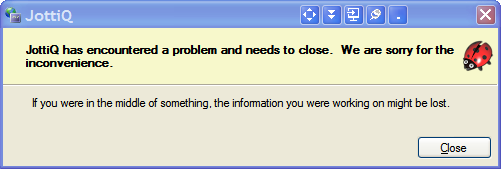
Fixed: Windows XP always crashes. WPF has a nasty bug involving high-
resolution icons on XP, and that gave a possible crash at two
different points. Strangely enough, the About box was never affected.
For now, the fix is not to show these images; default behaviour
differs between XP and Vista+ making for a fortunate accident that
still keeps the window icon looking like a lady bug.
Fixed: Windows XP had the most ugly visuals ever. I've tried to patch
them up a little. Side-effect is that on Vista+, the background
colours aren't as white and pristine anymore, which is how the
standard window colouring seems to have developed over time. Still,
at most it gives the 'dated' impression you'd find in many windows
throughout the operating system.
Fixed: Several dialogs shows a lady bug on XP despite being dialogs that
aren't intended to have a lady bug. Big woop, fixed now.
Fixed: Clarified the message given when unable to make changes to the
file context menu configuration so it won't confuse as many people.
...
KNOWN ISSUES
------------
1) There is no installer just yet.
2) Shell extension registration is always for the 'Local Machine'.
If I figure out a proper way to support both 'Current User' and
'Local Machine', both in JottiQ and the installer that is yet to be
written, I will implement it. Currently, I find 'Local Machine' the more
useful of the two, thus that is the only option currently available.
UPDATE: the UAC shield icon is totally wrong on XP and clipped, and the
actual elevation is also a totally different whoop-ass experience.
It _works_, but it is nowhere as user-friendly as it is on Vista+.
3) JottiQ has not been tested on anything other than Windows 7. Especially
testing on Windows XP systems is required, as I expect at least the icon
of the file context menus to break on there. (UPDATE: it breaks!)
Microsoft has made a mess out of the images-on-menu-items thing. (I do
very little OS testing in the hope that some stuff just works as I expect
it to in regards to the file context menu stuff, so please test on WXP
32-bit systems!)
4) The configuration file has an obscene name and is hidden in a stupid place.
And I have no clue how to change it, since .NET comes up with that rather
idiotic path all by itself, and thus far I haven't found a good way to
influence it yet. It should be something under
AppData\Local Settings\Gholam_Inc.\XXXXX
If anyone can explain to me how to get rid of that disaster, I would
appreciate it. Right now, version upgrades won't remember settings, and
I would really prefer to have them remember it without me going through
endless hoops to fix that stuff. Seriously, who puts hashes in directory
names with settings in them? Argh!
(No, I am not planning to use .MSIs for my deployment as it is pure hell
once you work with the hell that is 32-bit and 64-bit context menu
extensions, and I don't have that patience nor time.)

Trying to enable context menu crashed the app after the windows dialog was shown.
Suggestion:
Maybe move the file-related buttons to the bottom, under the grid?
Maybe add a right-click option to search for the filename in browser to help people learn more? maybe on a favorite process info site?
Original address: https://www.donationcoder.com/forum/index.php?topic=24663.0