


Hi:
Screenshot Captor is an awesome tool. Thanks so much for developing it!
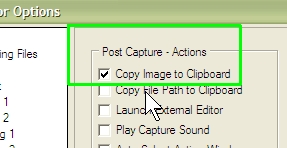
I have the "Copy Image to Clipboard" box checked under "Post Capture - Actions" - see attachment. My assumption is that this means that every time I do a screenshot, the image should automatically be placed in the windows clipboard. This is not working for me. I need to click the "Image to Clipboard" button on the pop-up choice window to get the image to the clipboard. Any idea as to what I might be doing wrong or might I have something wrong in the configuration? (I attached my config file in case that helps.)
I'm using version 2.88.01 on a Windows XP Pro SP3 box.
Thanks in advance for your help.
Dave
Screenshot Captor is an awesome tool. Thanks so much for developing it!
I have the "Copy Image to Clipboard" box checked under "Post Capture - Actions" - see attachment. My assumption is that this means that every time I do a screenshot, the image should automatically be placed in the windows clipboard. This is not working for me. I need to click the "Image to Clipboard" button on the pop-up choice window to get the image to the clipboard. Any idea as to what I might be doing wrong or might I have something wrong in the configuration? (I attached my config file in case that helps.)
I'm using version 2.88.01 on a Windows XP Pro SP3 box.
Thanks in advance for your help.
Dave
 ScreenshotCaptor.ini


