Hi there,
i hv google desktop software.
i hv google desktop software.


 Topic: What is the currently best Desktop Search software? (Read 1,110,399 times)


 ). You can find a comparison of the commercial and free version here.


 I have updated my previous message : http://www.donationcoder.com/forum/index.php?topic=2434.msg373068#msg373068
In fact after watching some videos about it, I won't try it because I don't use regex for searching keywords, and because the interface seems not very enough user friendly (I don't want to click many times just to do a keyword search !).


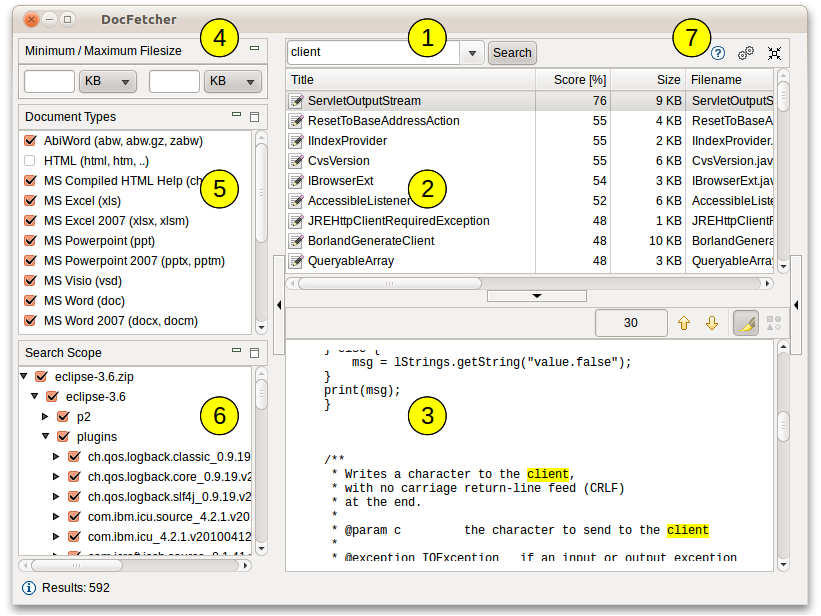
Developer(s): DocFetcher project
Stable release: 1.1.11 / March 3, 2014
Written in: Java
Operating system: MS Windows, Mac OS X, Linux
License: Eclipse Public License
Portable Document Repositoriesclick thumb for 821x616 pixels:
One of DocFetcher's outstanding features is that it is available as a portable version which allows you to create a portable document repository — a fully indexed and fully searchable repository of all your important documents that you can freely move around.
Index updates: Of course, an index only reflects the state of the indexed files when it was created, not necessarily the latest state of the files. Thus, if the index isn't kept up-to-date, you could get outdated search results, much in the same way a telephone book can become out of date. However, this shouldn't be much of a problem if we can assume that most of the files are rarely modified.
Additionally, DocFetcher is capable of automatically updating its indexes:
(1) When it's running, it detects changed files and updates its indexes accordingly.
(2) When it isn't running, a small daemon in the background will detect changes and keep a list of indexes to be updated; DocFetcher will then update those indexes the next time it is started.
And don't you worry about the daemon: It has really low CPU usage and memory footprint, since it does nothing except noting which folders have changed, and leaves the more expensive index updates to DocFetcher.
Java: Performance and portability: One aspect some people might take issue with is that DocFetcher was written in Java, which has a reputation of being "slow". This was indeed true ten years ago, but since then Java's performance has seen much improvement, according to Wikipedia.
Anyways, the great thing about being written in Java is that the very same portable DocFetcher package can be run on Windows, Linux and Mac OS X — many other programs require using separate bundles for each platform. As a result, you can, for example, put your portable document repository on a USB drive and then access it from any of these operating systems, provided that a Java runtime is installed.
Supported Document Formats
##Microsoft Office (doc, xls, ppt) ##Microsoft Office 2007 and newer (docx, xlsx, pptx, docm, xlsm, pptm) ##Microsoft Outlook (pst) ##OpenOffice.org (odt, ods, odg, odp, ott, ots, otg, otp) ##Portable Document Format (pdf) ##EPUB (epub) ##HTML (html, xhtml, ...) ##TXT and other plain text formats (customizable) ##Rich Text Format (rtf) ##AbiWord (abw, abw.gz, zabw) ##Microsoft Compiled HTML Help (chm) ##MP3 Metadata (mp3) ##FLAC Metadata (flac) ##JPEG Exif Metadata (jpg, jpeg) ##Microsoft Visio (vsd) ##Scalable Vector Graphics (svg)
##Regex-based exclusion of files from indexing: You can use regular expressions to exclude certain files from indexing. For example, to exclude Microsoft Excel files, you can use a regular expression like this: .*\.xls
##Mime-type detection: You can use regular expressions to turn on "mime-type detection" for certain files, meaning that DocFetcher will try to detect their actual file types not just by looking at the filename, but also by peeking into the file contents. This comes in handy for files that have the wrong file extension.
##Powerful query syntax: In addition to basic constructs like OR, AND and NOT DocFetcher also supports, among other things: Wildcards, phrase search, fuzzy search ("find words that are similar to..."), proximity search ("these two words should be at most 10 words away from each other"), boosting ("increase the score of documents containing...")
Armando,
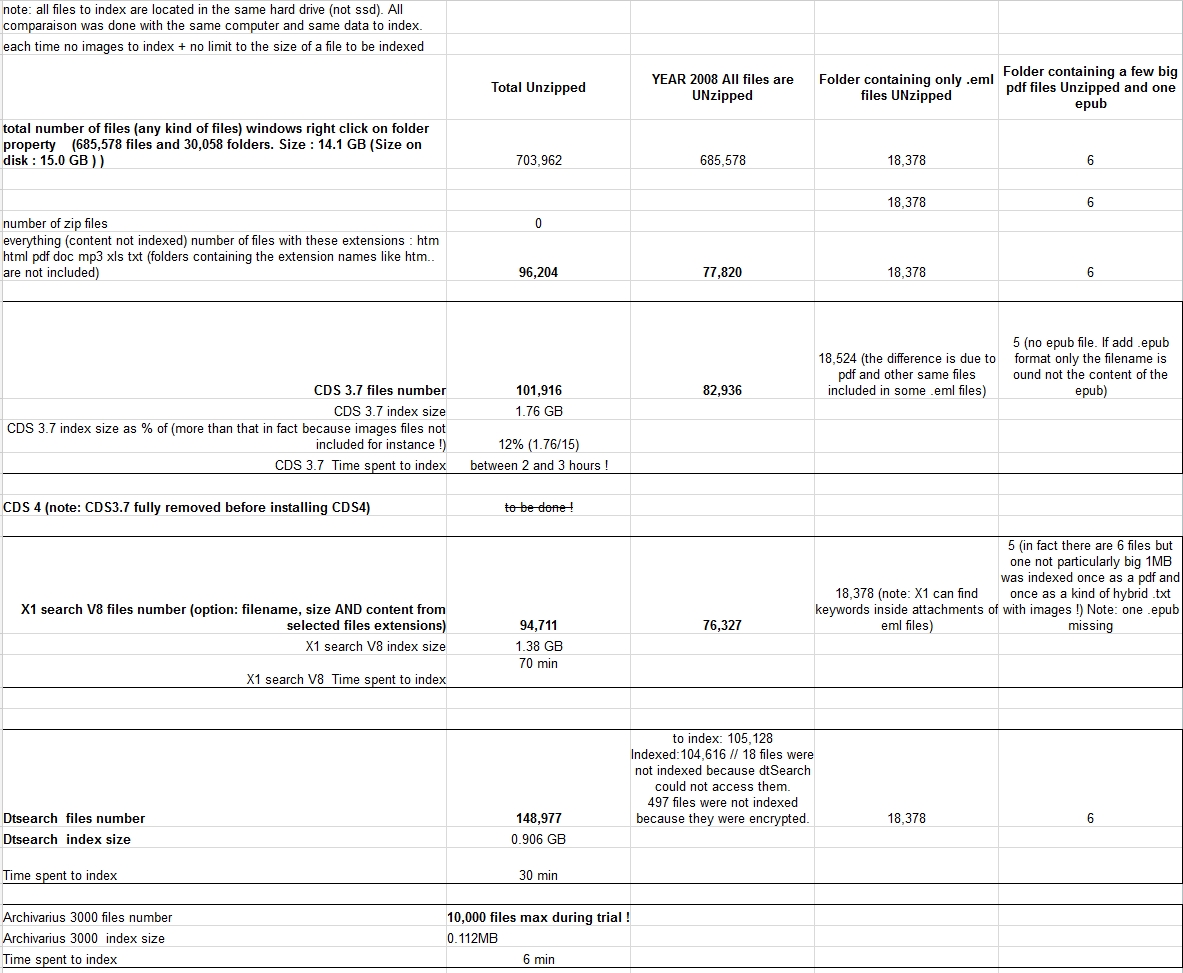
I have tried X1 with the big pdf file inside your link : http://www.donationcoder.com/forum/index.php?topic=2434.msg220457#msg220457
Indeed, to my surprise, the pdf is not indexed in full by X1 ! I have tested it into another big pdf file of mine and I have the same result ! ;(
I don't know why but X1 stops indexing pdf files after some number of characters. Maybe 1Million or something else like Google Drive? I don't know !
Also I noticed that X1 did not index some of my yearly subfolders (see above).
I going to test dtsearch !
See ya
 2015-01-14_105908.jpg
(483.1 KB, 1183x973 - viewed 4024 times.)
2015-01-14_105908.jpg
(483.1 KB, 1183x973 - viewed 4024 times.)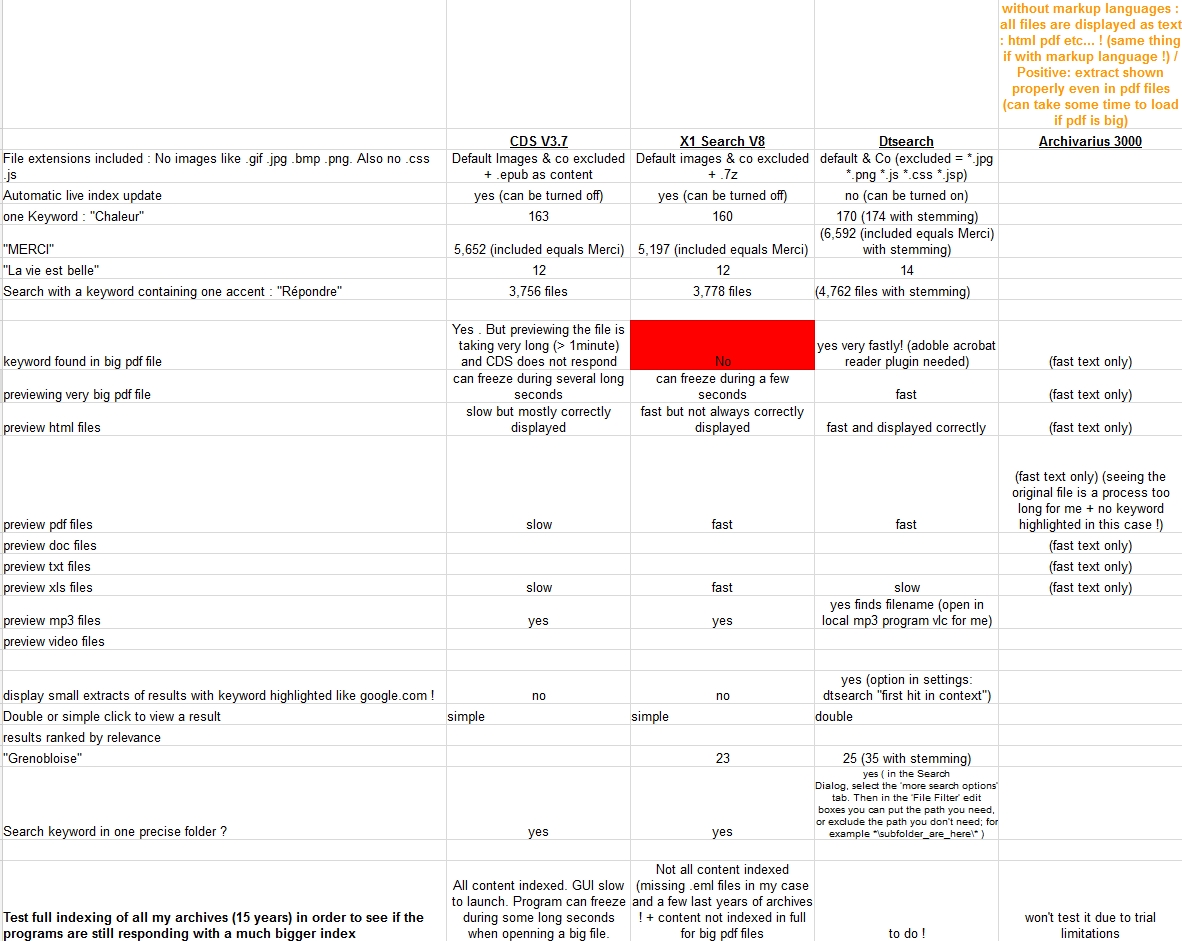 2015-01-14_105919.jpg
(524.5 KB, 1182x941 - viewed 3863 times.)
2015-01-14_105919.jpg
(524.5 KB, 1182x941 - viewed 3863 times.)


 .
.

Original address: https://www.donationcoder.com/forum/index.php?topic=2434.0