DonationCoder.com forum
 
Read-only archive. This is a static copy of the DonationCoder.com forum. Reading and searching work as before; logging in, posting and private messages do not.
Archive of 2026-10-21 · About this archive · Main site

Author Topic: How do I completely Uninstall FARR and reinstall with Default Settings?  (Read 9,062 times)

jbullfrog

  • Supporting Member
  • Joined in 2008
  • **
  • Posts: 3
I would like to do a "fresh installation" of FARR.

I did an Advanced Uninstall using Revo Uninstaller.

When I re-installed FARR, I still had my old settings.

Any help would be appreciated!

Thanks.

mouser

  • First Author
  • Administrator
  • Joined in 2005
  • *****
  • Posts: 40,931
    • Gathering Badge
    • Plugin Coding Medal
    • Participated in NANY Challenge Seventeen Times
    • Cody Award
    • Coding Snacks
    • Volunteers/Staff
This is an excellent question, and shame on me for not providing clear instructions for this  :(

What you want to do is exit FARR, and then delete the FindAndRunRobot.ini file which will be in the "C:\Program Files\FindAndRunRobot" directory if you are on winxp or lower, or in MyDocuments\DonationCoder\FindAndRunRobot if on Vista or higher.

If you want a completely clean uninstall and reinstall, exit farr, then delete those two folders, and reinstall.

jbullfrog

  • Supporting Member
  • Joined in 2008
  • **
  • Posts: 3
Thanks a million mouser!  FARR beats La*nchy any day, hands down.

I have been experimenting around with FARR these last couple of days and after completing reading its tutorial I was amazed at how comprehensive and customizable it could be.

For the first time, I used GroupAliases.  ;D  They remind of "keywords" in Chrome or Firefox.
I found another really useful piece of software called HotCorners: http://sites.google.com/site/programsforpeers/hotcorners

I found this software on this site: http://www.addictivetips.com/

I use it to open my most common folders.

Maybe this can help a fellow shortcut enthusiast like me.

mouser

  • First Author
  • Administrator
  • Joined in 2005
  • *****
  • Posts: 40,931
    • Gathering Badge
    • Plugin Coding Medal
    • Participated in NANY Challenge Seventeen Times
    • Cody Award
    • Coding Snacks
    • Volunteers/Staff
Glad you like it!

Don't miss all the FARR tutorial videos here: http://www.donationcoder.com/3ds/
They will show you all the advanced FARR tips and tricks.

Addictivetips.com looks like a good site  :up:

tosim

  • Supporting Member
  • Joined in 2010
  • **
  • Posts: 25
Re: Runtime error
« Reply #4 on: January 24, 2011, 03:06 PM »
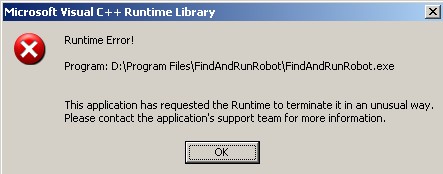
I had installed, and run FARR several months ago, but for some reason, uninstalled it. I've tried to reinstall a fresh download several times now, but when I click on icon to run, I get pop-up "MS Visual C++ Runtime L[attach]

mouser

  • First Author
  • Administrator
  • Joined in 2005
  • *****
  • Posts: 40,931
    • Gathering Badge
    • Plugin Coding Medal
    • Participated in NANY Challenge Seventeen Times
    • Cody Award
    • Coding Snacks
    • Volunteers/Staff
its almost certainly a plugin problem.
delete any plugins (they wont be uninstalled autoamtically when you uninstall)(.

also you can delete the FindAndRunRobot.ini file to reset all settings.

tosim

  • Supporting Member
  • Joined in 2010
  • **
  • Posts: 25
Hey Mouser-That did the trick. Thank you, both for the assist, and the quick reply.

mouser

  • First Author
  • Administrator
  • Joined in 2005
  • *****
  • Posts: 40,931
    • Gathering Badge
    • Plugin Coding Medal
    • Participated in NANY Challenge Seventeen Times
    • Cody Award
    • Coding Snacks
    • Volunteers/Staff
you know i really need to add an option to remove all user settings when you uninstall, this definitely confuses people.

tosim

  • Supporting Member
  • Joined in 2010
  • **
  • Posts: 25
When I delete an app, I also go to appsdata and remove it, plus check the registry. I left the plugs in directory as I figured to save time upon next installation of FARR. Again, thank you.

Original address: https://www.donationcoder.com/forum/index.php?topic=24337.0