DonationCoder.com forum
 
Read-only archive. This is a static copy of the DonationCoder.com forum. Reading and searching work as before; logging in, posting and private messages do not.
Archive of 2026-10-21 · About this archive · Main site

Author Topic: how to make a list of fonts you have  (Read 24,896 times)

eleman

  • Spam Killer
  • Supporting Member
  • Joined in 2009
  • **
  • Posts: 413
how to make a list of fonts you have
« on: September 18, 2010, 10:26 PM »
I have more than 10K fonts on my computer. Naturally, I can't install them all at once. That would bring windows to its knees.

I need to make a list of these fonts. A list of filenames won't do, since most of them have irrelevant file names. For instance 00195934.ttf may be "Times New Roman". Hence "dir *.ttf /b>list.txt" is not an option.

Font viewer utilities show the names of individual fonts, but I can't find one that can list all fonts in a given folder.

Have any one of you come across such a utility?

Eóin

  • O'Callaghan
  • Charter Member
  • Joined in 2006
  • ***
  • Posts: 1,401
Re: how to make a list of fonts you have
« Reply #1 on: September 18, 2010, 11:50 PM »
Veign's CFont might do the job?
Interviewer: Is there anything you don't like?
Bjarne Stroustrup: Marketing hype as a substitute for technical argument. Thoughtless adherence to dogma. Pride in ignorance.

eleman

  • Spam Killer
  • Supporting Member
  • Joined in 2009
  • **
  • Posts: 413
Re: how to make a list of fonts you have
« Reply #2 on: September 19, 2010, 12:35 PM »
Veign's CFont might do the job?

Nope. It can only list installed fonts. I can't install fonts. Not all of them at once anyway. Installing a thousand at a time, listing them, and unistalling them is a long ordeal.

cmpm

  • Charter Member
  • Joined in 2006
  • ***
  • Posts: 2,026

NigelH

  • Charter Member
  • Joined in 2005
  • ***
  • Posts: 210
Re: how to make a list of fonts you have
« Reply #4 on: September 19, 2010, 12:50 PM »
How about fastfontpreview
I can't vouch for it, but it does claim
Quote
VERY fast preview both uninstalled or installed fonts by folder from Hard drive,CD's or USB drive
and
Quote
Lanmisoft programs does not contain spyware, adware or viruses!

eleman

  • Spam Killer
  • Supporting Member
  • Joined in 2009
  • **
  • Posts: 413
Re: how to make a list of fonts you have
« Reply #5 on: September 19, 2010, 01:04 PM »
http://www.moo0.com/?top=http://www.moo0.com/software/FontViewer/

might work for you

No luck with that one. It refuses to have anything to do with not-installed fonts.


How about fastfontpreview
it does claim
Quote
VERY fast preview both uninstalled or installed fonts by folder from Hard drive,CD's or USB drive

Yes, its claim is true, it offers blazing fast previews of both uninstalled and installed fonts. However, it does not provide a list of any sorts.

I always felt my need was very extraordinary. I am beginning to think I was right :(

lanux128

  • Global Moderator
  • Joined in 2005
  • *****
  • Posts: 6,277
    • Coding Snacks
    • Volunteers/Staff
    • Gathering Badge
    • Participated in NANY Challenge Once
    • Linux User
Re: how to make a list of fonts you have
« Reply #6 on: September 19, 2010, 01:07 PM »
Font viewer utilities show the names of individual fonts, but I can't find one that can list all fonts in a given folder.

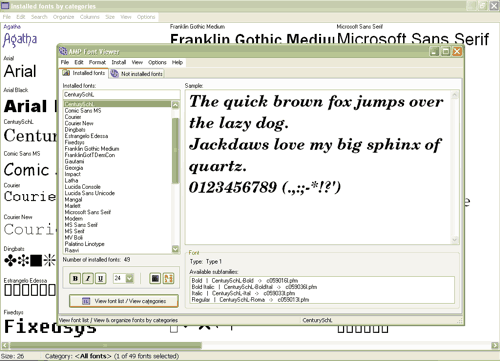
how about AMP Font Viewer? it claims to be able to show a "list of the fonts from a folder with several display options."


• http://www.ampsoft.net/utilities/FontViewer.php

eleman

  • Spam Killer
  • Supporting Member
  • Joined in 2009
  • **
  • Posts: 413
Re: how to make a list of fonts you have
« Reply #7 on: September 19, 2010, 01:26 PM »
how about AMP Font Viewer? it claims to be able to show a "list of the fonts from a folder with several display options."

This one shows me a list of fonts, but not the names of the associated font files. Anyway, this is better than nothing. It does not let me export the list to a text file, but I can make faststone capture take a screenshot of the list, and put it through an OCR.

Better than nothing I guess. Thanks a lot.

Anyway, if anyone knows a program that can list fonts alongside the file names, I'd appreciate it as well.

Eóin

  • O'Callaghan
  • Charter Member
  • Joined in 2006
  • ***
  • Posts: 1,401
Re: how to make a list of fonts you have
« Reply #8 on: September 19, 2010, 01:27 PM »
Nope. It can only list installed fonts. I can't install fonts. Not all of them at once anyway. Installing a thousand at a time, listing them, and unistalling them is a long ordeal.

It can list fonts from a folder and install them individually at least. But not sure about bulk operations.
Interviewer: Is there anything you don't like?
Bjarne Stroustrup: Marketing hype as a substitute for technical argument. Thoughtless adherence to dogma. Pride in ignorance.

joiwind

  • carpe momentum
  • Participant
  • Joined in 2009
  • *
  • Posts: 486
Re: how to make a list of fonts you have
« Reply #9 on: September 19, 2010, 02:56 PM »
eleman - have a look at NexusFont - it might be the one !

Curt

  • Supporting Member
  • Joined in 2006
  • **
  • Posts: 7,565
Re: how to make a list of fonts you have
« Reply #10 on: September 19, 2010, 05:10 PM »
$35: X-Fonter  :up:
http://www.blacksunsoftware.com/xfonter.html
http://www.blacksunsoftware.com/xfscreenshots.html

Quote
X-Fonter
Advanced Font Manager / Viewer

X-Fonter is an advanced font manager, especially created for web-designers, graphic artists and font fanatics.

In a simple user interface you can quickly find the font that you need. Even with thousands of fonts on your computer, with X-Fonter they're just a few clicks away.
Try X-Fonter out now with our free trial version.

Preview:
• Quickly view all installed fonts • Search or Search for fonts on any drive • Compare fonts with custom text samples • Compare fonts in Dual pane

Install:
• Supports all Font Types • Truetype, Opentype, Postscript, Raster, Vector • Load fonts temporarily to save resources

Organize:
• Create your own custom collections • Load an entire collection at once

Print:
• Print Font overview or character maps • Up to 3 lines of custom text per font

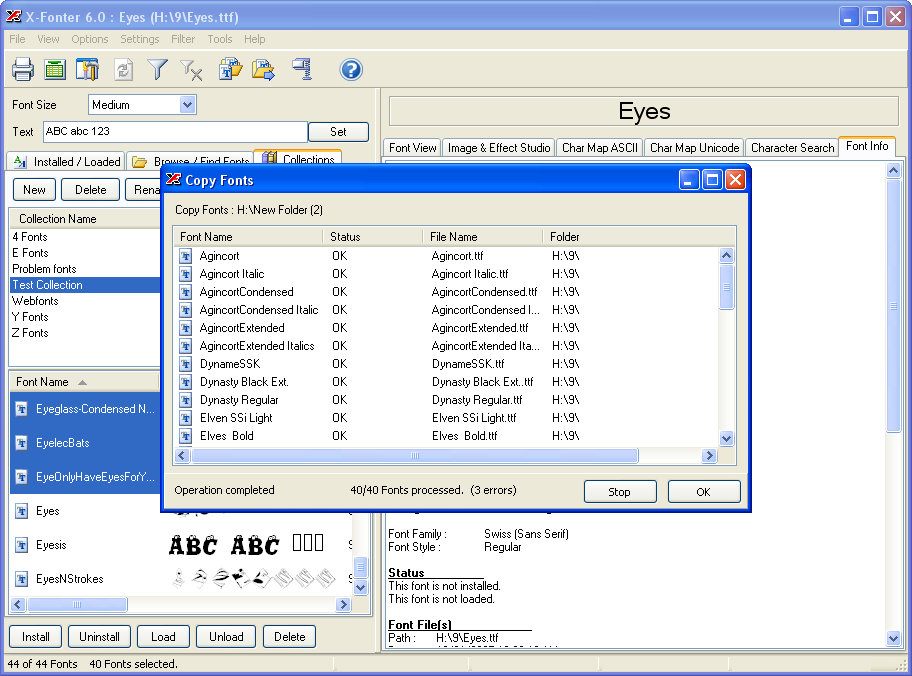
and it will show both font and file-names:

click for 912x676 pixels:
[attachthumb=#]


With X-Fonter, you can create an awesome font book (in HTM).
It may not be updated until the next Windows version, or never, but it is bug free and well working.

app103

  • That scary taskbar girl
  • Global Moderator
  • Joined in 2006
  • *****
  • Posts: 5,888
    • Participated in NANY Challenge Six Times
    • Coding Snacks
    • Gathering Badge
    • Cody Award
    • Volunteers/Staff
Re: how to make a list of fonts you have
« Reply #11 on: September 19, 2010, 08:53 PM »
It's not freeware, but FontExpert can export to html, creating images of each font, and can use templates for the page.

screenshot from mine:

Screenshot - 9_19_2010 , 4_48_59 PM.png

lanux128

  • Global Moderator
  • Joined in 2005
  • *****
  • Posts: 6,277
    • Coding Snacks
    • Volunteers/Staff
    • Gathering Badge
    • Participated in NANY Challenge Once
    • Linux User
Re: how to make a list of fonts you have
« Reply #12 on: September 20, 2010, 03:43 AM »
This one shows me a list of fonts, but not the names of the associated font files. Anyway, this is better than nothing. It does not let me export the list to a text file, but I can make faststone capture take a screenshot of the list, and put it through an OCR.

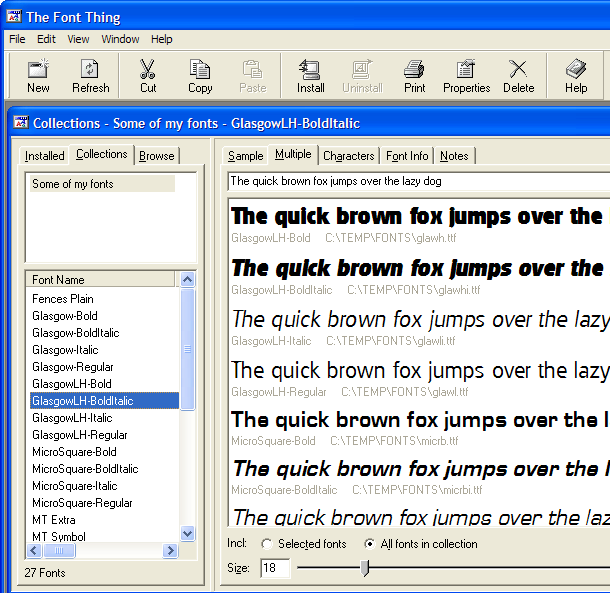
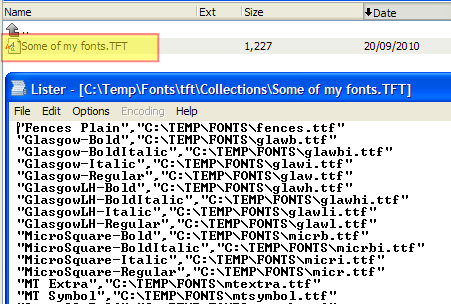
that's not so good then.. however try this - The Font Thing. you can browse and add the fonts into a 'collection' (see fig. 1). for each collection, a text file is generated with the fonts name and its corresponding filename in a CSV-like manner (see fig. 2). you just need to change the file's extension to something other than the default 'TFT'.

Fig. 1
[attachthumb=#]

Fig. 2
[attachthumb=#]

• http://members.ozemail.com.au/~scef/

ACall

  • Supporting Member
  • Joined in 2007
  • **
  • Posts: 7
Re: how to make a list of fonts you have
« Reply #13 on: September 20, 2010, 10:00 AM »
FontOrg and RedEars's FontRenamer are free and make an excellent combo.
You may want to try FontOrg's List function.
Both can be found in the download section over at: http://fontorg.us/default.html

Quote
List Button

List creates an HTML document in the Source Folder named FontOrg.html. It will look similar to the following example. Each font name is a hyperlink allowing you to click on it and open the font in the Windows font viewer.

FontOrg - font organization program
Explorer based cross reference
(c) 2006 Alfred M Jones

2Rebels
      _unknown
      Jandoni
RightBrain-Normal
      Anna Morelli
      CKIBLMQuattrocchi
      Gonza
      Gonza[A]
      Gonza-Bold
      Gonza-Bold[A]
      Gonza-BoldOblique
      Gonza-BoldOblique[A]
      Gonza-Oblique
      Gonza-Oblique[A]

... etc ...

eleman

  • Spam Killer
  • Supporting Member
  • Joined in 2009
  • **
  • Posts: 413
Re: how to make a list of fonts you have
« Reply #14 on: September 20, 2010, 06:26 PM »
FontOrg: It is supposed to do the job, but curiously, it wont. Even if I tick the "use internal font names" box.

The Font Thingie: It won't install... Some 16-bit work-system mumbo-jumbo says its installer. I don't have the win95 compatibility mode on my xp installation for some reason, so can't try it.

FontExpert: Highly polished program with some advanced functions. Its html list function can more than do the job. Find duplicate fonts function is also nice. Not free though.

Nexusfont: Nope, it's not created for my intent in mind.

X-Fonter: This one lets you place each font in a collection of your choice, and saves such collections in text files with a curious extension. Just changing the extension to txt gives you a list like this:

hede.ttf|Times New Roman
hodo.ttf|Arial
gak.ttf|Comic Sans MS
guk.ttf|Verdana
...

So it does the job neatly. But $35? I sent the programmers an e-mail offering one-tenth as a donation. I'll see what they'll say.

Thanks again for all your suggestions, I wouldn't be able to find a solution if it weren't for your recommendations.

Curt

  • Supporting Member
  • Joined in 2006
  • **
  • Posts: 7,565
Re: how to make a list of fonts you have
« Reply #15 on: September 20, 2010, 10:23 PM »
$35? I sent the programmers an e-mail offering one-tenth

-why not just USE the program? AFAIR, the trial doesn't limit the features.

ACall

  • Supporting Member
  • Joined in 2007
  • **
  • Posts: 7
Re: how to make a list of fonts you have
« Reply #16 on: September 20, 2010, 10:39 PM »
FontOrg: It is supposed to do the job, but curiously, it wont. Even if I tick the "use internal font names" box.
eleman, please take the FontOrg v2 beta version for a spin as there seems to be...issues...with the list function in v1.

Veign

  • Charter Honorary Member
  • Joined in 2005
  • ***
  • Posts: 993
    • Gathering Badge
    • Participated in NANY Challenge Twice
Re: how to make a list of fonts you have
« Reply #17 on: September 20, 2010, 11:07 PM »
Veign's CFont might do the job?

Nope. It can only list installed fonts. I can't install fonts. Not all of them at once anyway. Installing a thousand at a time, listing them, and unistalling them is a long ordeal.

It will browse and display non-installed fonts from a folder.  Its one of the key features of Cfont Pro.

lanux128

  • Global Moderator
  • Joined in 2005
  • *****
  • Posts: 6,277
    • Coding Snacks
    • Volunteers/Staff
    • Gathering Badge
    • Participated in NANY Challenge Once
    • Linux User
Re: how to make a list of fonts you have
« Reply #18 on: September 21, 2010, 01:38 AM »
The Font Thingie: It won't install... Some 16-bit work-system mumbo-jumbo says its installer. I don't have the win95 compatibility mode on my xp installation for some reason, so can't try it.

fwiw, there's an non-install zip version if you're still keen on it. ;)

• Zipped EXE and help files (483K)

PitrPaulus

  • Supporting Member
  • Joined in 2006
  • **
  • Posts: 76
Re: how to make a list of fonts you have
« Reply #19 on: November 02, 2010, 06:59 PM »
02.11.2010.
Hello; i (also) use for years AMP-font-viewer. It's simple und works fine (for me).
This program looks for all fonts installed on your computer.
Succes!
Greetings, pitrpaulus.

skwire

  • I eat Coding Snacks for breakfast...
  • Global Moderator
  • Joined in 2005
  • *****
  • Posts: 5,297
    • Participated in NANY Challenge Seventeen Times
    • Coding Snacks
    • Superboy Coder
    • Cody Award
    • Volunteers/Staff
    • Gathering Badge
Re: how to make a list of fonts you have
« Reply #20 on: November 02, 2010, 07:37 PM »
eleman, did you still need this utility?  I can make a Coding Snack out of it if so.  I assume you just need a simple text listing like this:

somename.ttf --> Arial
othername.ttf --> Courier New
...

Let me know.  Thanks.

eleman

  • Spam Killer
  • Supporting Member
  • Joined in 2009
  • **
  • Posts: 413
Re: how to make a list of fonts you have
« Reply #21 on: November 02, 2010, 07:46 PM »
eleman, did you still need this utility?  I can make a Coding Snack out of it if so.  I assume you just need a simple text listing like this:

somename.ttf --> Arial
othername.ttf --> Courier New
...

Let me know.  Thanks.

Thanks skwire, that is what I needed. But I took care of it, thanks to the recommendation of lanux128. The Font Thing does the job. You can create font collections in it. And it handily saves the list of fonts in a collection to a text file, with corresponding file names as well.

skwire

  • I eat Coding Snacks for breakfast...
  • Global Moderator
  • Joined in 2005
  • *****
  • Posts: 5,297
    • Participated in NANY Challenge Seventeen Times
    • Coding Snacks
    • Superboy Coder
    • Cody Award
    • Volunteers/Staff
    • Gathering Badge
Re: how to make a list of fonts you have
« Reply #22 on: November 02, 2010, 07:55 PM »
Great.  I'll step away from the Coding Snack bowl.  :D

Original address: https://www.donationcoder.com/forum/index.php?topic=24031.0