DonationCoder.com forum
 
Read-only archive. This is a static copy of the DonationCoder.com forum. Reading and searching work as before; logging in, posting and private messages do not.
Archive of 2026-10-21 · About this archive · Main site

Author Topic: how do I remove an entire context menu?  (Read 5,593 times)

Curt

  • Supporting Member
  • Joined in 2006
  • **
  • Posts: 7,565
how do I remove an entire context menu?
« on: September 11, 2010, 04:48 PM »
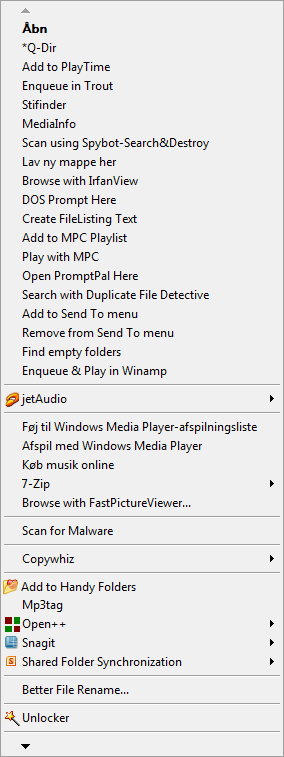
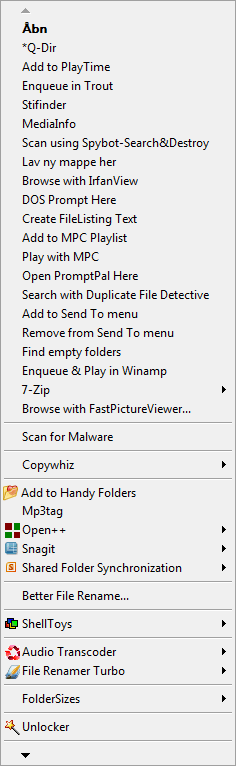
Having tried this and that program, I now have two context menus for music files folders! They shift turns, to display, but not consistent. [Edited: They don't show at the same time] One is the one I want, the other is missing Windows Media Player, among other things:


1ctmenu.GIF2ctmenu.GIF


How do I remove the "wrong" menu, without destroying the proper one?
:tellme:
32-bits Vista.
« Last Edit: September 19, 2010, 05:20 PM by Curt »

Curt

  • Supporting Member
  • Joined in 2006
  • **
  • Posts: 7,565
Re: how do I remove an entire context menu?
« Reply #1 on: September 11, 2010, 04:56 PM »
hmm... looking with 'new eyes', I think one is for picture files and the other one for music files. Yeah, that must be the problem. Hmm... this is the music directory; the folders already are marked as containing audio files. Obviously this feature is not all stable! Can it be made stable?

hpearce

  • Charter Member
  • Joined in 2005
  • ***
  • Posts: 139
Re: how do I remove an entire context menu?
« Reply #2 on: September 11, 2010, 06:49 PM »
I recommend using NIRSOFT's shell exchange view and shell menu view to maintain your basic context menu.
One handles actual context menu commands while the other manages shell extensions/DLL entries.

With them you can enable/disable  entries and control where/when they appear and whether they appear on the regular menu or the enhanced shift menu only.

I try to disable those I don't use or at the least make them only appear when I use the shift key ... the second is a very handy feature to use.
Windows 7 SP1 (TM) Home Premium 64-bit .. Intel(R) Core(TM)2 Duo CPU P8400 @ 2.26 GHz / 2.27 GHz .. 4GB RAM .. NVIDIA GeForce 9800M GTS .. Gateway P-7805u FX
« Last Edit: September 11, 2010, 06:52 PM by hpearce »

sajman99

  • Supporting Member
  • Joined in 2006
  • **
  • Posts: 664
Re: how do I remove an entire context menu?
« Reply #3 on: September 18, 2010, 06:03 PM »
Curt, please let us know if you figured out this weird issue with multiple context menus.

I have also used Nirsoft's ShellExView and ShellMenuView to nuke unwanted entries, but I've never experienced what you've described here. Very strange. :o

Programs like FilerFrog will allow you to organize/consolidate context menus entries. But it seems you need more than this. :-\

Curt

  • Supporting Member
  • Joined in 2006
  • **
  • Posts: 7,565
Re: how do I remove an entire context menu?
« Reply #4 on: September 18, 2010, 11:51 PM »
I have "decided" that the problem not is caused by the context menus themselves, but by the combination of many audio files and CD cover photos.  Explorer is then not 'sure' / have forgotten if the folder should display as a picture holding or music holding -folder. Hence the two different menus from a slightly unstable Vista Explorer.

Plausible?  :tellme:

Original address: https://www.donationcoder.com/forum/index.php?topic=23953.0