There seems to be some unusual behavior on my vista 64 laptop.
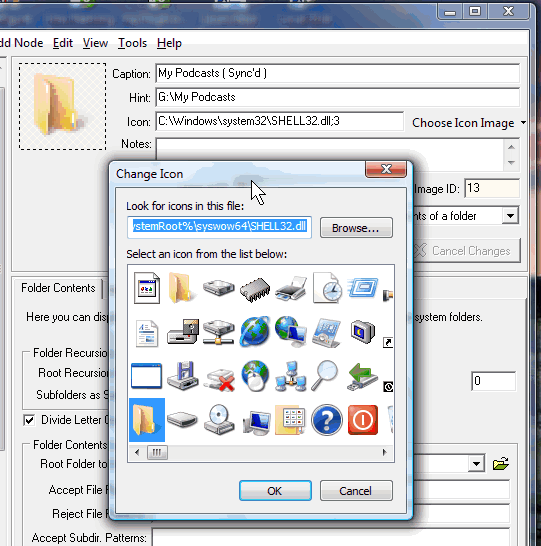
two different default icon strings are showing depending on where i click on the tree.
( see attach png file )
C:\Windows\system32\SHELL32.dll;3
%SystemRoot%\syswow64\SHELL32.dll;4
If i "select icon from system", it will show up in that pane after selection, but not in the tree even after i press save. whatever icon was in the tree...will now blank.
i've tried the maintenance functions but that doesn't work.
it's not the number of nodes...127 because i have about 170 at work.
there was some mcf corruption but the same thing happens with the backup.
if i drag a folder to the tree, the icon doesn't show.
i thought this was a permission issue since i originally install the program in C:\_Menus
so i re-installed the program and no joy.
This has happened before on this laptop but not on the xp or win7 machines.
Any ideas on reset my icons?
two different default icon strings are showing depending on where i click on the tree.
( see attach png file )
C:\Windows\system32\SHELL32.dll;3
%SystemRoot%\syswow64\SHELL32.dll;4
If i "select icon from system", it will show up in that pane after selection, but not in the tree even after i press save. whatever icon was in the tree...will now blank.
i've tried the maintenance functions but that doesn't work.
it's not the number of nodes...127 because i have about 170 at work.
there was some mcf corruption but the same thing happens with the backup.
if i drag a folder to the tree, the icon doesn't show.
i thought this was a permission issue since i originally install the program in C:\_Menus
so i re-installed the program and no joy.
This has happened before on this laptop but not on the xp or win7 machines.
Any ideas on reset my icons?
 HmLap 2010.08.24 19.21.rar