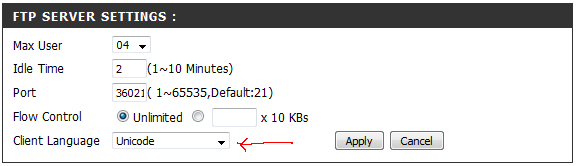
OK, now this is really unpleasant. This is what happens when I copy certain files from a Win7 local drive (left) to an ntfs partition on a NAS drive (right):
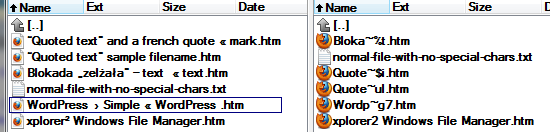
Whenever a file contains characters such as curly quotes, angle quotes, bullet characters, subscript characters, em-dash etc., only the short 8.3 filename gets copied to the NAS drive. So a file named Abc „def” – ghi « jklm.htm on the Win7 system becomes Abcde~6h.HTM on the NAS drive.
I only discovered this after setting up a backup regime in SyncBack Pro and testing the results with Beyond Compare. I thought it was a SyncBack issue, but it is not - the filenames get clobbered no matter how they are copied (TotalCommander, Explorer, etc.). I wouldn't sweat it (so much) if the troublesome characters just got dropped, but what happens is that meaningful filenames are replaced with gibberish as above.
And (of course) the problem did not occur when I was running XP, and nothing on the NAS drive changed since I installed 7 a week ago. Files that were previously copied onto the NAS drive (under XP) still show up fine, which tells me that 7 is actively interfering with the copy operations. And now my NAS drive is no longer useful for backup.
Why could this be happening? I've googled, but couldn't find anything relevant.
Whenever a file contains characters such as curly quotes, angle quotes, bullet characters, subscript characters, em-dash etc., only the short 8.3 filename gets copied to the NAS drive. So a file named Abc „def” – ghi « jklm.htm on the Win7 system becomes Abcde~6h.HTM on the NAS drive.
I only discovered this after setting up a backup regime in SyncBack Pro and testing the results with Beyond Compare. I thought it was a SyncBack issue, but it is not - the filenames get clobbered no matter how they are copied (TotalCommander, Explorer, etc.). I wouldn't sweat it (so much) if the troublesome characters just got dropped, but what happens is that meaningful filenames are replaced with gibberish as above.
And (of course) the problem did not occur when I was running XP, and nothing on the NAS drive changed since I installed 7 a week ago. Files that were previously copied onto the NAS drive (under XP) still show up fine, which tells me that 7 is actively interfering with the copy operations. And now my NAS drive is no longer useful for backup.
Why could this be happening? I've googled, but couldn't find anything relevant.




 - carpe noctem