DonationCoder.com forum
 
Read-only archive. This is a static copy of the DonationCoder.com forum. Reading and searching work as before; logging in, posting and private messages do not.
Archive of 2026-10-21 · About this archive · Main site

Author Topic: What do you use to warn you of disk limits being reached?  (Read 23,305 times)

superboyac

  • Is your software in my list?
  • Charter Member
  • Joined in 2005
  • ***
  • Posts: 6,347
What do you use to warn you of disk limits being reached?
« on: August 16, 2010, 08:08 PM »
I'm regularly running into trouble with filling up my hard drives.  I need a tool to warn me when I reach my disk limits.  I don't want to use the built in XP system tool because I just don't like using anything that comes built in.  What good freeware/shareware do you guys use and why?  Obviously, for something this simple that needs to be running continuously, it needs to be simple and lightweight.  Thanks!

sajman99

  • Supporting Member
  • Joined in 2006
  • **
  • Posts: 664
Re: What do you use to warn you of disk limits being reached?
« Reply #1 on: August 16, 2010, 09:32 PM »
I haven't used this program in years, but I had a freeware named FreeMeter on my old computer.

IIRC FreeMeter allowed me to configure assorted displays and notifications (including disk space usage), and it provided this info. in the system tray.

http://www.tiler.com/freemeter/features/
Quote
Runs on Windows 7, Vista, 2008, 2003, and XP. Works with all language versions. It has not been thoroughly tested on 64-bit versions of Windows, but some users have reported it works.

Regards.

superboyac

  • Is your software in my list?
  • Charter Member
  • Joined in 2005
  • ***
  • Posts: 6,347
Re: What do you use to warn you of disk limits being reached?
« Reply #2 on: August 16, 2010, 10:27 PM »
I haven't used this program in years, but I had a freeware named FreeMeter on my old computer.

IIRC FreeMeter allowed me to configure assorted displays and notifications (including disk space usage), and it provided this info. in the system tray.

http://www.tiler.com/freemeter/features/
Quote
Runs on Windows 7, Vista, 2008, 2003, and XP. Works with all language versions. It has not been thoroughly tested on 64-bit versions of Windows, but some users have reported it works.

Regards.
Thanks!  That looks great, I'm going to try it.

Curt

  • Supporting Member
  • Joined in 2006
  • **
  • Posts: 7,565
Re: What do you use to warn you of disk limits being reached?
« Reply #3 on: August 17, 2010, 12:35 PM »
hmm... I imagine you are looking for an updated version of Disk Watchman. It *seems* this specific kind of tools died with the arrival of Vista? I have not been able to find any new ones, only big multi-tools like FreeMeter.

superboyac

  • Is your software in my list?
  • Charter Member
  • Joined in 2005
  • ***
  • Posts: 6,347
Re: What do you use to warn you of disk limits being reached?
« Reply #4 on: August 17, 2010, 01:45 PM »
hmm... I imagine you are looking for an updated version of Disk Watchman. It *seems* this specific kind of tools died with the arrival of Vista? I have not been able to find any new ones, only big multi-tools like FreeMeter.
Yeah, that does sound good.  I like that company, also.  The last update to their software was 2005, but maybe it still works.

I also used to have a program called HDlife or HDDlife, I wonder if that can do what I'm asking?

ha14

  • Participant
  • Joined in 2010
  • *
  • Posts: 276
Re: What do you use to warn you of disk limits being reached?
« Reply #5 on: August 17, 2010, 02:00 PM »
Hi
Free Disk Space
http://www.softweerd.com/pages/fds.htm

Mihov DiskFree
http://www.mihov.com/sw/en/df.php


Sentry-go Quick Disk Monitor
http://www.sentry-go.com/qm-disk-monitoring.aspx


PA WatchDISK
Naturally low disk space alerts haven't been forgotten. But PA WatchDISK goes one step further: Besides just alerting on low disk space, it can alert you on significant changes in disk space usage as well.
http://www.poweradmin.com/watchdisk/

NetWrix disk space
http://www.netwrix.com/disk_space_monitor_freeware.html


superboyac

  • Is your software in my list?
  • Charter Member
  • Joined in 2005
  • ***
  • Posts: 6,347
Re: What do you use to warn you of disk limits being reached?
« Reply #6 on: August 17, 2010, 02:10 PM »
Hi
Free Disk Space
http://www.softweerd.com/pages/fds.htm

Mihov DiskFree
http://www.mihov.com/sw/en/df.php


Sentry-go Quick Disk Monitor
http://www.sentry-go.com/qm-disk-monitoring.aspx


PA WatchDISK
Naturally low disk space alerts haven't been forgotten. But PA WatchDISK goes one step further: Besides just alerting on low disk space, it can alert you on significant changes in disk space usage as well.
http://www.poweradmin.com/watchdisk/

NetWrix disk space
http://www.netwrix.com/disk_space_monitor_freeware.html
Thanks.  Have you used any of these?  Which one do you prefer and why?

f0dder

  • [Well, THAT escalated quickly!]
  • Charter Honorary Member
  • Joined in 2005
  • ***
  • Posts: 9,153
    • Participated in NANY Challenge Once
Re: What do you use to warn you of disk limits being reached?
« Reply #7 on: August 17, 2010, 02:34 PM »
I don't want to use the built in XP system tool because I just don't like using anything that comes built in.
>_<
- carpe noctem

superboyac

  • Is your software in my list?
  • Charter Member
  • Joined in 2005
  • ***
  • Posts: 6,347
Re: What do you use to warn you of disk limits being reached?
« Reply #8 on: August 17, 2010, 02:50 PM »
I don't want to use the built in XP system tool because I just don't like using anything that comes built in.
>_<
;D I know...what can I say?  i couldn't come up with a better reason than that.  besides, I just like software.

ha14

  • Participant
  • Joined in 2010
  • *
  • Posts: 276
Re: What do you use to warn you of disk limits being reached?
« Reply #9 on: August 17, 2010, 05:01 PM »
I would go  for Free Disk Space
http://www.softweerd.com/pages/fds.htm

Its free I used it on xp some years ago, then I changed my hard drive so didnt contiued using it. The second one is also freewares, but among sharewares PA WatchDISK  looks good but it alittle expensive, so depends on you what exctly you want to do.

sajman99

  • Supporting Member
  • Joined in 2006
  • **
  • Posts: 664
Re: What do you use to warn you of disk limits being reached?
« Reply #10 on: August 17, 2010, 06:57 PM »
Here's a free tool with an alternative approach:  Meerkat - Disk Space Monitor.

http://meerkat.codeplex.com/
Quote
Project Description: Meerkat sends admins an email alert whenever a disk runs low on free space. Written in C# .NET, Meerkat is a tiny unintrusive service configured by a separate small GUI. From the GUI you can set which disks to monitor, the free space threshold, who to notify, and the location of an SMTP server. Runs on Windows Server 2000/2003/2008 and Windows XP/Vista. The project is a Visual Studio 2008 project.

Why?: Why write another disk space checker when there's already quite a few out there? I guess there are two categories of checkers - suites like What's Up Gold that perform all sorts of checks and cost plenty of cash, or shareware apps that do exactly what Meerkat does but ask you to pay for it. I couldn't find anything that was simple, small and free. So I wrote Meerkat, and it's been monitoring a variety of servers in the workplace and at home for almost a year now.

Haven't tried it--thankfully I've got plenty of free space on this machine.

Curt

  • Supporting Member
  • Joined in 2006
  • **
  • Posts: 7,565
Re: What do you use to warn you of disk limits being reached?
« Reply #11 on: August 20, 2010, 12:06 AM »
The one you really might be wanting could be another Disk Space Monitor; jongrieve.net's Disk Space Monitor. It hasn't been updated for several years, but works all the same. At least it does on my 32-bits Vista:

[attachimg=#]

As you can see, the colours of each icon shows how much space there is on each disk. If you point at an icon, it will pop up and tell the exact size. No other features. Perfect!?

111 KB, freeware. No installation. http://jongrieve.net/software/diskmon/


Josh

  • Charter Honorary Member
  • Joined in 2005
  • ***
  • Posts: 3,411
    • Gathering Badge
    • Official Forum Clown
    • Coding Snacks
    • Plugin Coding Medal
    • Volunteers/Staff
    • Military Service Badge - US Army
    • Furry Fandom Badge - Furry Fandom
    • Linux User
Re: What do you use to warn you of disk limits being reached?
« Reply #12 on: August 20, 2010, 12:18 AM »
Powershell

Get-WMIObject Win32_LogicalDisk | ForEach-Object {$_.freespace}
Strength in Knowledge

Curt

  • Supporting Member
  • Joined in 2006
  • **
  • Posts: 7,565
Re: What do you use to warn you of disk limits being reached?
« Reply #13 on: August 20, 2010, 12:31 PM »

[attachimg=#]

As you can see, the colours of each icon shows how much space there is on each disk. If you point at an icon, it will pop up and tell the exact size. No other features. Perfect!?

As seen on the screenshot, the icons from Disk Space Monitor are displayed in a "wrong" order. I wrote the author and asked if this could be 'fixed', even though the program is very old. To my surprise he answered me in a couple of hours:

Quote
Hi Curt,

DiskMon will try and add the icons in a sensible order, but ultimately it is up to Windows how they end up being displayed.  You might want to try manually tweaking the order, by changing the Registry entry where DiskMon stores it's settings..
  HKEY_CURRENT_USER\Software\Jon Grieve\DiskMon - DefaultDrives

DefaultDrives stores list list of drive letters ("FEDC"), and you need to specify them in reverse order - again, this is due to the way that Windows adds system tray icons.

Beyond that, I think it is out of my control, and I don't really update these utilities any more.

Regards,
Jon

sajman99

  • Supporting Member
  • Joined in 2006
  • **
  • Posts: 664
Re: What do you use to warn you of disk limits being reached?
« Reply #14 on: September 23, 2010, 08:26 PM »
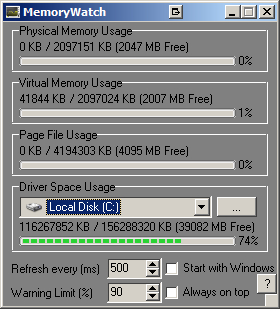
MemoryWatch is a small open source app which will do exactly what you want. It provides memory usage and disk space usage, allowing you to set a warning level %.

Runs very light, neat little app--I'm keeping it even though I don't really "need" it.

Spotted today at Addictive Tips btw.

superboyac

  • Is your software in my list?
  • Charter Member
  • Joined in 2005
  • ***
  • Posts: 6,347
Re: What do you use to warn you of disk limits being reached?
« Reply #15 on: September 23, 2010, 08:34 PM »
MemoryWatch is a small open source app which will do exactly what you want. It provides memory usage and disk space usage, allowing you to set a warning level %.

Runs very light, neat little app--I'm keeping it even though I don't really "need" it.

Spotted today at Addictive Tips btw.
Very nice, great suggestion! I like this one: nice, simple, informative.  Here's a screenshot since there's not any on the website:
screenshot_20100923133406.png

sajman99

  • Supporting Member
  • Joined in 2006
  • **
  • Posts: 664
Re: What do you use to warn you of disk limits being reached?
« Reply #16 on: October 18, 2010, 07:50 PM »
DriveGLEAM is another of these system info. utilities which reside in the system tray. It's been mentioned lately on several blogs such as freewaregenius.

Sorry I've not yet tried it myself (at work atm).

steeladept

  • Fettucini alfredo is macaroni & cheese for adults
  • Supporting Member
  • Joined in 2006
  • **
  • Posts: 1,061
    • Linux User
    • Military Service Badge - US Air Force
Re: What do you use to warn you of disk limits being reached?
« Reply #17 on: October 18, 2010, 09:33 PM »
Powershell

Get-WMIObject Win32_LogicalDisk | ForEach-Object {$_.freespace}
+1 :Thmbsup:

Shades

  • Member
  • Joined in 2006
  • **
  • Posts: 2,954
Re: What do you use to warn you of disk limits being reached?
« Reply #18 on: October 18, 2010, 10:15 PM »
Prism HUD.

Portable freeware with a lot of monitoring functions.

When any action from the PC it is running happens, it triggers the software and at that moment a (transparent) item shows up in a designated area of your screen(s) which tells you how much of the associated resources are consumed.

It is very effective and not too intrusive.
The easy path is usually downhill...

Original address: https://www.donationcoder.com/forum/index.php?topic=23749.0