DonationCoder.com forum
 
Read-only archive. This is a static copy of the DonationCoder.com forum. Reading and searching work as before; logging in, posting and private messages do not.
Archive of 2026-10-21 · About this archive · Main site

Author Topic: Windows countdown timer  (Read 18,608 times)

jaden

  • Supporting Member
  • Joined in 2008
  • **
  • Posts: 145
    • Linux User
Windows countdown timer
« on: August 12, 2010, 08:33 PM »
[attachimg=#]

Before I knew about Donation Coder I posted a Windows Countdown Timer Showdown on my blog that was mentioned here (let me say one more time I had no intention of disparaging App's Instant Boss, it just didn't fit what I was looking for).  I thought I'd found what I wanted with Marxio Timer, but now that it's gone I decided to write a timer that would satisfy my requirements.

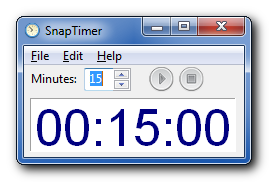
SnapTimer is the result.
mouser

  • First Author
  • Administrator
  • Joined in 2005
  • *****
  • Posts: 40,931
    • Gathering Badge
    • Plugin Coding Medal
    • Participated in NANY Challenge Seventeen Times
    • Cody Award
    • Coding Snacks
    • Volunteers/Staff
Re: Windows countdown timer
« Reply #1 on: August 12, 2010, 08:48 PM »
Very nice, and thanks for sharing it!

jaden

  • Supporting Member
  • Joined in 2008
  • **
  • Posts: 145
    • Linux User
Re: Windows countdown timer
« Reply #2 on: August 12, 2010, 09:12 PM »
Thanks :)

nudone

  • Cody's Creator
  • Columnist
  • Joined in 2005
  • ***
  • Posts: 4,119
    • Cody Award
Re: Windows countdown timer
« Reply #3 on: August 13, 2010, 02:39 PM »
ooh, i like this. thanks very much, jaden. (have a few dc credits.)

app103

  • That scary taskbar girl
  • Global Moderator
  • Joined in 2006
  • *****
  • Posts: 5,888
    • Participated in NANY Challenge Six Times
    • Coding Snacks
    • Gathering Badge
    • Cody Award
    • Volunteers/Staff
Re: Windows countdown timer
« Reply #4 on: August 13, 2010, 03:01 PM »
This is actually quite nice.

When I do my next version of DClock, I plan on keeping the same modular design with it, enhancing it to dynamically load extra tools to the popup menu (rather than hard coded to only be able to launch what I have included).

The stopwatch and timer utilities that I currently include with it were things I had planned to rewrite, but with the dynamic menus, I won't have to. I can just include a link on my app's page and recommend yours, which users will be able to just drop in the tools folder and launch it from the clock's menu.

This is great!

jaden

  • Supporting Member
  • Joined in 2008
  • **
  • Posts: 145
    • Linux User
Re: Windows countdown timer
« Reply #5 on: August 13, 2010, 04:17 PM »
Thanks nudone, I appreciate it.

@app103 I used DClock and liked how extensible you'd made it, but it never occurred to me to have it use SnapTimer as another extension.  Great idea!

app103

  • That scary taskbar girl
  • Global Moderator
  • Joined in 2006
  • *****
  • Posts: 5,888
    • Participated in NANY Challenge Six Times
    • Coding Snacks
    • Gathering Badge
    • Cody Award
    • Volunteers/Staff
Re: Windows countdown timer
« Reply #6 on: August 13, 2010, 04:22 PM »
Thanks nudone, I appreciate it.

@app103 I used DClock and liked how extensible you'd made it, but it never occurred to me to have it use SnapTimer as another extension.  Great idea!

Well, you can't yet, because it won't show on the menu til I rewrite it. But in the next version you'll be able to do it.

jaden

  • Supporting Member
  • Joined in 2008
  • **
  • Posts: 145
    • Linux User
Re: Windows countdown timer
« Reply #7 on: August 13, 2010, 04:38 PM »
Aha.  I saw the Tools menu item and all the separate tools in the application directory and thought it was pulling the .exe files dynamically.

So I guess right now it's modular, but will be extensible in the next version :)

app103

  • That scary taskbar girl
  • Global Moderator
  • Joined in 2006
  • *****
  • Posts: 5,888
    • Participated in NANY Challenge Six Times
    • Coding Snacks
    • Gathering Badge
    • Cody Award
    • Volunteers/Staff
Re: Windows countdown timer
« Reply #8 on: August 13, 2010, 04:40 PM »
So I guess right now it's modular, but will be extensible in the next version

Exactly. Right now the items on the menu are hard coded to the tools I included with it, and nothing more (or less).

jaden

  • Supporting Member
  • Joined in 2008
  • **
  • Posts: 145
    • Linux User
Re: Windows countdown timer
« Reply #9 on: August 13, 2010, 04:41 PM »
Cool, I look forward to the next version :)

justice

  • Solve issues simply.
  • Supporting Member
  • Joined in 2006
  • **
  • Posts: 1,898
    • Participated in NANY Challenge Four Times
    • Cody Award
    • Coding Snacks
    • DJ Badge - DJ
Re: Windows countdown timer
« Reply #10 on: October 06, 2010, 01:02 PM »
Found this today, great program, very useful for timing Stronghold Kingdom ETA's and also as a productivity boost I think it will come in handy!

erikts

  • Supporting Member
  • Joined in 2007
  • **
  • Posts: 227
Re: Windows countdown timer
« Reply #11 on: October 13, 2010, 02:18 AM »
Well, I love SnapTimer!  :Thmbsup: I have been looking for countdown timer that displays time in taskbar.

jaden

  • Supporting Member
  • Joined in 2008
  • **
  • Posts: 145
    • Linux User
Re: Windows countdown timer
« Reply #12 on: October 13, 2010, 03:21 AM »
Thanks justice and erikts, it's great to hear from people who enjoy using it.

I plan to add more features, but it was my second app using Free Pascal and Lazarus and there's not much documentation and it differs from standard Delphi enough to not be able to use examples I've found.  I end up using trial and error, which can be slow.  If there are any Lazarus experts on the forum, I'd love to talk with you :)

Original address: https://www.donationcoder.com/forum/index.php?topic=23719.0
