
skwire works on an AHK script that does this very well, hope he will post his work soon
ebs that looks very interesting, not sure how it works though
ebs that looks very interesting, not sure how it works though


 Topic: Finished Coding Snack: Organize Text (Read 60,368 times)


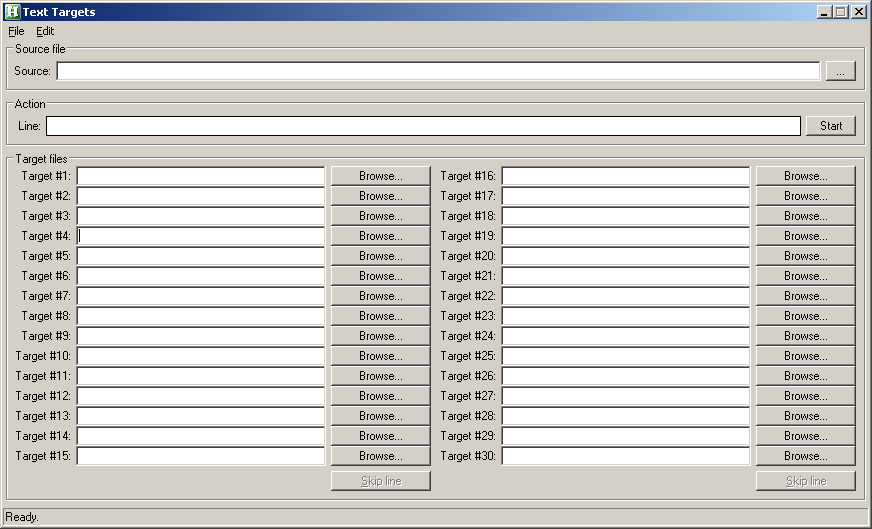



Here's what kalos and I came up with. "Text Targets" is the name.
Download
Features
- Unicode compatible. The app can read UTF-16 or UTF-8 files. Target files are written in UTF-8.
- Select up to thirty target files.
- Each target file can have its own hotkey. Spacebar skips a line.
Workflow(see attachment in previous post)
- Choose a source file.
- Set destination/target files.
- Click Start.
- The "Line" field will then show the first line of the source file.
- At this point, you can choose a target file for the line or simply skip it.
- After choosing a target file or skipping, the next line is shown and so on until you click Stop or reach the end of the source file.
- Lines that were sent to a target file are removed from the source file once Stop is clicked or the end of the file is reached. Skipped lines remain in the source file.
had a try with this AHK and I find that my target file gets  put in at the beginning of the 1st line.
also the hotkeys aren't being saved just been using control 1 control 2 in trying this out.
 . Would you mind sending me one of those files, please?
kalos,
I have a need for a program like this from time to time. I've been too lazy to write one, but your request made me finally go ahead and do it.
How about this?
(see attachment in previous post)
It's pretty simple to use:
1. Open your input file and each line is displayed in the top list.
2. Specify your output filenames in the bottom list. You can have up to 36 output files, corresponding to tags "0" to "9" and "A" to "Z".
Files (and the necessary folders) are created if they don't exist. You can choose to overwrite or append to existing files.
3. Tag each line of the input file for the desired output file by pressing the appropriate key.
The highlight automatically moves down the list as each line is tagged. You can use the Shift or Ctrl key to tag multiple lines.
If you enter an incorrect tag, just select the line (or lines) and enter the new tag.
4. When you're done tagging input lines, click the "Write Files" button and your tagged lines will be written to the specified output files.
I've got the basic application written, but I want to add the ability to save output filenames,
so they don't have to be re-entered (if you use the same files each time).
If this would be useful, I would be glad to contribute it when I'm done - let me know.

I know necro-posting is looked down upon but it finally dawned on me how radical Text Targets is. (Note that I haven't downloaded the program so I'm not sure I get this correctly.)
This thing, in concept, would arguably be the fastest GTD Weekly Review processor for any .txt GTD softwae set-up that was ever invented.
You could literally quick capture every task in Anuran, mass-export the archives via AnuVu..., send the text to this program...create several .txts like @Work, or @PC, or Someday/Maybe and then line by line send these tasks in one full scroll without ever having to be overloaded by all the tasks in front of you. Wow!
Consider my head blown. This is the first app that made me regret not using GTD anymore.
Original address: https://www.donationcoder.com/forum/index.php?topic=23382.0