Don't know if you're familiar with AutoIt but I just added a few lines to a script I modified
here.
Only for Explorer. (Most decent file managers would do this type of thing already, ie. insert file dates, meta data into a rename function.)
Shift+Alt+V - copies the file path/name of the first selected item in an Explorer window, (file or folder), or if nothing is selected then it copies the current Explorer path to the clipboard.
Shift+Alt+D - copies the MODIFIED date of the selected item, (or Explorer path if nothing selected), into the clipboard in Universal format: YYYYMMDD HHMMSS (NOTE: Won't capture the date of root directories.)
The hotkeys, type of date retrieved, and it's output format could all be changed in the source.
#region ;**** Directives created by AutoIt3Wrapper_GUI ****
#AutoIt3Wrapper_UseUpx=n
#endregion ;**** Directives created by AutoIt3Wrapper_GUI ****
; http://www.autoitscript.com/forum/topic/89833-windows-explorer-current-folder/page__st__40#entry973904
#include <Array.au3>

HotKeySet('+!v', '_HK_Path') ; Shift+Alt+V
HotKeySet('+!d', '_HK_Date') ; Shift+Alt+D

Local $oErrorHandler = ObjEvent("AutoIt.Error", "_ComErrFunc")

While 1
	Sleep(100)
WEnd

Func _HK_Path()
	_ExClip(False)
EndFunc   ;==>_HK_Path

Func _HK_Date()
	_ExClip(True)
EndFunc   ;==>_HK_Date

Func _ExClip($temp)
	$hExplr = WinActive("[REGEXPCLASS:(Explore|Cabinet)WClass]")
	If $hExplr <> '' Then
		$aSelection = _ExplorerWinGetSelectedItems($hExplr)
;~ 		_ArrayDisplay($aSelection)
		If $aSelection[0] = 0 Then
			If StringLeft($aSelection[1], 2) <> '::' Then
				If Not $temp Then
					ClipPut($aSelection[1])
				Else
					$sDate = FileGetTime($aSelection[1], 0, 1) ; Get MODIFIED date (0), change 0 to 1 for CREATED, 2 for ACCESSED
					ClipPut(StringLeft($sDate, 8) & " " & StringMid($sDate, 9))
				EndIf
			EndIf
		Else
			If Not $temp Then
				ClipPut($aSelection[2])
			Else
				$sDate = FileGetTime($aSelection[2], 0, 1) ; Get MODIFIED date (0) (0), change 0 to 1 for CREATED, 2 for ACCESSED
				ClipPut(StringLeft($sDate, 8) & " " & StringMid($sDate, 9))
			EndIf
		EndIf
	EndIf
EndFunc   ;==>_ExClip


; ==========================================================================================================================

; Func _ObjectSHFolderViewFromWin($hWnd)
;
; Returns an 'ShellFolderView' Object for the given Window handle
;
; Author: Ascend4nt, based on code by KaFu, klaus.s
; ==========================================================================================================================

Func _ObjectSHFolderViewFromWin($hWnd)
	If Not IsHWnd($hWnd) Then Return SetError(1, 0, 0)
	Local $oShell, $oShellWindows, $oIEObject, $oSHFolderView

	; Shell Object
	$oShell = ObjCreate("Shell.Application")
	If Not IsObj($oShell) Then Return SetError(2, 0, 0)

	;   Get a 'ShellWindows Collection' object
	$oShellWindows = $oShell.Windows()
	If Not IsObj($oShellWindows) Then Return SetError(3, 0, 0)

	;   Iterate through the collection - each of type 'InternetExplorer' Object

	For $oIEObject In $oShellWindows
		If $oIEObject.HWND = $hWnd Then
			; InternetExplorer->Document = ShellFolderView object
			$oSHFolderView = $oIEObject.Document
			If IsObj($oSHFolderView) Then Return $oSHFolderView
			Return SetError(4, 0, 0)
		EndIf
	Next

	Return SetError(-1, 0, 0)
EndFunc   ;==>_ObjectSHFolderViewFromWin

; ==========================================================================================================================
; Func _ExplorerWinGetSelectedItems($hWnd)
;
;
; Author: klaus.s, KaFu, Ascend4nt (consolidation & cleanup, Path name simplification)
; ==========================================================================================================================

Func _ExplorerWinGetSelectedItems($hWnd)
	If Not IsHWnd($hWnd) Then Return SetError(1, 0, '')
	Local $oSHFolderView
	Local $iSelectedItems, $iCounter = 2, $aSelectedItems[2] = [0, ""]

	$oSHFolderView = _ObjectSHFolderViewFromWin($hWnd)
	If @error Then Return SetError(@error, 0, '')

	;   SelectedItems = FolderItems Collection object->Count
	$iSelectedItems = $oSHFolderView.SelectedItems.Count

	Dim $aSelectedItems[$iSelectedItems + 2] ; 2 extra -> 1 for count [0], 1 for Folder Path [1]

	$aSelectedItems[0] = $iSelectedItems
	;   ShellFolderView->Folder->Self as 'FolderItem'->Path
	$aSelectedItems[1] = $oSHFolderView.Folder.Self.Path

	;   ShellFolderView->SelectedItems = FolderItems Collection object
	$oSelectedFolderItems = $oSHFolderView.SelectedItems

	#cs
		; For ALL items in an Explorer Window (not just the selected ones):
		$oSelectedFolderItems = $oSHFolderView.Folder.Items
		ReDim $aSelectedItems[$oSelectedFolderItems.Count+2]
	#ce

	For $oFolderItem In $oSelectedFolderItems
		$aSelectedItems[$iCounter] = $oFolderItem.Path
		$iCounter += 1
	Next

	Return SetExtended($iCounter - 2, $aSelectedItems)
EndFunc   ;==>_ExplorerWinGetSelectedItems

Func _ComErrFunc($oError)
	ConsoleWrite("COM Error occurred:" & @CRLF & _
			"Number: " & @TAB & $oError.number & @CRLF & _
			"Windescription:" & @TAB & $oError.windescription & @CRLF & _
			"Description is: " & @TAB & $oError.description & @CRLF & _
			"Source is: " & @TAB & $oError.source & @CRLF & _
			"Helpfile is: " & @TAB & $oError.helpfile & @CRLF & _
			"Helpcontext is: " & @TAB & $oError.helpcontext & @CRLF & _
			"Lastdllerror is: " & @TAB & $oError.lastdllerror & @CRLF & _
			"Scriptline is: " & @TAB & $oError.scriptline & @CRLF & _
			"Retcode is: " & @TAB & $oError.retcode & @CRLF & @CRLF)
EndFunc   ;==>_ComErrFunc


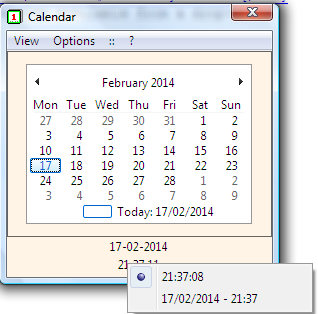
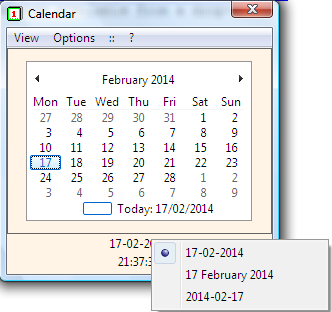

 (pasted current date/time [/edit]

 ExClip.7z