DonationCoder.com forum
 
Read-only archive. This is a static copy of the DonationCoder.com forum. Reading and searching work as before; logging in, posting and private messages do not.
Archive of 2026-10-21 · About this archive · Main site

Author Topic: Error when closing Launchbar Commander after a change  (Read 5,600 times)

dluby

  • Charter Member
  • Joined in 2006
  • ***
  • Posts: 253
Error when closing Launchbar Commander after a change
« on: June 23, 2010, 07:03 AM »
Hi,

After I make a change to Launchbar Commander (v 1.112.01), I click the save button and if I click the X button on the top right of the screen I get an error (see below).  So please excuse my ignorance, but how do I close the preferences so that LB returns back to the system tray?

It would also be nice to see the busy mousepointer when saving.

Regards

Damian
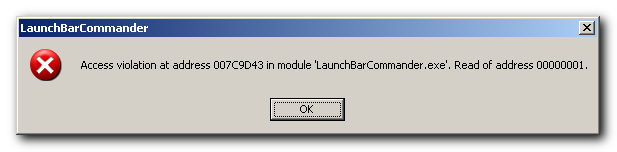
« Last Edit: June 23, 2010, 07:14 AM by dluby »

mouser

  • First Author
  • Administrator
  • Joined in 2005
  • *****
  • Posts: 40,931
    • Gathering Badge
    • Plugin Coding Medal
    • Participated in NANY Challenge Seventeen Times
    • Cody Award
    • Coding Snacks
    • Volunteers/Staff
Re: Error when closing Launchbar Commander after a change
« Reply #1 on: June 23, 2010, 11:56 AM »
would it be possible for you to send me your lbc file that is having the problem, or upload it for me somewhere? (mouser@donationcoder.com)  i'd love to have a LBC file that reliably errors when you close the configuration dialog, so that i could fix the bug.

if it's taking an extended amount of time to save the file, it's probably the case that you could benefit from running the Cleanup and Remove maintenance operations on it.  i should probably start performing those operations automatically when saving a file now that they seem to have proven to be stable.

Screenshot - 6_23_2010 , 6_54_13 AM.png

dluby

  • Charter Member
  • Joined in 2006
  • ***
  • Posts: 253
Re: Error when closing Launchbar Commander after a change
« Reply #2 on: June 23, 2010, 12:22 PM »
I've sent you the file.  Running the maintenance options did indeed stop the error - thanks.

Original address: https://www.donationcoder.com/forum/index.php?topic=23182.0