NANY 2011 Entry Information
| Application Name | NetLaunch |
| Version | 1.0 |
| Short Description | Netlaunch is a program to launch applications based on Network status. It functions in both Agent (GUI) and command-line form. |
| Supported OSes | Windows (XP+) |
| Web Page | None yet |
| Download Link | NetLaunch 1.0.1.zip (461.5 KB) |
| System Requirements |
|
| Version History |
|
| Author | Kamahl |
Description
NetLauncher is designed for use on a computer (probably a netbook), which is often going in and out of wireless access.
The idea is that NetLaunch will sit as a background agent, and check network status. On status change, the program will launch/quit programs depending on user-defined rules.
Sample Configuration
Network activated:
- Launch Pidgin
- Launch Windows Live Sync
- Kill Windows Live Sync process
- Gracefully close pidgin
- Prompt user whether to close Firefox
While this app will not be useful while sitting in a flaky wireless area, it is perfect for people who travel between areas with wi-fi, and those without wi-fi (or just none that you have access to
 ).
).Features
- Command-line arguments for once-off launch checking.
- Agent mode
Planned Features
Per-interface rules (possible, not yet sure whether it's worth it.)
Screenshots
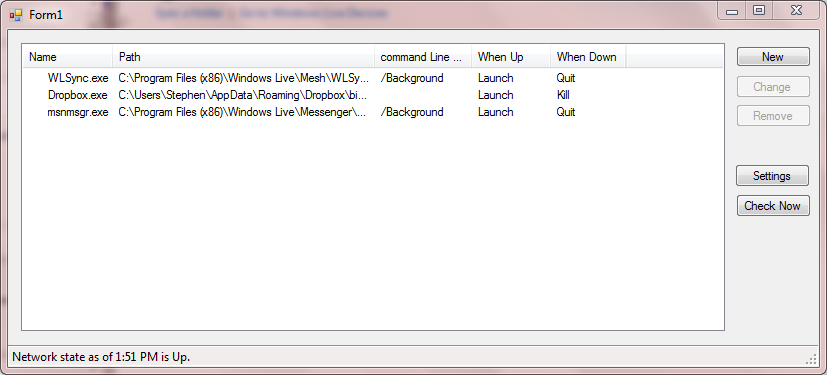
Usage
Installation
Extract zip into a folder. Not much of an install process yet.
Using the Application
Using the Command-line Interface is best done with a shortcut, or FARR item.
NetLaunch.exe -u "C:\Program Files\pidgin\pidgin.exe" -u "C:\Program Files\Windows Live\SyncUX\wlsync.exe" -d pskill.exe [pidgin.exe] -d pskill [wlsync.exe]
Uninstallation
Delete Files.
Known Issues
Can't launch apps with command line arguments, as NetLaunch eats them.Still no GUI.Cannot edit or delete tasks.- Adaptor Blacklist may be wrong in places. If someone finds an adaptor that is incorrectly allowed/blocked, please tell me.
Original Post
NetLauncher is a piece of software I'm designing for use on a computer (probably a netbook), which is often going in and out of wireless access.
The idea is that NetLauncher will sit as a background agent, and check network status. On status change, the program will launch/quit programs depending on user-defined rules.
Sample configuration (my netbook):
Network activated:
While this app will not be useful while sitting in a flakey wireless area, it is perfect for people who travel between areas with wifi, and those without.
It will also have a command line interface, to allow users to run actions without the use of an agent.
IE: NetLaunch.exe -u "C:\Program Files\Pidgin\Pidgin.exe"
or: NetLaunch.exe -d "pskill.exe Pidgin.exe"
It will be a Windows-only application.
The idea is that NetLauncher will sit as a background agent, and check network status. On status change, the program will launch/quit programs depending on user-defined rules.
Sample configuration (my netbook):
Network activated:
- Launch Pidgin
- Launch Windows Live Sync
- Kill Windows Live Sync process
- Gracefully close pidgin
- Prompt user whether to close Firefox
While this app will not be useful while sitting in a flakey wireless area, it is perfect for people who travel between areas with wifi, and those without.
It will also have a command line interface, to allow users to run actions without the use of an agent.
IE: NetLaunch.exe -u "C:\Program Files\Pidgin\Pidgin.exe"
or: NetLaunch.exe -d "pskill.exe Pidgin.exe"
It will be a Windows-only application.


 ) I don't remember much of the recode, but it's done now. And neater


 NetLaunchIcon1.zip