


I'm looking for the ideal way to send out and manage email invitations. i don't like evite because it's too cluttered. I was using Google Calendar to send out invites. I like Google Calendar, but the emails it sends out are pretty messy. I discovered that it didn't inspire people to click the Yes/No/Maybe option because it was either too far down in the email, or the email itself was full of nasty headers and so forth.
part of the problem is the different ways people recieve emails. Not all of them are using an html renderer to look at emails. And some people access it from their blackberry's or smart phones. So, ideally the email that is sent out should be simple enough to be handled even in text only mode.
The other problem is that all the invite services have to add additional stuff that I hate. It's essentially advertising. A bunch of headers and footers, and phrases about Google, and what not.
Ideally, the email should have my simple message. And then the Yes/No/Maybe options have to be links of some sort, but they have to be very short links. It can't be 80 characters, because the people with html turned off will see a mess.
Here's what the Google invite looks like in Outlook 2007, with html enabled:
now, it's not google's fault for the way it looks. This is dependant on the person's email settings and will vary between clients, phones, etc. That's why the best way to do this would be with simple text messages and short links. And please, get rid of all the useless small print, disclaimers, and stupid mock-advertisements.
So, what's a better alternative for all of this?
part of the problem is the different ways people recieve emails. Not all of them are using an html renderer to look at emails. And some people access it from their blackberry's or smart phones. So, ideally the email that is sent out should be simple enough to be handled even in text only mode.
The other problem is that all the invite services have to add additional stuff that I hate. It's essentially advertising. A bunch of headers and footers, and phrases about Google, and what not.
Ideally, the email should have my simple message. And then the Yes/No/Maybe options have to be links of some sort, but they have to be very short links. It can't be 80 characters, because the people with html turned off will see a mess.
Here's what the Google invite looks like in Outlook 2007, with html enabled:
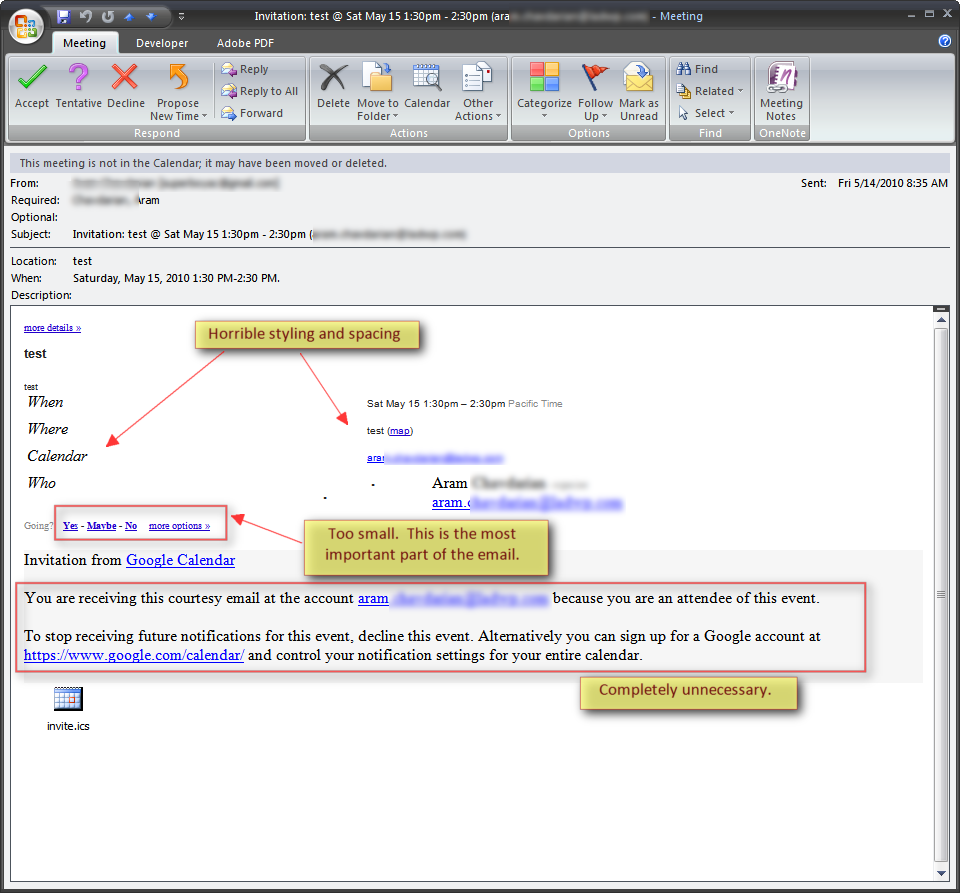
now, it's not google's fault for the way it looks. This is dependant on the person's email settings and will vary between clients, phones, etc. That's why the best way to do this would be with simple text messages and short links. And please, get rid of all the useless small print, disclaimers, and stupid mock-advertisements.
So, what's a better alternative for all of this?

