DonationCoder.com forum
 
Read-only archive. This is a static copy of the DonationCoder.com forum. Reading and searching work as before; logging in, posting and private messages do not.
Archive of 2026-10-21 · About this archive · Main site

Author Topic: How to remove ">>>" characters from mail and rewrap mail text?  (Read 15,138 times)

David.P

  • Ergonomics Junkie
  • Supporting Member
  • Joined in 2008
  • **
  • Posts: 208
Hi forum,

quite simply put: how can I convert this:

Quote
> Lorem ipsum dolor sit amet, consectetur
> adipisicing elit, sed do eiusmod tempor
> incididunt ut labore et dolore magna aliqua.
> Ut enim ad minim veniam, quis nostrud
> exercitation ullamco laboris nisi ut aliquip
> ex ea commodo consequat.

> > Duis aute irure
> > dolor in reprehenderit in voluptate velit esse
> > cillum dolore eu fugiat nulla pariatur.
> > Excepteur sint occaecat cupidatat non
> > proident, sunt in culpa qui officia deserunt
> > mollit anim id est laborum.

......back to this:

Quote
Lorem ipsum dolor sit amet, consectetur adipisicing elit, sed do eiusmod tempor incididunt ut labore et dolore magna aliqua. Ut enim ad minim veniam, quis nostrud exercitation ullamco laboris nisi ut aliquip ex ea commodo consequat.

Duis aute irure dolor in reprehenderit in voluptate velit esse cillum dolore eu fugiat nulla pariatur. Excepteur sint occaecat cupidatat non proident, sunt in culpa qui officia deserunt mollit anim id est laborum.

I thought there must be zillions of Thunderbird addons or other freeware products that can do this -- however I can't find any! Not even NotePad++ with it's powerful TextFX function seems to be able to do it (out of the box)!

Aaaaaaaaaaaaaaaaahhhhhhhhhrg!

Help!

Thanks already and
Cheers David.P
« Last Edit: April 21, 2010, 11:27 AM by David.P »

pilgrim

  • Cogito ergo ?
  • Supporting Member
  • Joined in 2008
  • **
  • Posts: 316
Re: How to remove ">>>" characters from mail and rewrap mail text?
« Reply #1 on: April 21, 2010, 11:13 AM »
I use this: http://www.papercut.com/emailStripper.htm
You might need to reformat.
I spent 25 years training to be an eccentric then I woke up one morning and realised that I'd cracked it.
I've not had to try since.

I wonder what happens if I click on thi

lanux128

  • Global Moderator
  • Joined in 2005
  • *****
  • Posts: 6,277
    • Coding Snacks
    • Volunteers/Staff
    • Gathering Badge
    • Participated in NANY Challenge Once
    • Linux User
Re: How to remove ">>>" characters from mail and rewrap mail text?
« Reply #2 on: April 21, 2010, 11:23 AM »
you may try eCleaner which cleans up the text.

• http://ecleaner.tripod.com/

David.P

  • Ergonomics Junkie
  • Supporting Member
  • Joined in 2008
  • **
  • Posts: 208
Re: How to remove ">>>" characters from mail and rewrap mail text?
« Reply #3 on: April 21, 2010, 11:36 AM »
Thanks heaps guys!

Emailstripper perfectly did it for me  :Thmbsup: :Thmbsup: :Thmbsup:

Cheers David.P

Curt

  • Supporting Member
  • Joined in 2006
  • **
  • Posts: 7,565
Re: How to remove ">>>" characters from mail and rewrap mail text?
« Reply #4 on: April 21, 2010, 11:54 AM »
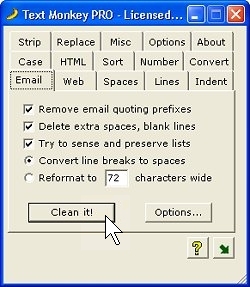
TextMonkey Pro is one of the best for the job, but is $30


http://www.boxersoftware.com/textmonkey.htm
features: http://www.boxersoftware.com/tmfeat.htm


textmonkeylogo2.jpg tmshot01.jpg


Quote
We also have a freeware version called Text Monkey Lite. This version has fewer features than Text Monkey PRO, but it's completely free to use for as long as you like:

Text Monkey Lite - Freeware Version:
http://www.boxersoftware.com/textmonkeylite.exe
« Last Edit: April 21, 2010, 11:58 AM by Curt »

Darwin

  • Charter Member
  • Joined in 2005
  • ***
  • Posts: 6,985
    • Gathering Badge
Re: How to remove ">>>" characters from mail and rewrap mail text?
« Reply #5 on: April 21, 2010, 01:23 PM »
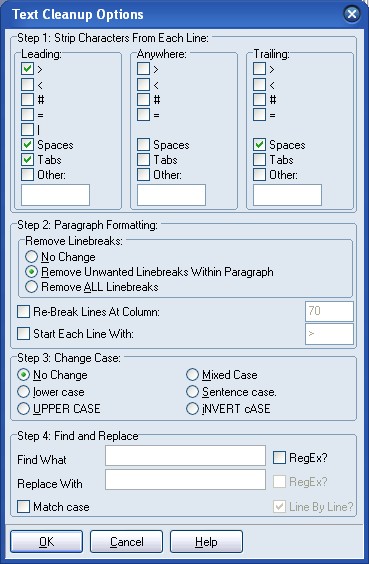
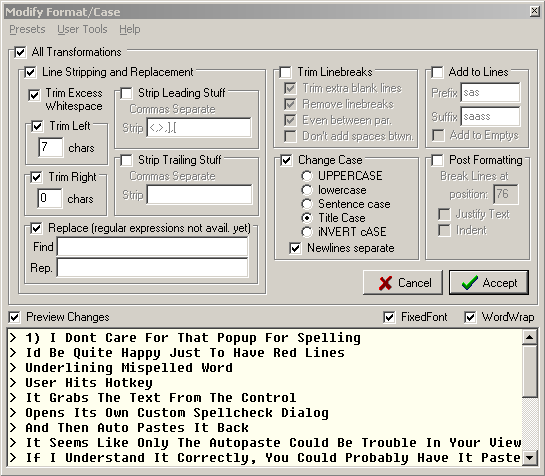
Both mouser's own Clipboard Help and Spell and Clipmate offer much the same functionality as TextMonkey.

Clipmate:

[attachthumb=#]

Clipboard Help and Spell:

[attachthumb=#]

EDIT: added images
"Some people have a way with words, other people,... oh... have not way" - Steve Martin
« Last Edit: April 21, 2010, 01:27 PM by Darwin »

Eóin

  • O'Callaghan
  • Charter Member
  • Joined in 2006
  • ***
  • Posts: 1,401
Re: How to remove ">>>" characters from mail and rewrap mail text?
« Reply #6 on: April 21, 2010, 01:25 PM »
This is such a pet peeve of mine. I also want a cleaner to undo HTML style quoting. There really aren't that many email programs in common usage, surely a application could be written to identify and specifically undo each existing programs handiwork.
Interviewer: Is there anything you don't like?
Bjarne Stroustrup: Marketing hype as a substitute for technical argument. Thoughtless adherence to dogma. Pride in ignorance.

IainB

  • @Slartibartfarst
  • Supporting Member
  • Joined in 2008
  • **
  • Posts: 7,544
Re: How to remove ">>>" characters from mail and rewrap mail text?
« Reply #7 on: April 21, 2010, 03:32 PM »
When I reformat text, I use a freeware program called Cleaner (version 1.02), which is a real time-saver.  This utility is ideal if you wish to keep and use text received through email.  It's really annoying to see all the ">" symbols in front of each line.  Not only does this nifty little program remove them from email messages, making the message look cleaner and preventing choppy word wraps, but also it clears any special formatting properties - e.g., losing any special formats that may have been put in by Outlook or Word.
Someone mentioned the newer version eCleaner, above.

If you want a copy of:
Cleaner (version 1.02) - the version I prefer to use - then go here: Cleaner v1.02.zip
eCleaner (version 2.02)  - the latest version - then go to the author's website: http://ecleaner.tripod.com/

cyberdiva

  • Supporting Member
  • Joined in 2006
  • **
  • Posts: 1,041
Re: How to remove ">>>" characters from mail and rewrap mail text?
« Reply #8 on: April 21, 2010, 05:23 PM »
TextMonkey Pro is one of the best for the job, but is $30
I was about to recommend this, since I too use and like it, but I see Curt has gotten here first.

NigelH

  • Charter Member
  • Joined in 2005
  • ***
  • Posts: 210
Re: How to remove ">>>" characters from mail and rewrap mail text?
« Reply #9 on: April 21, 2010, 11:15 PM »
Have used stripmail for years - although not often lately.
Has individual paste, strip, paragraph, copy back to clipboard buttons as well as a "do it all" button

jaden

  • Supporting Member
  • Joined in 2008
  • **
  • Posts: 145
    • Linux User
Re: How to remove ">>>" characters from mail and rewrap mail text?
« Reply #10 on: May 08, 2010, 08:40 AM »
Just as an FYI, Notepad++ can do this.

Select all the text.
TextFX Tools -> Clean eMail >Quoting
TextFX Edit -> Unwrap Text


davcom

  • Charter Member
  • Joined in 2005
  • ***
  • Posts: 26
Re: How to remove ">>>" characters from mail and rewrap mail text?
« Reply #11 on: May 08, 2010, 02:29 PM »
You really can't go past StripMail. Small. Free. Been around for years. Is a stand-alone program that handles any such text you throw at it for stripping then formatting then copy/paste it back to wherever you need it. Only downside I found was that the formatting occassionally left a bit to be desired but the character removal worked spot on every time.

jaden

  • Supporting Member
  • Joined in 2008
  • **
  • Posts: 145
    • Linux User
Re: How to remove ">>>" characters from mail and rewrap mail text?
« Reply #12 on: May 08, 2010, 10:21 PM »
The main reason I prefer Notepad++ is because I'm already using it for text editing.  However, it's a pain to have to go through those menus to find the two options.  It took me a good 5 minutes to find them.

It's the classic debate between a simple application that does one thing well (stripmail) and a more complex application that does lots of things (notepad++), but not as well (or at least easily).

I tried creating a macro but it failed miserably.

I might have to start using stripmail myself  :)

Original address: https://www.donationcoder.com/forum/index.php?topic=22507.0