DonationCoder.com forum
 
Read-only archive. This is a static copy of the DonationCoder.com forum. Reading and searching work as before; logging in, posting and private messages do not.
Archive of 2026-10-21 · About this archive · Main site

Last post Author Topic: Windows 8 Requests  (Read 38,792 times)

zridling

  • Friend of the Site
  • Charter Member
  • Joined in 2005
  • ***
  • Posts: 3,299
Windows 8 Requests
« on: April 02, 2010, 06:39 AM »
[attach]
- zaine

lujomu

  • Member
  • Joined in 2008
  • **
  • Posts: 40
Re: Windows 8 Requests
« Reply #1 on: April 02, 2010, 07:02 AM »
Systm wide speel and gramar cheker

CleverCat

  • Cat's Are Fun!
  • Supporting Member
  • Joined in 2006
  • **
  • Posts: 1,164
Re: Windows 8 Requests
« Reply #2 on: April 02, 2010, 07:06 AM »
Don't you get a choice to reboot now or later as in XP?
If you need help - JUST ASK!

Deozaan

  • Charter Member
  • Joined in 2006
  • ***
  • Posts: 9,827
    • Participated in NANY Challenge Eight Times
    • Cody Award
Re: Windows 8 Requests
« Reply #3 on: April 02, 2010, 07:58 AM »
Windows 7 never forces me to reboot. Windows Updates that require a reboot will tell me I need to reboot, but just have a nag popup I can "dismiss" for up to 4 hours at a time.

My biggest complaint recently is the dismal file transfer speeds. It takes forever to copy/move files from one place to another! It shouldn't take 2 minutes to copy 50MB!

nudone

  • Cody's Creator
  • Columnist
  • Joined in 2005
  • ***
  • Posts: 4,119
    • Cody Award
Re: Windows 8 Requests
« Reply #4 on: April 02, 2010, 09:22 AM »
My biggest complaint recently is the dismal file transfer speeds. It takes forever to copy/move files from one place to another! It shouldn't take 2 minutes to copy 50MB!
that's got to be annoying. there's something weird going on with your machine - could it be related to the same problem vista had when it first came out? i never had the problem so i don't know what the solution was/is.

as for an "8" reqest: bring back the old xp taskbar (as an option) so i don't have to use several fixes and work arounds to get the same thing on "7". whoever designed the "7" taskbar obviously only runs a couple of programs at a time - or they just use their mac instead.

vegas

  • Charter Member
  • Joined in 2005
  • ***
  • Posts: 357
Re: Windows 8 Requests
« Reply #5 on: April 02, 2010, 10:00 AM »
My biggest complaint recently is the dismal file transfer speeds. It takes forever to copy/move files from one place to another! It shouldn't take 2 minutes to copy 50MB!
that's got to be annoying. there's something weird going on with your machine - could it be related to the same problem vista had when it first came out? i never had the problem so i don't know what the solution was/is.

as for an "8" reqest: bring back the old xp taskbar (as an option) so i don't have to use several fixes and work arounds to get the same thing on "7". whoever designed the "7" taskbar obviously only runs a couple of programs at a time - or they just use their mac instead.

Mind if I asked how you accomplished this?  I'm frustrated with what I see as a taskbar and tasktray in Windows 7 so far. Why does everything have to be so far spaced out. How bout any hacks to make the tasktray icons closer? Customize a StartButton Menu? Thx

nudone

  • Cody's Creator
  • Columnist
  • Joined in 2005
  • ***
  • Posts: 4,119
    • Cody Award
Re: Windows 8 Requests
« Reply #6 on: April 02, 2010, 10:41 AM »
i'm a bit pushed for time at the moment, vegas so i can't double check what i'll post below. i'll try to do a more thorough list when i've time...

this one might have everything: http://www.tipandtrick.net/2009/windows-7-usage-guides-how-to-hacks-tips-and-tricks-complete-list/
more: http://www.mydigitallife.info/2009/10/31/never-combine-icons-or-only-combine-when-full-but-hide-labels-in-windows-7-taskbar/

there are more things stored in a folder i've got related to win7 which i'll have to go through later.

Shades

  • Member
  • Joined in 2006
  • **
  • Posts: 2,954
Re: Windows 8 Requests
« Reply #7 on: April 02, 2010, 12:12 PM »
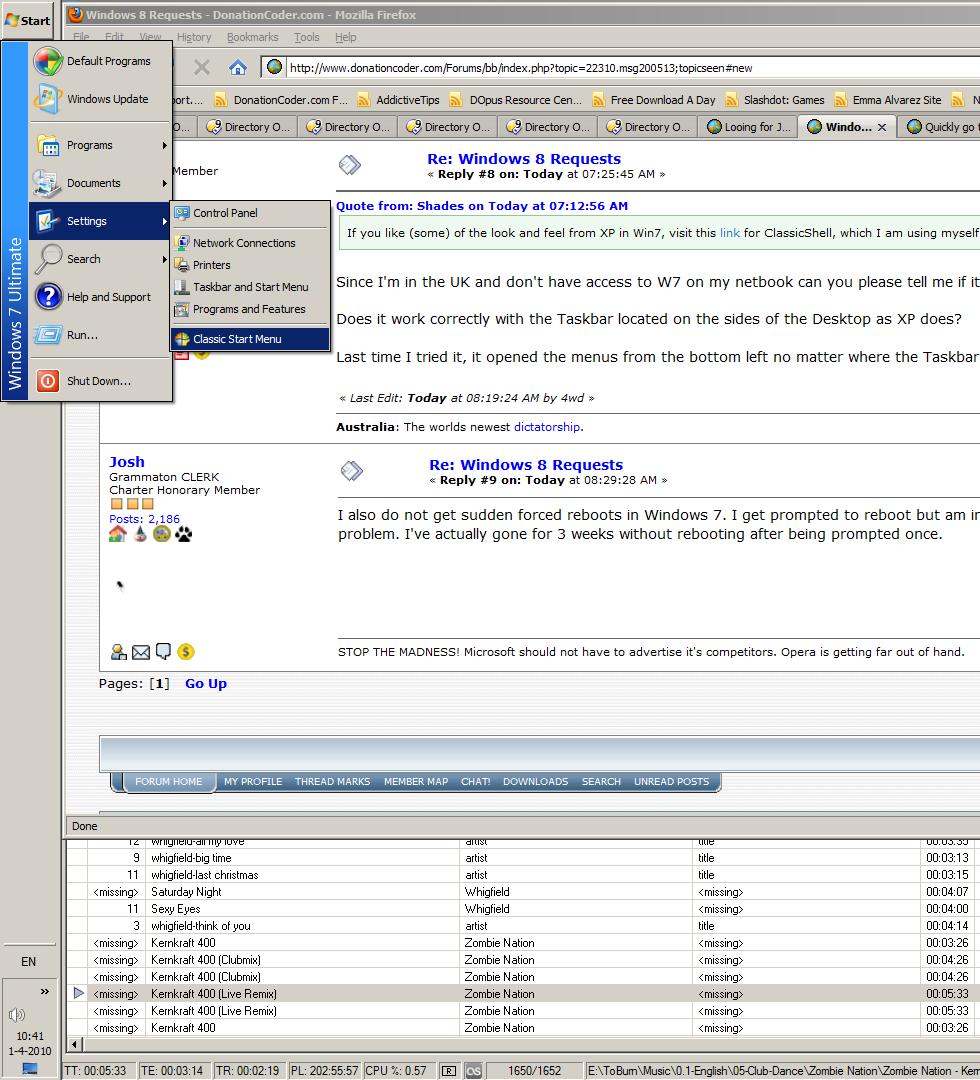
If you like (some) of the look and feel from XP in Win7, visit this link for ClassicShell, which I am using myself.

From the website:
Quote
    * Brings back the classic start menu that Windows 7 doesn't support
    * Adds a toolbar for Windows Explorer
    * Shows recently used documents. The number of documents to display is customizable
    * Translated in 35 languages, including Right-to-left support for Arabic and Hebrew
    * Does not disable the original start menu in Windows. You can access it by Shift+Click on the start button
    * Right-click on an item in the menu to delete, rename, sort, or perform other tasks
    * Available for 32 and 64-bit operating systems
    * Has support for skins, including additional 3rd party skins
    * Fully customizable in both looks and functionality
    * Support for Microsoft’s Active Accessibility
    * And last but not least – it's FREE!
The easy path is usually downhill...

4wd

  • Pedantic Old Bastard
  • Supporting Member
  • Joined in 2006
  • **
  • Posts: 5,652
    • Coding Snacks
Re: Windows 8 Requests
« Reply #8 on: April 02, 2010, 12:25 PM »
If you like (some) of the look and feel from XP in Win7, visit this link for ClassicShell, which I am using myself.

Since I'm in the UK and don't have access to W7 on my netbook can you please tell me if it passes this one simple test:

Does it work correctly with the Taskbar located on the sides of the Desktop as XP does?

Last time I tried it, it opened the menus from the bottom left no matter where the Taskbar was located which was extremely annoying.
"I will not follow where the path may lead, but I will go where there is no path, and I will leave a trail." - Muriel Strode, 1903
« Last Edit: April 02, 2010, 01:19 PM by 4wd »

Josh

  • Charter Honorary Member
  • Joined in 2005
  • ***
  • Posts: 3,411
    • Gathering Badge
    • Official Forum Clown
    • Coding Snacks
    • Plugin Coding Medal
    • Volunteers/Staff
    • Military Service Badge - US Army
    • Furry Fandom Badge - Furry Fandom
    • Linux User
Re: Windows 8 Requests
« Reply #9 on: April 02, 2010, 01:29 PM »
I also do not get sudden forced reboots in Windows 7. I get prompted to reboot but am in no way forced. Plus, a simple net stop "automatic updates" fixes that problem. I've actually gone for 3 weeks without rebooting after being prompted once.
Strength in Knowledge

Shades

  • Member
  • Joined in 2006
  • **
  • Posts: 2,954
Re: Windows 8 Requests
« Reply #10 on: April 02, 2010, 01:52 PM »
If you like (some) of the look and feel from XP in Win7, visit this link for ClassicShell, which I am using myself.

Since I'm in the UK and don't have access to W7 on my netbook can you please tell me if it passes this one simple test:

Does it work correctly with the Taskbar located on the sides of the Desktop as XP does?

Last time I tried it, it opened the menus from the bottom left no matter where the Taskbar was located which was extremely annoying.

Seems that this is fixed.

[attach]
The easy path is usually downhill...

cmpm

  • Charter Member
  • Joined in 2006
  • ***
  • Posts: 2,026
Re: Windows 8 Requests
« Reply #11 on: April 02, 2010, 01:53 PM »
here's a couple of tweakers

http://www.thewindowsclub.com/windows-7-taskbar-thumbnail-customizer-released

http://www.thewindowsclub.com/tweak-taskbar-button-thumbnail-sizes-with-w7-taskbar-tweaker

which should be in 8

and the upgrade price should be a LOT LESS

Innuendo

  • Charter Member
  • Joined in 2005
  • ***
  • Posts: 2,266
Re: Windows 8 Requests
« Reply #12 on: April 02, 2010, 03:37 PM »
Windows 7 never forces me to reboot. Windows Updates that require a reboot will tell me I need to reboot, but just have a nag popup I can "dismiss" for up to 4 hours at a time.

There's even a registry hack that goes all the way back to Windows XP which will turn off automatically rebooting altogether. A little icon will sit in your system tray reminding you that you need to reboot, but it will be up to you to do the rebooting yourself when you're ready.

Quote
My biggest complaint recently is the dismal file transfer speeds. It takes forever to copy/move files from one place to another! It shouldn't take 2 minutes to copy 50MB!

That's nothing a good file manager or TeraCopy won't fix.
« Last Edit: April 02, 2010, 10:14 PM by Innuendo »

Darwin

  • Charter Member
  • Joined in 2005
  • ***
  • Posts: 6,985
    • Gathering Badge
Re: Windows 8 Requests
« Reply #13 on: April 02, 2010, 04:00 PM »
I can confirm that the taskbar behaviour 4wd asked about works fine on my install (Win 7 64-bit). I tried it in every position (ie bottom, top, left and right of the desktop) and all menus opened where they were clicked.

As for the other comments - I've never had either Vista or Win7 reboot my computer after Windows Update. I do get pop ups warning me that I need to reboot, but that's it. If I am not around for the warnings, the power button on the start menu switches to "Install updates and shutdown". File transfers/copying speed is fine on my notebook (although I use DOpus 9 and TeraCopy, so perhaps I'm simply not seeing the behaviour).

NB I just tried using two instances of Windows Explorer with TeraCopy disabled and moved a 50MB file from E:\ to my desktop (on C:\) in less than a second.
"Some people have a way with words, other people,... oh... have not way" - Steve Martin

cranioscopical

  • Friend of the Site
  • Supporting Member
  • Joined in 2006
  • **
  • Posts: 4,776
    • Cody Award
    • Official Forum Clown
    • rotten turkey sandwich - Rotten Turkey Sandwich
Re: Windows 8 Requests
« Reply #14 on: April 02, 2010, 05:43 PM »
I tried it in every position (ie bottom, top, left and right of the desktop) and all menus opened where they were clicked.

How fortunate that you have such long arms!  :up:
Chris

superboyac

  • Is your software in my list?
  • Charter Member
  • Joined in 2005
  • ***
  • Posts: 6,347
Re: Windows 8 Requests
« Reply #15 on: April 02, 2010, 05:57 PM »
I have only one request:
Do whatever it takes to get it as fast, responsive, and lightweight as possible.  That's all I care about.  No extras.  I have third-party software to do just about everything better than anything that comes with Windows.  So just focus on OS speed, responsiveness...stuff like that.

MilesAhead

  • Supporting Member
  • Joined in 2009
  • **
  • Posts: 7,736
    • Coding Snacks
Re: Windows 8 Requests
« Reply #16 on: April 02, 2010, 05:57 PM »
Windows 7 never forces me to reboot. Windows Updates that require a reboot will tell me I need to reboot, but just have a nag popup I can "dismiss" for up to 4 hours at a time.

My biggest complaint recently is the dismal file transfer speeds. It takes forever to copy/move files from one place to another! It shouldn't take 2 minutes to copy 50MB!

Is it only file copy? Anything that poor I would run some disk diagnostics.  If you find it's due to retries you may have a defective drive.  Even Vista preSP1 was nowhere near that bad.

cmpm

  • Charter Member
  • Joined in 2006
  • ***
  • Posts: 2,026
Re: Windows 8 Requests
« Reply #17 on: April 02, 2010, 06:40 PM »
Life Rocks just posted this today.

http://www.nirmaltv.com/2010/04/02/tweak-windows-7-taskbar-settings/

I pretty sure that's where I found the other two I posted.

People are making these for a reason.
I'd say some flexibility built into Windows 8 is needed.

JavaJones

  • Review 2.0 Designer
  • Charter Member
  • Joined in 2005
  • ***
  • Posts: 2,739
    • Participated in NANY Challenge Once
Re: Windows 8 Requests
« Reply #18 on: April 02, 2010, 09:06 PM »
I certainly echo everyone's desire for WinXP/2000 style taskbard and start menu. But if I had to pick just one thing, it'd be this:

64 bit only!

- Oshyan

Eóin

  • O'Callaghan
  • Charter Member
  • Joined in 2006
  • ***
  • Posts: 1,401
Re: Windows 8 Requests
« Reply #19 on: April 02, 2010, 09:17 PM »
Don't require driver signing for 64bit versions!
Interviewer: Is there anything you don't like?
Bjarne Stroustrup: Marketing hype as a substitute for technical argument. Thoughtless adherence to dogma. Pride in ignorance.

Josh

  • Charter Honorary Member
  • Joined in 2005
  • ***
  • Posts: 3,411
    • Gathering Badge
    • Official Forum Clown
    • Coding Snacks
    • Plugin Coding Medal
    • Volunteers/Staff
    • Military Service Badge - US Army
    • Furry Fandom Badge - Furry Fandom
    • Linux User
Re: Windows 8 Requests
« Reply #20 on: April 02, 2010, 09:48 PM »
Don't require driver signing for 64bit versions!

Why would you even say that? It helps keep things stable. By requiring driver signing you force developers to certify their drivers.
Strength in Knowledge

Innuendo

  • Charter Member
  • Joined in 2005
  • ***
  • Posts: 2,266
Re: Windows 8 Requests
« Reply #21 on: April 02, 2010, 10:15 PM »
Why would you even say that? It helps keep things stable. By requiring driver signing you force developers to certify their drivers.

So very true! I wish MS had made this requirement long ago.

Eóin

  • O'Callaghan
  • Charter Member
  • Joined in 2006
  • ***
  • Posts: 1,401
Re: Windows 8 Requests
« Reply #22 on: April 02, 2010, 10:27 PM »
Ye serious? Truecrypt, Sandboxie, ImDisk Virtual Disk, and lord knows how many other excellent and often free opensource application currently have to pay at least $230/year just so people can use their products without resorting to dodgy hacks like Driver Signature Enforcement Overrider w/ Remove Watermark.

How does such a system ultimately benefit anyone but Microsoft's greed?
Interviewer: Is there anything you don't like?
Bjarne Stroustrup: Marketing hype as a substitute for technical argument. Thoughtless adherence to dogma. Pride in ignorance.

Josh

  • Charter Honorary Member
  • Joined in 2005
  • ***
  • Posts: 3,411
    • Gathering Badge
    • Official Forum Clown
    • Coding Snacks
    • Plugin Coding Medal
    • Volunteers/Staff
    • Military Service Badge - US Army
    • Furry Fandom Badge - Furry Fandom
    • Linux User
Re: Windows 8 Requests
« Reply #23 on: April 02, 2010, 10:33 PM »
When combined with WHQL certification, it benefits the end user by ensuring that the drivers meets a set of standards and won't crash a system due to poorly written code. It is designed to ensure you know where you are getting a driver from and that it is not some hacked driver. Yes, those programs might very well be decent and I use a couple of the, but they need to be signed and tested. This is not just to line Microsoft's pockets but to ensure the end users computer experience is a good one.
Strength in Knowledge
« Last Edit: April 02, 2010, 10:36 PM by Josh »

Eóin

  • O'Callaghan
  • Charter Member
  • Joined in 2006
  • ***
  • Posts: 1,401
Re: Windows 8 Requests
« Reply #24 on: April 02, 2010, 10:43 PM »
I realize dodgy drivers can wreak havoc on a system, but so can dodgy applications. If the requirement could either be turned off, or if the fee was within the afford ability of a hobby programmer I'd have no problem, but without those I see greed before the user.
Interviewer: Is there anything you don't like?
Bjarne Stroustrup: Marketing hype as a substitute for technical argument. Thoughtless adherence to dogma. Pride in ignorance.

Original address: https://www.donationcoder.com/forum/index.php?topic=22310.0