DonationCoder.com forum
 
Read-only archive. This is a static copy of the DonationCoder.com forum. Reading and searching work as before; logging in, posting and private messages do not.
Archive of 2026-10-21 · About this archive · Main site

Author Topic: Integrate into taskbar  (Read 8,718 times)

masu

  • Member
  • Joined in 2006
  • **
  • Posts: 401
Integrate into taskbar
« on: January 28, 2006, 09:25 AM »
the program searchfield could be integrated into the windows taskbar like in Copernic

Find+Run Robot 2.90.01
Windows 7

mouser

  • First Author
  • Administrator
  • Joined in 2005
  • *****
  • Posts: 40,931
    • Gathering Badge
    • Plugin Coding Medal
    • Participated in NANY Challenge Seventeen Times
    • Cody Award
    • Coding Snacks
    • Volunteers/Staff
Re: Integrate into taskbar
« Reply #1 on: January 28, 2006, 09:41 AM »
we've talked about this in the past.. the problem is that because of the way farr likes to show its results, in a popup listbox, it's hard to see why having it always visible in a taskbar would really have a benefit.  ie why have it onscreen all the time even when you're not using it?

jgpaiva

  • Artificial Idiocy
  • Global Moderator
  • Joined in 2006
  • *****
  • Posts: 4,727
    • Cody Award
    • Participated in NANY Challenge Once
    • Coding Snacks
    • Portugal Inhabitant
    • Linux User
Re: Integrate into taskbar
« Reply #2 on: January 28, 2006, 10:58 AM »
I was thinking: This idea might be nice, that way, there would be no need for a hotkey (well, maybe to focus), and it would look good, a bit like google search ;)
But it has some problems:
1) those people who don't have taskbars, still need the "normal" farr (don't think this is that much of a problem..)
2) identifying the results can get a bit strange, since you'd have the popup comming upwards from the bar, it would generate a strange behaviour from farr..Try selecting the option "edit bar on the bottom". It becomes quite hard to select the first option, since it isn't right below the edit bar. At least I can't use it like that.
3) maybe it would be only more work for mouser to accomplish an option that people would use in the beginning because it's nice to the eye, but would stop using later since it's not very handy.

just my two cents :)

jdd

  • Charter Member
  • Joined in 2005
  • ***
  • Posts: 214
Re: Integrate into taskbar
« Reply #3 on: January 28, 2006, 04:48 PM »
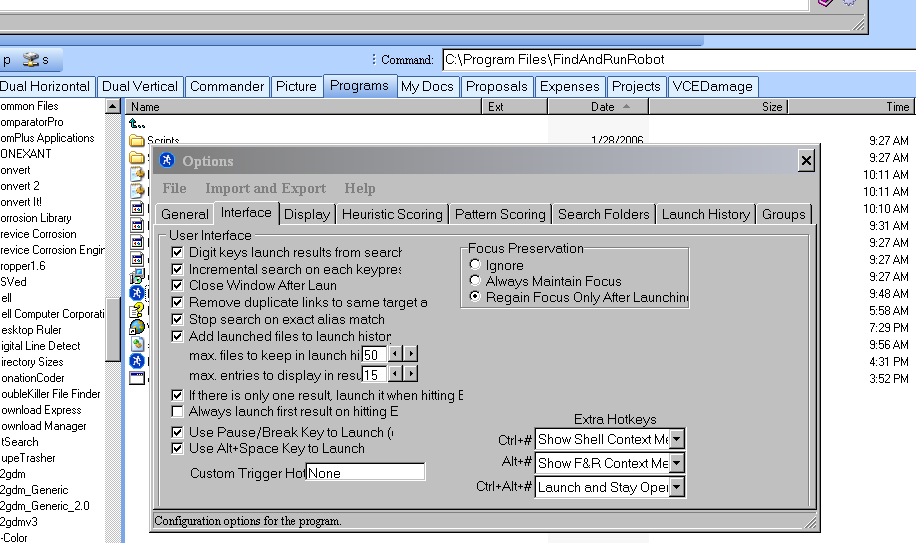
I am embarrassed to ask this question but I tried FARR and like it very much.  The problem I have (and it is not unique to FARR) is that when I open the Preferences dialogue, the text is truncated as shown in the attached file.

Any suggestions on how to fix this  ?My screen resolution is set to 1024x768.

Thanks,
jdd

Amadawn

  • Charter Member
  • Joined in 2006
  • ***
  • Posts: 86
Re: Integrate into taskbar
« Reply #4 on: January 28, 2006, 05:37 PM »
Some of us have experienced (and reported) this same problem, and it is even in the bugtracking system. It is related to the font size. If you are using some non-standard font size (like 120 dpi for instance) FARR does scale the size of the menus accordingly. I believe that mouser is working on that.

Cheers,

Angel

squid head

  • Participant
  • Joined in 2006
  • *
  • Posts: 14
Re: Integrate into taskbar
« Reply #5 on: February 17, 2006, 02:58 PM »
That´s a great feature. But dragging the mouse to it or using a hot key is almost the same... It doesn't open a new window, but it will, in the search results.
'Windows Desktop Search' is a great tool, but uses indexing, which causes some problems. It would be nice have such a program, integrate into taskbar, without indexing. Until then, still prefer FRR. 

Original address: https://www.donationcoder.com/forum/index.php?topic=2222.0