IDEA: NightMode (or Night Shift would be a nicer name).
First of all, WOW (and I say, "wow"). I am new to this site, and it is awesome. Never have I seen so many [simple software] ideas I had come true in one place. Congratulations to all of you.
I found DimScreen, and found it great. But it is not yet the idea I have.
I have worked on ships for a number of years, and during the night the lights on the bridge are always off or very low. And most of their systems have a "Night Mode", where the colors of the screen are changed so that the glare does not affect seeing outside in the dark.
Even the systems that run on Windows have it. A button that when pressed changes Windows' colors to ones that are good to be viewed in the dark. It does not make a negative image of the screen. The whole color scheme is changed, and not only for that application, but for the whole of Windows.
But my laptop and other computers not running those systems can't swith to "Night Mode", and it is terrible to look at a bright screen in a dark room. Not to mention the captain complaining about the reflection on the windows, making it impossible for him to see outside.
I tried making a Windows' color scheme for Night Mode, and can even access it through a shortcut (check Windows' Accessibility options). But the results aren't good. For example, if I open a Word document, the page color is still white, with black text, regardless of the color scheme I am using.
But not on those systems I mentioned: some (not all) that have "Night Mode" in them do something in Windows that changes ALL the colors, even of the pages of Microsoft Word, etc. I don't know what they do, but they do it. So I don't think it's related to using Windows' color schemes.
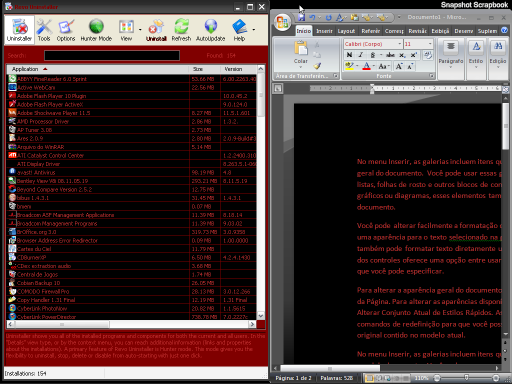
Anyway, my idea is a little application to toggle Night Mode on/off. Not just dim the screen, but actually change the colors of everything that is displayed on the screen so the colors are suitable for working in the dark. Like, make what is white dark, make what is black maybe light gray...
It's not making a negative image. If it were, then AutoCAD's black background would become white, and defeat the purpose of the software. MAybe it's something like: if color is brighter than x, then change to y or reverse. If less brigther than x, then don't do anything. Something like that, maybe?
Pushing a bit more, there could be a defaul color replacement scheme, and allow the user to change/load/save other ones. This may be useful depending on what applications are being used.
Any ideas?
Thanks to all,
Mickets
First of all, WOW (and I say, "wow"). I am new to this site, and it is awesome. Never have I seen so many [simple software] ideas I had come true in one place. Congratulations to all of you.
I found DimScreen, and found it great. But it is not yet the idea I have.
I have worked on ships for a number of years, and during the night the lights on the bridge are always off or very low. And most of their systems have a "Night Mode", where the colors of the screen are changed so that the glare does not affect seeing outside in the dark.
Even the systems that run on Windows have it. A button that when pressed changes Windows' colors to ones that are good to be viewed in the dark. It does not make a negative image of the screen. The whole color scheme is changed, and not only for that application, but for the whole of Windows.
But my laptop and other computers not running those systems can't swith to "Night Mode", and it is terrible to look at a bright screen in a dark room. Not to mention the captain complaining about the reflection on the windows, making it impossible for him to see outside.
I tried making a Windows' color scheme for Night Mode, and can even access it through a shortcut (check Windows' Accessibility options). But the results aren't good. For example, if I open a Word document, the page color is still white, with black text, regardless of the color scheme I am using.
But not on those systems I mentioned: some (not all) that have "Night Mode" in them do something in Windows that changes ALL the colors, even of the pages of Microsoft Word, etc. I don't know what they do, but they do it. So I don't think it's related to using Windows' color schemes.
Anyway, my idea is a little application to toggle Night Mode on/off. Not just dim the screen, but actually change the colors of everything that is displayed on the screen so the colors are suitable for working in the dark. Like, make what is white dark, make what is black maybe light gray...
It's not making a negative image. If it were, then AutoCAD's black background would become white, and defeat the purpose of the software. MAybe it's something like: if color is brighter than x, then change to y or reverse. If less brigther than x, then don't do anything. Something like that, maybe?
Pushing a bit more, there could be a defaul color replacement scheme, and allow the user to change/load/save other ones. This may be useful depending on what applications are being used.
Any ideas?
Thanks to all,
Mickets