DonationCoder.com forum
 
Read-only archive. This is a static copy of the DonationCoder.com forum. Reading and searching work as before; logging in, posting and private messages do not.
Archive of 2026-10-21 · About this archive · Main site

Author Topic: Word 2007: Styles with ridiculous spacing  (Read 10,622 times)

superboyac

  • Is your software in my list?
  • Charter Member
  • Joined in 2005
  • ***
  • Posts: 6,347
Word 2007: Styles with ridiculous spacing
« on: February 19, 2010, 05:56 PM »
I don't know about you guys, but one of my biggest annoyances in life (on the computer) is the crazy amount of double spacing and triple spacing that goes on with a lot of html-like styles.  Word 2007 has a bunch of nice styles built in, but they are totally ruined because a lot of them have INSANE amounts of spacing around them.  I mean, Fuck!  It's TOO MUCH!  You put one freaking heading over a paragraph, and all of a sudden, everything is pushed down like 3 inches.  It's out of control.  Who likes this??

I appreciate the option to control the amount of spacing, but why do so many programs assume that people prefer minimum double-spacing or more?  I have the same problem with things on the web.  Like with freaking headers (h1, h2, h3 tags, etc.).  by default, they all have huge amounts of spacing.  I hate it.  I just hate it.  And it's so hard to control.  I have to customize everything.  Create new styles for word, just for me.  Then I have to go in and mess with my wordpress templates for my web stuff.  I'm just tired of it all.

Maybe I'm wrong here, but in my opinion, people prefer single-space most of the time.  So that should be default.  If you want more space, then THOSE people should go and customize.  Not the other way around.

I am so tired of spacing issues.  I can't take it.

AndyM

  • Charter Member
  • Joined in 2006
  • ***
  • Posts: 616
Re: Word 2007: Styles with ridiculous spacing
« Reply #1 on: February 19, 2010, 06:07 PM »
When you see all that white space, is it multiple empty paragraphs?
If so, a macro that will, in a selection, replace two endPara marks with one, run repeatedly until there are no empty paragraphs will be handy.  This will take care of excessive space due to multiple Returns and also double spacing from double Returns.

If the white space is because of Word's Space Before and Space After settings (the proper way to construct a Word doc as it's poor form to use empty paragraphs for spacing), then you can automate editing those settings (hotkeys, right click, buttons, etc. with macros assigned to add/sub 2 or 8 pts before/after and/or specific settings like zero pts b4 or 4 pts after) depending on your needs and typical approach.

superboyac

  • Is your software in my list?
  • Charter Member
  • Joined in 2005
  • ***
  • Posts: 6,347
Re: Word 2007: Styles with ridiculous spacing
« Reply #2 on: February 19, 2010, 06:15 PM »
I know, I know.  but it goes back to what I was saying about having to customize everything.  I'm just tired of doing it that's all.  It's like I spend 20% of my life trying to get everything to be single spaced.

JavaJones

  • Review 2.0 Designer
  • Charter Member
  • Joined in 2005
  • ***
  • Posts: 2,739
    • Participated in NANY Challenge Once
Re: Word 2007: Styles with ridiculous spacing
« Reply #3 on: February 20, 2010, 12:19 AM »
I'm with you superboyac, I've long been annoyed by the same things. I have to think there's some "good" reason for this preset of leading and trailing space in most word processor styles (it's in OpenOffice too). I get that it's "best practice" to do things this way instead of using newlines or whatever. But I agree it has always proven less convenient and more cumbersome in practice. Maybe I just don't know the right shortcuts for adjusting leading/trailing space, but it seems a bit excessive to bother with that if I can control things reasonably well with newlines, "wrong" though it may be.

I'll say this for certain - docs that I've done with 0 leading and trailing space have a reasonably consistent, if not "sophisticated" look with using newlines for appropriate space, whereas any that I've ever done using leading/trailing space often less consistent and more jarring differences in spacing throughout, making them more annoying to read IMO.

- Oshyan

AndyM

  • Charter Member
  • Joined in 2006
  • ***
  • Posts: 616
Re: Word 2007: Styles with ridiculous spacing
« Reply #4 on: February 20, 2010, 02:17 AM »
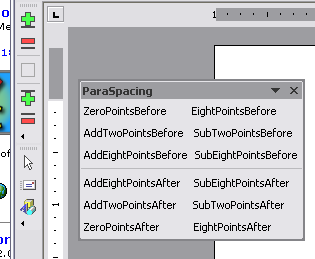
[attach=#]

Macro code below for adding/subtracting 2/8 pts before/after, also setting zero/8 before/after
I have shortcut keys for adding and subtracting.  The free floating toobar (usually not displayed) has all the macros.  On the docked toolbar the green pluses add 2 pts before and after, the red minuses subtract 2 pts before and after.

Makes fixing mis-spaced text easy.

Spoiler (click to show/hide)
Code: (vb)
Sub AddTwoPointsAfter()
'
' AddTwoPointsAfter Macro
' adds 2 points of space after (below) the paragraph each time you click the Button
' Macro written 16/03/00 by John McGhie
'
    Selection.ParagraphFormat.SpaceAfter = _
Selection.ParagraphFormat.SpaceAfter + 2
End Sub

Sub AddEightPointsAfter()
'
' AddEightPointsAfter Macro
' adds 8 points of space after (below) the paragraph each time you click the Button
' Macro written 16/03/00 by John McGhie
'
    Selection.ParagraphFormat.SpaceAfter = _
Selection.ParagraphFormat.SpaceAfter + 8
End Sub

Sub SubtractTwoPointsAfter()
'
' SubtractTwoPointsAfter Macro
' reduces the space after (below) the paragraph by 2 points each time you click the button
' Macro written 16/03/00 by John McGhie

On Error Resume Next
    Selection.ParagraphFormat.SpaceAfter = _
Selection.ParagraphFormat.SpaceAfter - 2
End Sub

Sub SubtractEightPointsAfter()
'
' SubtractEightPointsAfter Macro
' reduces the space after (below) the paragraph by 8 points each time you click the button
' Macro written 16/03/00 by John McGhie
'
On Error Resume Next
    Selection.ParagraphFormat.SpaceAfter = _
Selection.ParagraphFormat.SpaceAfter - 8
End Sub

Sub AddTwoPointsBefore()
'
' AddTwoPointsBefore Macro
' adds 2 points of space before (above) the paragraph each time you click the Button
' Macro written 16/03/00 by John McGhie
'
On Error Resume Next
    Selection.ParagraphFormat.SpaceBefore = _
Selection.ParagraphFormat.SpaceBefore + 2
End Sub

Sub SubtractTwoPointsBefore()
'
' SubtractTwoPointsBefore Macro
' reduces the space before (above) the paragraph by 2 points each time you click the button
' Macro written 16/03/00 by John McGhie
'
    On Error Resume Next
    Selection.ParagraphFormat.SpaceBefore = _
Selection.ParagraphFormat.SpaceBefore - 2
End Sub

Sub AddEightPointsBefore()
'
' AddEightPointsBefore Macro
' adds 8 points of space before (above) the paragraph each time you click the Button
' Macro written 16/03/00 by John McGhie
'
    Selection.ParagraphFormat.SpaceBefore = _
Selection.ParagraphFormat.SpaceBefore + 8
End Sub

Sub SubtractEightPointsBefore()
'
' SubtractEightPointsBefore Macro
' reduces the space before (above) the paragraph by 8 points each time you click the button
' Macro written 16/03/00 by John McGhie
'
On Error Resume Next
    Selection.ParagraphFormat.SpaceBefore = _
Selection.ParagraphFormat.SpaceBefore - 8
End Sub

Sub EightPointsAfter()
'
' EightPointsAfter Macro
' puts 8 points of space after (below) the paragraph
' Macro written 16/03/00 by John McGhie
'
  Selection.ParagraphFormat.SpaceAfter = 8
End Sub

Sub EightPointsBefore()
'
' EightPointsBefore Macro
' puts 8 points of space after (below) the paragraph
' Macro written 16/03/00 by John McGhie
'
  Selection.ParagraphFormat.SpaceBefore = 8
End Sub

Sub ZeroPointsAfter()
'
' ZeroPointsAfter Macro
' puts 0 points of space after (below) the paragraph
' Macro written 16/03/00 by John McGhie
'
  Selection.ParagraphFormat.SpaceAfter = 0
End Sub

Sub ZeroPointsBefore()
'
' ZeroPointsBefore Macro
' puts 0 points of space before the paragraph
' Macro written 16/03/00 by John McGhie
'
  Selection.ParagraphFormat.SpaceBefore = 0
End Sub

JavaJones

  • Review 2.0 Designer
  • Charter Member
  • Joined in 2005
  • ***
  • Posts: 2,739
    • Participated in NANY Challenge Once
Re: Word 2007: Styles with ridiculous spacing
« Reply #5 on: February 20, 2010, 02:28 AM »
Nice, thanks Andy. :)

- Oshyan

AndyM

  • Charter Member
  • Joined in 2006
  • ***
  • Posts: 616
Re: Word 2007: Styles with ridiculous spacing
« Reply #6 on: February 20, 2010, 06:00 AM »
... whereas any that I've ever done using leading/trailing space often less consistent and more jarring differences in spacing throughout, making them more annoying to read IMO.

Using styles gives you the best of both worlds, if you design your styles to work in a standard way.  I don't often have to mess with the before & after settings.  I use the tools for cleanup including the sort superboyac was talking about, for exeptions like spacing the signature lines at the end of a document, or for setup and design (when I get it how I like it, I update the style to match).

Using empty paragraphs (that's what you mean by newlines, right?) makes it impossible to use a very handy function of styles, which is to set the style of the paragraph following (you can always force a repeat of the current style in the next paragraph if you hit Enter just before the last character in the paragraph, like a space).  Useful capability when doing outlines and lists and some other things, adds consistency, and in some cases can save much time.

J-Mac

  • Supporting Member
  • Joined in 2007
  • **
  • Posts: 2,918
Re: Word 2007: Styles with ridiculous spacing
« Reply #7 on: February 27, 2010, 12:03 AM »
I tried to create an outline the other day - doesn’t work with Roman numerals. The first line gets an "I", and then it boots you out of outline format! Searching around I find out that you have to create a style for this. Bunch of BS!!

Jim
"I am getting so tired of slitting the throats of people who say that I am a violent psychopath."

edbro

  • Charter Member
  • Joined in 2006
  • ***
  • Posts: 426
Re: Word 2007: Styles with ridiculous spacing
« Reply #8 on: February 27, 2010, 01:54 AM »
When you see all that white space, is it multiple empty paragraphs?
If so, a macro that will, in a selection, replace two endPara marks with one, run repeatedly until there are no empty paragraphs will be handy.  This will take care of excessive space due to multiple Returns and also double spacing from double Returns.

If the white space is because of Word's Space Before and Space After settings (the proper way to construct a Word doc as it's poor form to use empty paragraphs for spacing), then you can automate editing those settings (hotkeys, right click, buttons, etc. with macros assigned to add/sub 2 or 8 pts before/after and/or specific settings like zero pts b4 or 4 pts after) depending on your needs and typical approach.
You don't really need macros to do this. Set one paragraph the way you like it then right click on the style and choose Update to Match Selection. That will change/update everything with that style. If you update it in normal.dot then it will be that way forever.

AndyM

  • Charter Member
  • Joined in 2006
  • ***
  • Posts: 616
Re: Word 2007: Styles with ridiculous spacing
« Reply #9 on: February 27, 2010, 03:00 AM »
Set one paragraph the way you like it then right click on the style and choose Update to Match Selection.

The tools are to make setting it the way I like quick and efficient, otherwise it's too many clicks/keys to change space b4/after.  Once I like it, I update the style to match.  Like I said, I seldom have to mess with these settings.  New designs and cleaning up imported text are when it comes up.   

Original address: https://www.donationcoder.com/forum/index.php?topic=21806.0