DonationCoder.com forum
 
Read-only archive. This is a static copy of the DonationCoder.com forum. Reading and searching work as before; logging in, posting and private messages do not.
Archive of 2026-10-21 · About this archive · Main site

Author Topic: IDEA: Dockable auto-hiding drag & drop multi-monitor desktop wallpaper app  (Read 18,834 times)

FrankEBailey`

  • I am a maniac
  • Participant
  • Joined in 2008
  • *
  • Posts: 20
There are lots of desktop wallpaper managers out there, but not one has what I would've considered the most intuitive way of changing wallpaper, which is to drag and drop a picture from a folder or one's browser onto a app, and that picture immediately being assigned to the desktop as wallpaper.

Having recently joined the multiple monitor fraternity, I got to thinking that it would be extremely handy to have a little app that can either dock to the side of the screen or maybe come up with a hotkey, that has a little screen per monitor where I can drop a picture and have that picture assigned to the monitor that little screen represents.

The reason I'd class this as a coding snack rather than something more complex is that the app wouldn't have to maintain a list of desktop picture folders, be able to change wallpapers randomly or anything like that - just the ability to assign a dropped picture to the relevant monitor.

Hope that makes sense!  ;D

A nice-to-have would be to be able to set up whether to tile, stretch to fill or stretch proportionally the picture per monitor.

Thanks, and I want to add I think you guys are awesome!  :Thmbsup:

skwire

  • I eat Coding Snacks for breakfast...
  • Global Moderator
  • Joined in 2005
  • *****
  • Posts: 5,297
    • Participated in NANY Challenge Seventeen Times
    • Coding Snacks
    • Superboy Coder
    • Cody Award
    • Volunteers/Staff
    • Gathering Badge
This is trivial to write with the exception of being able to specify a per-monitor-specific wallpaper.  How adamant are you on that feature request?

FrankEBailey`

  • I am a maniac
  • Participant
  • Joined in 2008
  • *
  • Posts: 20
Oh, EXTREMELY adamant ;)

Seriously though, it would make the app a lot more useful to me personally. I figured that reading the monitor information from the OS might not be so easy, so it's not a dealbreaker, but if all the solutions on here were trivial then I'm sure this site wouldn't be half as much fun as it is.

Thanks for your quick response Skwire! ;D

skwire

  • I eat Coding Snacks for breakfast...
  • Global Moderator
  • Joined in 2005
  • *****
  • Posts: 5,297
    • Participated in NANY Challenge Seventeen Times
    • Coding Snacks
    • Superboy Coder
    • Cody Award
    • Volunteers/Staff
    • Gathering Badge
Seriously though, it would make the app a lot more useful to me personally. I figured that reading the monitor information from the OS might not be so easy, so it's not a dealbreaker, but if all the solutions on here were trivial then I'm sure this site wouldn't be half as much fun as it is.

Actually, reading the monitor information is the easy part.  The problem stems from the fact that there is no built-in API to handle per-monitor wallpapers.  That part has to be handled manually via GDI+ or some other image manipulation library.  In other words, the images you want to use have be stitched/cut/cropped into one image that is actually stretched across your two monitors.  That's the not-so-easy part.  =]  Make sense?

skwire

  • I eat Coding Snacks for breakfast...
  • Global Moderator
  • Joined in 2005
  • *****
  • Posts: 5,297
    • Participated in NANY Challenge Seventeen Times
    • Coding Snacks
    • Superboy Coder
    • Cody Award
    • Volunteers/Staff
    • Gathering Badge
BTW, have you checked out DisplayFusion?  http://www.binaryfortress.com/displayfusion/

FrankEBailey`

  • I am a maniac
  • Participant
  • Joined in 2008
  • *
  • Posts: 20
Actually, reading the monitor information is the easy part.  The problem stems from the fact that there is no built-in API to handle per-monitor wallpapers.  That part has to be handled manually via GDI+ or some other image manipulation library.  In other words, the images you want to use have be stitched/cut/cropped into one image that is actually stretched across your two monitors.  That's the not-so-easy part.  =]  Make sense?

Sure, makes perfect sense. I see it's not as straightforward as I'd previously thought.

Displayfusion is a useful tool, but interacting with it leaves a lot to be desired; the simplicity of function I've come to relish in DonationCoder-style apps is lacking. I'd venture that a one-click and drag'n'drop style app would fill a gap in the desktop wallpaper management landscape.

Would allowing multiple copies of our theoretical utility to run, one per monitor desktop, make things any easier? (I doubt it but it's an angle I thought needed to be at least mentioned).

skwire

  • I eat Coding Snacks for breakfast...
  • Global Moderator
  • Joined in 2005
  • *****
  • Posts: 5,297
    • Participated in NANY Challenge Seventeen Times
    • Coding Snacks
    • Superboy Coder
    • Cody Award
    • Volunteers/Staff
    • Gathering Badge
Would allowing multiple copies of our theoretical utility to run, one per monitor desktop, make things any easier? (I doubt it but it's an angle I thought needed to be at least mentioned).

Unfortunately, no.  Windows sees all your monitors (I've tested six at once before) as one piece of desktop real estate.

Perry Mowbray

  • N.A.N.Y. Organizer
  • Charter Member
  • Joined in 2005
  • ***
  • Posts: 1,817
    • Participated in NANY Challenge Three Times
    • Plugin Coding Medal
Oh, that's interesting.

That means that every software has to stitch the different graphics together to put onto this "one" desktop?

I was using software that the graphics card supplied to put two different graphics on my two monitors, but it conflicted with something else so I ended up using html desktop item to display the required graphic over the top of the base desktop of the appropriate monitor. Not so nifty, but at least it works without other hassles.

« Last Edit: February 15, 2010, 02:13 AM by Perry Mowbray »

skwire

  • I eat Coding Snacks for breakfast...
  • Global Moderator
  • Joined in 2005
  • *****
  • Posts: 5,297
    • Participated in NANY Challenge Seventeen Times
    • Coding Snacks
    • Superboy Coder
    • Cody Award
    • Volunteers/Staff
    • Gathering Badge
That means that every software has to stitch the different graphics together to put onto this "one" desktop?

Based on what I know...yes.  If anybody knows otherwise, by all means, say so.  =]

Perry Mowbray

  • N.A.N.Y. Organizer
  • Charter Member
  • Joined in 2005
  • ***
  • Posts: 1,817
    • Participated in NANY Challenge Three Times
    • Plugin Coding Medal
So you couldn't use html objects in the same way that I did?

skwire

  • I eat Coding Snacks for breakfast...
  • Global Moderator
  • Joined in 2005
  • *****
  • Posts: 5,297
    • Participated in NANY Challenge Seventeen Times
    • Coding Snacks
    • Superboy Coder
    • Cody Award
    • Volunteers/Staff
    • Gathering Badge
I assume you're talking about Active Desktop?

Perry Mowbray

  • N.A.N.Y. Organizer
  • Charter Member
  • Joined in 2005
  • ***
  • Posts: 1,817
    • Participated in NANY Challenge Three Times
    • Plugin Coding Medal
Yep

skwire

  • I eat Coding Snacks for breakfast...
  • Global Moderator
  • Joined in 2005
  • *****
  • Posts: 5,297
    • Participated in NANY Challenge Seventeen Times
    • Coding Snacks
    • Superboy Coder
    • Cody Award
    • Volunteers/Staff
    • Gathering Badge
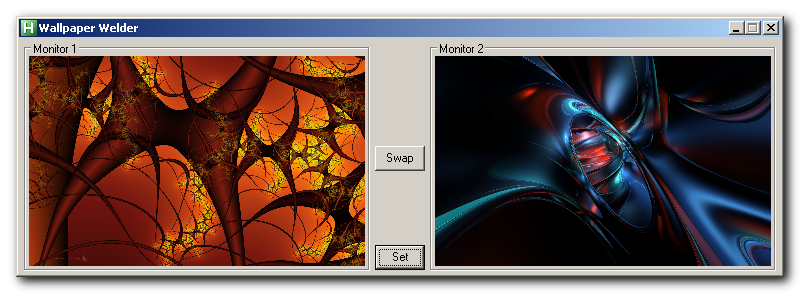
Here is one of the crudest proof-of-concepts I've ever released.  Currently, there are NO options to do anything to your chosen images (stretch, center, etc).  So, for the best results, pick two images that match the resolution of one of your monitors.  For instance, I have two 1680x1050 screens so I'd choose two different images whose dimensions are each 1680x1050.  

Usage:  
  • 1) Simply drag and drop an image to each box and click the "Set" button.
  • 2) If the images didn't end up on the monitor you expected them to, click the "Swap" button and then click "Set" once more.

Caveats:
  • 1) Currently, this application is intended for dual-monitor setups where the monitors are the same resolution and side-by-side.
  • 2) WinXP and later; no Win9x support.  You should be able to use this under Win2k if you have the gdiplus.dll installed.

Again, this is a proof-of-concept and, at this point, I'm not even certain I want to continue making this into a full-fledged application.

Download:  http://skwire.dcmembers.com/apps/snacks/WallpaperWelder.zip

[attachthumb=#]

All that said, I'd be curious to know if it works on anything besides my home and work computers.  =]
« Last Edit: February 17, 2010, 03:17 AM by skwire »

FrankEBailey`

  • I am a maniac
  • Participant
  • Joined in 2008
  • *
  • Posts: 20
Wow, that was fast :)

Unfortunately when I run it under Windows 7 Ultimate x64 it does.... Absolutely nothing.  :o

I can drag the pics to the squares, and they swap around alright, but clicking "set" does nothing at all.

Just my 2c. Even if you don't choose to proceed further with it, thanks for trying.  :Thmbsup:

skwire

  • I eat Coding Snacks for breakfast...
  • Global Moderator
  • Joined in 2005
  • *****
  • Posts: 5,297
    • Participated in NANY Challenge Seventeen Times
    • Coding Snacks
    • Superboy Coder
    • Cody Award
    • Volunteers/Staff
    • Gathering Badge
I don't have Windows 7 so I have no way of testing it.  At this point, I'd have to guess that Microsoft have changed something with the way wallpapers are set between XP and Windows 7.

Stoic Joker

  • Honorary Member
  • Joined in 2008
  • **
  • Posts: 6,652
    • Cody Award
    • Participated in NANY Challenge Five Times
I can sort of confirm the nothing happens (I'm on Win7 x64 pro). I didn't have any pics with the same resolution as the desktop, but I gave it a shot with a different size and it tiled the existing wallpaper into blocks the size of the image I'd selected.

(Correction/clarification-> It didn't change the size of the currently displayed wallpaper, it only tiled it at its native size (it had been stretched to fit).
« Last Edit: February 17, 2010, 12:32 AM by Stoic Joker »

skwire

  • I eat Coding Snacks for breakfast...
  • Global Moderator
  • Joined in 2005
  • *****
  • Posts: 5,297
    • Participated in NANY Challenge Seventeen Times
    • Coding Snacks
    • Superboy Coder
    • Cody Award
    • Volunteers/Staff
    • Gathering Badge
I can sort of confirm the nothing happens (I'm on Win7 x64 pro). I didn't have any pics with the same resolution as the desktop, but I gave it a shot with a different size and it tiled the existing wallpaper into blocks the size of the image I'd selected.

(Correction/clarification-> It didn't change the size of the currently displayed wallpaper, it only tiled it at its native size (it had been stretched to fit).

Hmmm...that would indicate that it DID try to set the wallpaper.    :huh:

mouser

  • First Author
  • Administrator
  • Joined in 2005
  • *****
  • Posts: 40,931
    • Gathering Badge
    • Plugin Coding Medal
    • Participated in NANY Challenge Seventeen Times
    • Cody Award
    • Coding Snacks
    • Volunteers/Staff
i tested on win7 and it seemed to work, so that's strange that it's working for some people and not others..

steeladept

  • Fettucini alfredo is macaroni & cheese for adults
  • Supporting Member
  • Joined in 2006
  • **
  • Posts: 1,061
    • Linux User
    • Military Service Badge - US Air Force
Not necessarily.  Remember, they said they were using 64-bit, not 32-bit.  The display driver, or the 64 bit WOW implimentation in windows could cause the issue as well.  That is unless you are using 64 bit too Mouser.....

lanux128

  • Global Moderator
  • Joined in 2005
  • *****
  • Posts: 6,277
    • Coding Snacks
    • Volunteers/Staff
    • Gathering Badge
    • Participated in NANY Challenge Once
    • Linux User
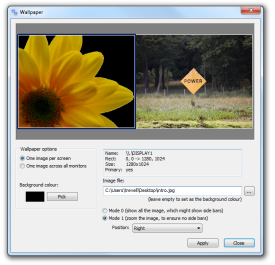
this freeware ZBar, has support for one wallpaper image per screen. other handy features include a taskbar on the second monitor, with an optional clock.

[attach=#]
• http://www.zhornsoftware.co.uk/zbar/index.html

Original address: https://www.donationcoder.com/forum/index.php?topic=21736.0