


Win 7 64 bit OS Circle Dock V 1.5.1.1 This is an install over V1 that was an install over an older version etc.
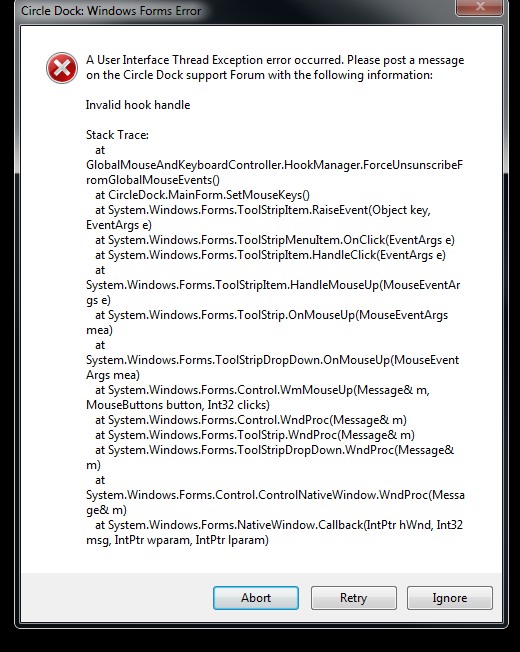
I can open the Dock Settings and Item settings screens just fine. They appear to function correctly as well. However after I close them I can no longer use my middle mouse button to toggle CD. If I restart Circle Dock the middle button toggles CD again. Any changed settings are retained. Going to the Item settings screen does not always produce this effect, the Dock settings screen always does. In the failed state I used the taskbar icon to open CD up and went into the Dock Settings screen and it did show the middle mouse button set as the toggle. I tried closing the Settings screen and using the middle button to no avail. I also tried changing the toggle to a new function and back to middle button and it did not help.
I did notice that in the failed state if I change the toggle to something else like Right mouse + shift, and exit the settings screen the new hot-key does work without a restart. It does however ignore the need for the additional key. No matter what Keys I choose in addition to right click, a simple right click with no buttons pressed toggles the dock. Going back into the settings screen and choosing middle button does not restore functionality. Only restarting circle dock restores the middle button toggle.
Also when I use the Icon settings screen to change the label of an icon it truncates the first few letters off of several other Icon labels. There does not appear to be a hard limit like 8 chars. Some examples Downloads : loads
Microsoft Visual Studio 2008 : soft Visual Studio 2008
Oblivion : livion
That is real annoying because if I go in to fix one, it truncates 3-4 more labels.
I can open the Dock Settings and Item settings screens just fine. They appear to function correctly as well. However after I close them I can no longer use my middle mouse button to toggle CD. If I restart Circle Dock the middle button toggles CD again. Any changed settings are retained. Going to the Item settings screen does not always produce this effect, the Dock settings screen always does. In the failed state I used the taskbar icon to open CD up and went into the Dock Settings screen and it did show the middle mouse button set as the toggle. I tried closing the Settings screen and using the middle button to no avail. I also tried changing the toggle to a new function and back to middle button and it did not help.
I did notice that in the failed state if I change the toggle to something else like Right mouse + shift, and exit the settings screen the new hot-key does work without a restart. It does however ignore the need for the additional key. No matter what Keys I choose in addition to right click, a simple right click with no buttons pressed toggles the dock. Going back into the settings screen and choosing middle button does not restore functionality. Only restarting circle dock restores the middle button toggle.
Also when I use the Icon settings screen to change the label of an icon it truncates the first few letters off of several other Icon labels. There does not appear to be a hard limit like 8 chars. Some examples Downloads : loads
Microsoft Visual Studio 2008 : soft Visual Studio 2008
Oblivion : livion
That is real annoying because if I go in to fix one, it truncates 3-4 more labels.



 Are you talking about .net 2 SP3? I do believe I am on .net SP3 on that machine. I do dev work with MS Visual studio on that machine and have mostly the latest version of each production version of .net on it. I have not loaded the .net 4 framework on that machine though. (MSDN sub)