DonationCoder.com forum
 
Read-only archive. This is a static copy of the DonationCoder.com forum. Reading and searching work as before; logging in, posting and private messages do not.
Archive of 2026-10-21 · About this archive · Main site

Author Topic: Screenshot Captor and drop shadow - continuation from email...  (Read 8,492 times)

gmichaud

  • Supporting Member
  • Joined in 2010
  • **
  • Posts: 2
mouser,

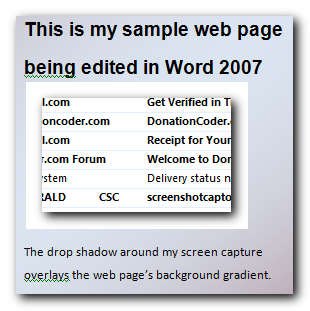
This is the attachment I couldn't attach to the other forum email:
Shadow.png

Well, I can't see the attachment in preview - maybe it'll post OK. If not, maybe it's an IE 8 (Windows 7) issue?? Don't know what else could be the problem. I'm using a filename with no spaces, I used the browse button to attach it, I see no errors.

Are these known problems with attaching images to forum posts??

Gerry

gmichaud

  • Supporting Member
  • Joined in 2010
  • **
  • Posts: 2
Re: Screenshot Captor and drop shadow - continuation from email...
« Reply #1 on: February 03, 2010, 01:07 AM »
:Thmbsup: HEY!!! :Thmbsup:

The attachment worked!!!

Now I'm sure you can see what I've been talking about.

Would be nice if the drop shadow allowed the background to show through on the web page.

Thanks again,

Gerry

mouser

  • First Author
  • Administrator
  • Joined in 2005
  • *****
  • Posts: 40,931
    • Gathering Badge
    • Plugin Coding Medal
    • Participated in NANY Challenge Seventeen Times
    • Cody Award
    • Coding Snacks
    • Volunteers/Staff
Re: Screenshot Captor and drop shadow - continuation from email...
« Reply #2 on: February 03, 2010, 01:36 AM »
this should be possible by unchecking the flatten transparency option:
Screenshot - 2_2_2010 , 7_33_32 PM.png

just make sure you save as a png file.

mouser

  • First Author
  • Administrator
  • Joined in 2005
  • *****
  • Posts: 40,931
    • Gathering Badge
    • Plugin Coding Medal
    • Participated in NANY Challenge Seventeen Times
    • Cody Award
    • Coding Snacks
    • Volunteers/Staff
Re: Screenshot Captor and drop shadow - continuation from email...
« Reply #3 on: February 03, 2010, 01:37 AM »
that png that i attached to the previous post is a working example of saving with transparency when that option is unchecked (note you have to uncheck that BEFORE you create the shadow effect).

it has a shadow with true transparency, that is blended into the background of the web page (at least in firefox and IE8).

if i open it in irfanview here is what it looks like:
Screenshot - 2_2_2010 , 7_36_20 PM.png
« Last Edit: February 03, 2010, 01:40 AM by mouser »

Original address: https://www.donationcoder.com/forum/index.php?topic=21596.0