DonationCoder.com forum
 
Read-only archive. This is a static copy of the DonationCoder.com forum. Reading and searching work as before; logging in, posting and private messages do not.
Archive of 2026-10-21 · About this archive · Main site

Author Topic: Make XP look like Win7  (Read 8,220 times)

zridling

  • Friend of the Site
  • Charter Member
  • Joined in 2005
  • ***
  • Posts: 3,299
Make XP look like Win7
« on: January 29, 2010, 10:27 AM »
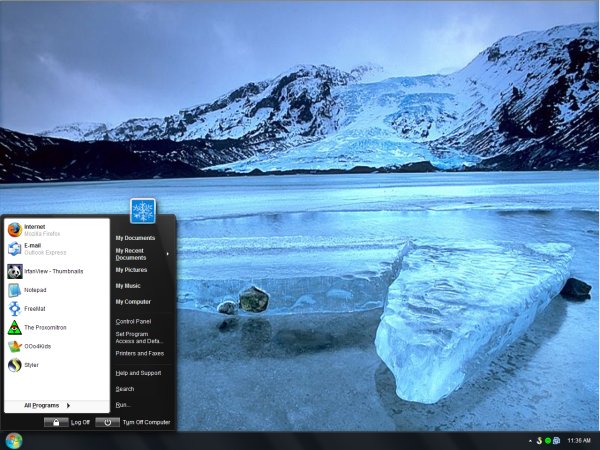
"If you see no reason in switching to Windows 7 and would still like to impress your divorced neighbor, then you now have the tools to make your aging Windows XP look posh and nobby." Dedoimedo has a nice guide on how to make XP look as cool as Win7.

[attach]
- zaine

f0dder

  • [Well, THAT escalated quickly!]
  • Charter Honorary Member
  • Joined in 2005
  • ***
  • Posts: 9,153
    • Participated in NANY Challenge Once
Re: Make XP look like Win7
« Reply #1 on: January 29, 2010, 10:56 AM »
Pretty pointless, IMHO - you'll get the new looks, but not the GPU-accelerated performance, nor the memory savings of keeping bitmap elements solely in video memory.
- carpe noctem

app103

  • That scary taskbar girl
  • Global Moderator
  • Joined in 2006
  • *****
  • Posts: 5,888
    • Participated in NANY Challenge Six Times
    • Coding Snacks
    • Gathering Badge
    • Cody Award
    • Volunteers/Staff
Re: Make XP look like Win7
« Reply #2 on: January 29, 2010, 11:12 AM »
Is there a guide to making Win7 look like Win2000 and behave like XP?

Because I am very happy with my XP system with classic theme, and I'd rather not upgrade if I am going to end up forced to look at a bunch of eye candy that I'd rather not, and lose functionality with all the crap they changed.

tomos

  • Charter Member
  • Joined in 2006
  • ***
  • Posts: 11,970
    • Gathering Badge
    • Participated in NANY Challenge Once
Re: Make XP look like Win7
« Reply #3 on: January 29, 2010, 12:45 PM »
Is there a guide to making Win7 look like Win2000 and behave like XP?

Because I am very happy with my XP system with classic theme, and I'd rather not upgrade if I am going to end up forced to look at a bunch of eye candy that I'd rather not, and lose functionality with all the crap they changed.

I use xp with classic (but I've changed the icons and made the colours nicer - for my taste at any rate) -
I had always been a bit envious of flash looking Vista/Aero screenshots though.
Anyways,
lately I was messing around with a Win.7 laptop and I was really suprised how *little* I liked Aero. I presume it can be tweaked (I was too busy struggling with other eh aspects) but, out of the box I found it ugly and those ginormous icons! they looked ridiculous on a 15.6" screen at any rate...
Tom

cmpm

  • Charter Member
  • Joined in 2006
  • ***
  • Posts: 2,026
Re: Make XP look like Win7
« Reply #4 on: January 29, 2010, 03:30 PM »
Is there a guide to making Win7 look like Win2000 and behave like XP?

Because I am very happy with my XP system with classic theme, and I'd rather not upgrade if I am going to end up forced to look at a bunch of eye candy that I'd rather not, and lose functionality with all the crap they changed.

You can change the start menu with "Classic Shell" to look like XP.

http://www.raymond.cc/blog/archives/2009/12/15/looking-for-the-best-windows-7-classic-start-menu/

The rest you can do through "Personalize" (right click desktop for options).
Except for the taskbar, which I haven't seen anything that I remember to change it to a 'classic' look. You can kill the Aero easy enough but still the quick launch is W7 and not XP. I switched to small icons on the taskbar which makes it easier on the eye and mind.

Overall I'm getting used to W7 as it is, and like it better then XP.
Searching is quick with W7's indexer.
The start menu search box is programs and a 'run' box.
Help is actually helpful, if you can believe it.
I've indexed the entire computer for working with windows explorer.
That helps and doesn't slow anything down that I've noticed.
The tray is much more usable and easier to deal with.

KynloStephen66515

  • Animated Giffer in Chief
  • Honorary Member
  • Joined in 2010
  • **
  • Posts: 3,772
    • Participated in NANY Challenge Three Times
    • Cody Award
    • Coding Snacks
    • Official Forum Clown
    • Volunteers/Staff
    • Writer
    • Hardware Hacker
    • DJ Badge - DJ
    • Linux User
Re: Make XP look like Win7
« Reply #5 on: January 29, 2010, 03:40 PM »
Personally I am much happier on Windows XP, using a few vista features, like the sidebar, but mixed in with AlienGUIuse, this gives me some great visual effects without affecting the speed or practicality of my computer.

Also, if you really want to confuse or impress your friends, then I suggest changing the boot up/login screens with customized one's to represent your version of an operating system (For instance, mine says 'Taking The Beast Out of The Cage' where it usually comes up with the windows logo).

Original address: https://www.donationcoder.com/forum/index.php?topic=21531.0