DonationCoder.com forum
 
Read-only archive. This is a static copy of the DonationCoder.com forum. Reading and searching work as before; logging in, posting and private messages do not.
Archive of 2026-10-21 · About this archive · Main site

Author Topic: Automation via *Screenshots* - wow (based on jython)  (Read 8,520 times)

tinjaw

  • I'm so glad breakbeat techno isn't an illegal drug
  • Supporting Member
  • Joined in 2006
  • **
  • Posts: 1,927
    • Participated in NANY Challenge Twice
    • Coding Snacks
    • Military Service Badge - US Army
    • Linux User
Automation via *Screenshots* - wow (based on jython)
« on: January 22, 2010, 03:21 PM »
Just learned of this 15 minutes ago. Watched the video. Downloading now. I'll comment as I play with it.

Sikuli
http://sikuli.csail.mit.edu/

ewemoa

  • Honorary Member
  • Joined in 2008
  • **
  • Posts: 2,922
    • Plugin Coding Medal
    • Participated in NANY Challenge Three Times
Re: Automation via *Screenshots* - wow (based on jython)
« Reply #1 on: January 23, 2010, 01:57 AM »
Thanks for sharing :)

I watched a bit of the video demo.  It looks to me like if you want to automate a series of GUI tasks, you write a script that contains functions (like: switchApp, click, wait, and type) that take arguments that can be text or images.

Sample script from first video:

Quote
switchApp("System Preferences.app")
click(image of network system preference)
click(image of ethernet option)
click(image of "Using DHCP")
click(image of "Manually" from combo box / drop down)
wait(image of text field labeled "IP Address")
type("192.168.0.1\t")
type("255.255.255.0\t")
type("192,168.0.254")
click(image of "Apply" button)
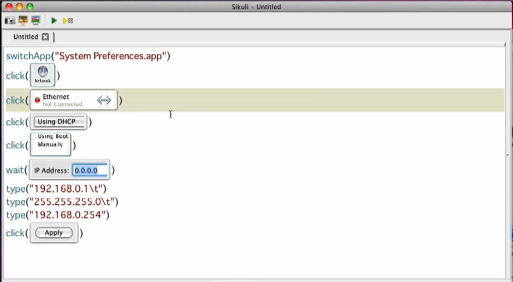
Note the use of "backslash t" to tab between fields.

sikuli-demo-script.png

I guess there's a fair bit more to it than this -- there are tutorials and examples at:

http://sikuli.csail.mit.edu/documentation.shtml
« Last Edit: January 23, 2010, 02:07 AM by ewemoa »

Original address: https://www.donationcoder.com/forum/index.php?topic=21458.0