DonationCoder.com forum
 
Read-only archive. This is a static copy of the DonationCoder.com forum. Reading and searching work as before; logging in, posting and private messages do not.
Archive of 2026-10-21 · About this archive · Main site

Author Topic: Notification Icons  (Read 5,452 times)

Msgt

  • Supporting Member
  • Joined in 2007
  • **
  • Posts: 13
Notification Icons
« on: January 17, 2010, 09:39 PM »
Hello, all.  Have a question I haven't been able to find an answer to.  When you click on the "Taskbar and Start Menu Properties" , go to the bottom where you can hide inactive icons and click on customize, another box comes up "Customize Notifications" with two sections.  One is "current items" and the second is "past items".  What I would like to know is how to delete some of the items in the "past items" section.  Some are icons for programs I no longer have or no longer use or have no idea where they came from.  Is there anyway to delete these items without using the register?  Thanks for your time.

MilesAhead

  • Supporting Member
  • Joined in 2009
  • **
  • Posts: 7,736
    • Coding Snacks
Re: Notification Icons
« Reply #1 on: January 17, 2010, 11:29 PM »
You could try CCleaner and see if deleting Tray Notification Cache will clean it out.

lanux128

  • Global Moderator
  • Joined in 2005
  • *****
  • Posts: 6,277
    • Coding Snacks
    • Volunteers/Staff
    • Gathering Badge
    • Participated in NANY Challenge Once
    • Linux User
Re: Notification Icons
« Reply #2 on: January 18, 2010, 02:07 AM »
there are some very good tools to manage the tray icons. take a look in the following threads..

• Tray Management Utility
• Tray Management Utilities Mini-Review

Msgt

  • Supporting Member
  • Joined in 2007
  • **
  • Posts: 13
Re: Notification Icons
« Reply #3 on: January 18, 2010, 09:20 PM »
Thanks for the information.  I did some more searches using some different key words and found some suggestions.  It seems the only way to do it, is to edit the register.  Lots of suggestions on how to do it, but really not that important, so guess I'll just leave well enough lone. Thanks so much for taking the time to answer. 

PhilB66

  • Supporting Member
  • Joined in 2007
  • **
  • Posts: 1,522
Re: Notification Icons
« Reply #4 on: January 19, 2010, 04:50 AM »
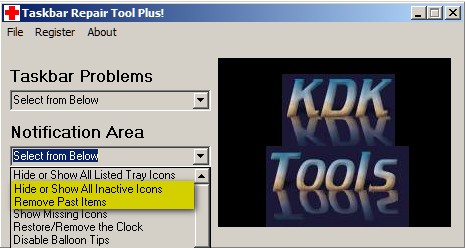
ccleaner does that. Anyway, hear's an alternative...  TaskbarRepairToolPlus! (Search the forums)

[attach]

Original address: https://www.donationcoder.com/forum/index.php?topic=21401.0